
TL;DR
- Tattoos are currently limited to face and neck placement only via the Face Paint menu
- Full-body tattoos and AI-generated custom designs are scheduled for August 2025 release
- Color customization is available but design modification remains restricted for now
- Access character creator through appearance editing to apply tattoos post-creation
- Strategic placement can create unique looks despite current limitation constraints
InZoi delivers remarkably comprehensive character personalization that includes detailed tattoo application features. The system enables players to adorn their Zois with various body art, though the current implementation has specific restrictions that users should understand before diving in.
The tattoo functionality represents one of InZoi’s more sophisticated customization elements, yet its interface placement isn’t immediately intuitive. Our comprehensive guide will help you navigate these options efficiently while highlighting the current scope limitations you’ll encounter during the process.
Unlike traditional gaming tattoo systems, InZoi currently embeds tattoo options within character creation interfaces rather than providing dedicated in-world parlors. This means once your Zoi exists in the game world, you cannot visit tattoo shops for additional body art—all modifications must occur through the character appearance editor.
Placement choices remain quite restricted during the initial launch phase, with Zois only being able to have face or neck tattoos currently available. This limitation affects how creatively you can express your character’s personality through body art at this stage.
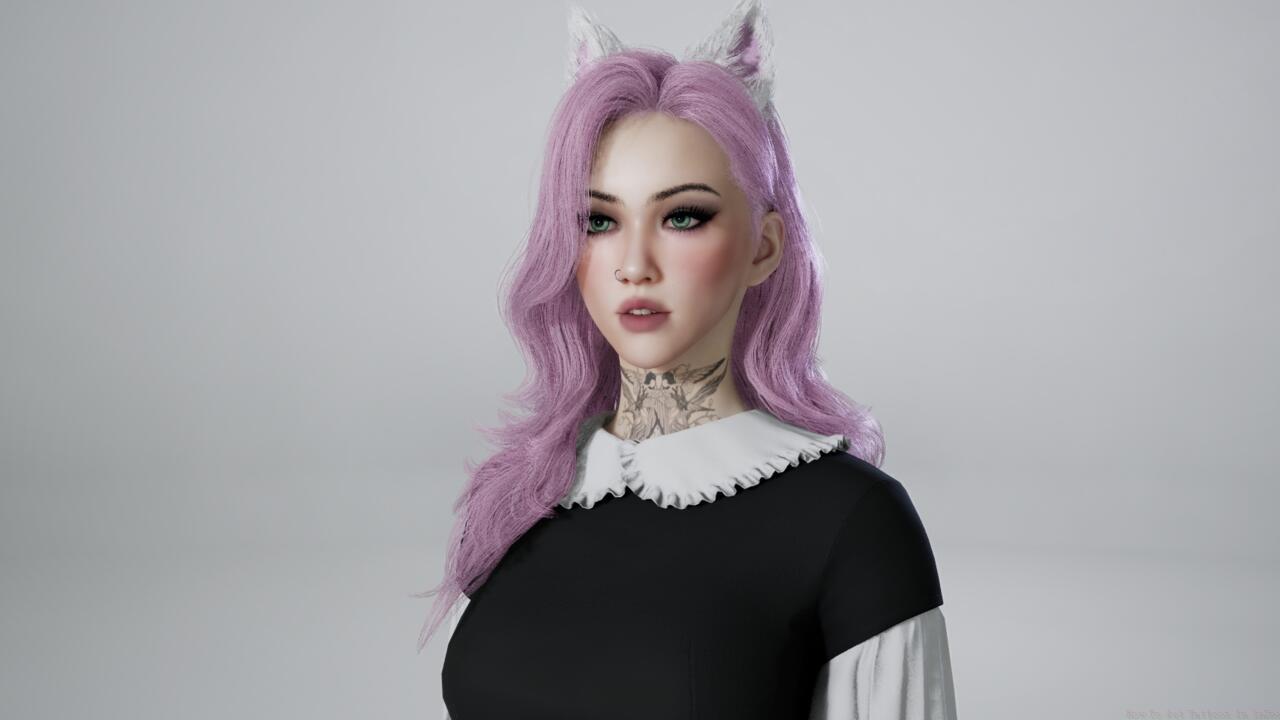
Current tattoo placement is restricted to facial and neck areas only.
To begin customizing your Zoi with tattoos, access the character creation screen either during initial character setup or by selecting the appearance editing option while playing. This dual-access method ensures you can modify your character’s look at any point, though the available options remain consistent regardless of when you access the system.
Navigate directly to the accessories section within the customization interface. This menu houses multiple appearance modification tools, with tattoos being one of the more subtle options available amidst the various customization categories.
Select the “Face Paint” category to reveal available tattoo designs. This terminology can be misleading since the category contains both temporary-looking face paint patterns and permanent-style tattoo artwork, creating some initial confusion for players exploring these options.
The current selection blends decorative facial patterns—such as cheek hearts and leopard print accents—with more traditional neck and facial tattoo artwork. You’ll notice that customization extends primarily to color adjustment rather than design modification, allowing hue changes but not shape alterations.
According to the official InZoi development roadmap, full-body tattoos are expected to be added to the game around August 2025. This significant expansion will likely move tattoo options to a dedicated menu category rather than keeping them within the face paint section where they currently reside.
While waiting for the full-body tattoo update, creative players can maximize current options by strategically combining multiple face and neck designs. Layering different tattoo elements can create more complex artwork than using single designs in isolation, partially overcoming the current placement limitations.
Future developments will introduce AI-generated tattoo technology, enabling completely custom designs. This feature will be particularly valuable for players aiming to replicate real-life tattoos or create completely unique artwork that reflects their personal aesthetic preferences.
A common mistake involves overlooking the color customization options available for each design. Even with limited placement, changing default colors can dramatically alter a tattoo’s appearance and better match your character’s overall style theme.
Advanced customization strategies include coordinating tattoo colors with clothing palettes and using subtle facial tattoos to enhance rather than dominate your Zoi’s appearance, especially given the current restriction to visible areas.
Plan your tattoo placements considering that additional body areas will become available post-update. Starting with facial and neck artwork that can integrate well with future full-body designs will provide the most cohesive long-term appearance.
Beyond tattoos, InZoi offers limited piercing options within the same accessories menu. These additional body modifications can complement your tattoo choices and create a more comprehensive alternative appearance for your character.
For players seeking additional ways to personalize their Zois while awaiting expanded tattoo features, exploring the complete Complete Guide to character customization reveals numerous other modification possibilities beyond body art.
The character editor contains extensive options for facial features, body proportions, and clothing styles that can work harmoniously with your tattoo selections to create a truly unique Zoi persona.
As you experiment with these customization features, remember that strategic appearance choices can influence social interactions within the game world, making your tattoo and piercing decisions more than purely aesthetic choices.
Action Checklist
- Access character creator via main menu or in-game appearance edit
- Navigate to Accessories menu and select Face Paint category
- Browse available designs, noting mix of temporary paint and permanent tattoos
- Experiment with color customization for selected designs
- Layer multiple tattoos strategically to create complex artwork
No reproduction without permission:SeeYouSoon Game Club » How To Get Tattoos In InZoi Master InZoi tattoo customization with expert tips, future updates, and creative placement strategies