
TL;DR
- Configure Passing Type to ‘Placement & Accuracy’ for optimal control balance
- Disable Passing Slowdown to maintain offensive rhythm and timing
- Use Small Pass Lead Increase for precise receiver targeting
- Set Reticle Visibility to User Only for competitive advantage
- Master pre-snap reads and defensive coverage recognition
Executing successful passing plays in College Football 26 demands both technical skill and strategic awareness, making proper configuration of the Passing Mechanics system absolutely essential for offensive success.
Many players instinctively jump straight into Road to Glory or Dynasty modes upon launching CFB 26, but seasoned gamers understand that visiting the settings menu first provides significant competitive advantages. This preliminary step enables comprehensive customization of all gameplay parameters while familiarizing you with EA’s latest feature implementations. The Passing Mechanics section represents one of the most crucial configuration areas in College Football 26, requiring careful selection to match your playing style.
These mechanical settings fundamentally dictate quarterback performance, receiver behavior, and ball trajectory physics throughout CFB 26. Since several options feature nuanced functionality that may confuse newcomers, we’ll provide detailed explanations of optimal Passing Mechanics configurations.
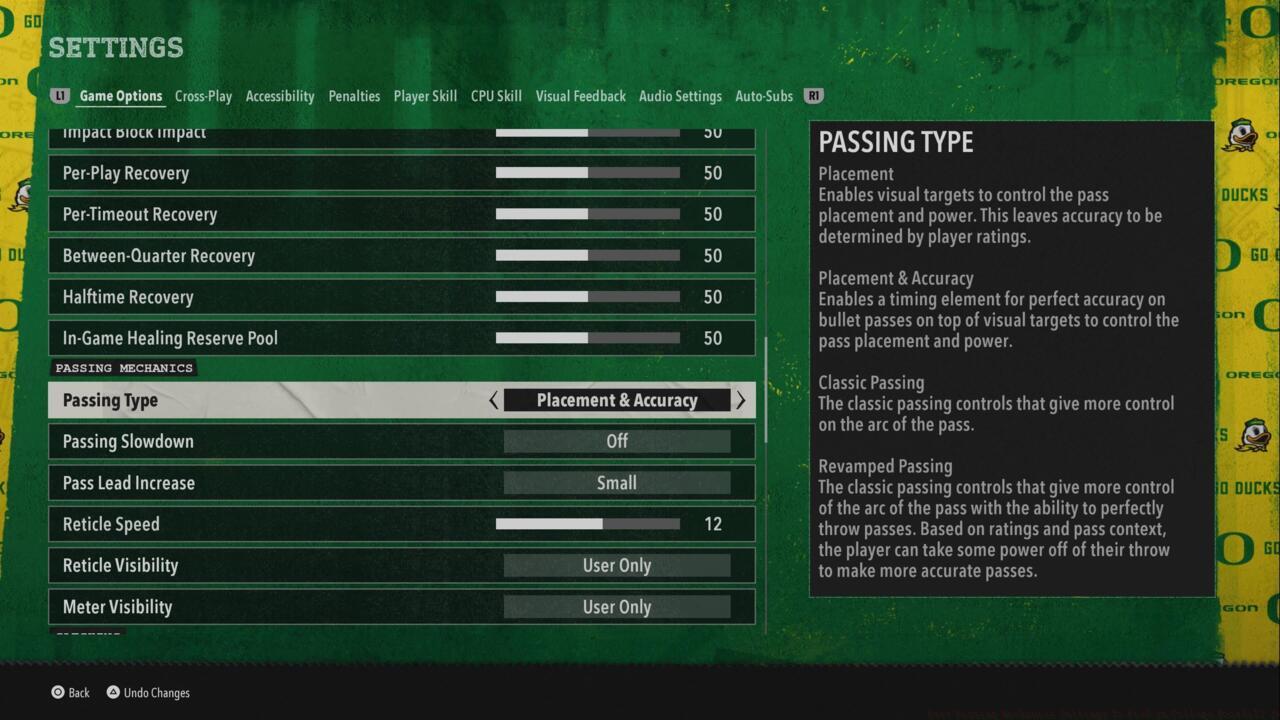
The Passing Mechanics settings in CFB 26
Accessing Passing Mechanics requires navigating to CFB 26’s main menu and locating the horizontal tab navigation bar positioned at the screen’s top edge. The ‘Settings’ option typically appears toward the right side of this interface. After selecting Settings, choose ‘Gameplay Settings’ and browse downward through the ‘Game Options’ tab until you encounter the Passing Mechanics category.
Upon reaching the Passing Mechanics interface, you’ll discover multiple adjustable parameters that influence throwing mechanics. The ‘Passing Type’ setting stands as the most impactful option, capable of radically transforming how quarterbacks deliver passes in CFB 26, necessitating thorough comprehension before commitment.
For players seeking definitive guidance on optimal Passing Mechanics configurations, examine these expert-recommended settings:
- Passing Type: Placement & Accuracy – This balanced approach provides reasonable user control while maintaining realistic quarterback performance characteristics
- Passing Slowdown: Off – Disabling this feature preserves game flow and prevents disruption of your passing rhythm during critical moments
- Pass Lead Increase: Small – Minimal adjustment ensures precise receiver targeting without overcompensating trajectory calculations
- Reticle Visibility: User Only – Restricting visibility to your perspective prevents opponents from anticipating your passing intentions
The Placement & Accuracy passing type strikes an ideal balance between user input and quarterback attributes, allowing skilled players to influence throws while maintaining authenticity. Unlike pure placement systems that can feel overly arcade-like, this hybrid model rewards both player ability and quarterback ratings. For those transitioning from other sports titles, this setting provides the most natural learning curve.
Passing Slowdown disabled maintains offensive tempo, particularly important during no-huddle situations or two-minute drills where timing proves critical. The Small Pass Lead Increase setting offers subtle receiver targeting assistance without making the passing game feel automated or removing skill requirements.
Beyond basic configuration, mastering College Football 26’s passing game requires understanding defensive coverages and defensive tendencies. Always perform pre-snap reads to identify blitz packages and coverage shells, adjusting your protection accordingly. Recognize that different quarterback archetypes excel with specific passing styles – strong-arm quarterbacks benefit from different settings than precision passers.
Common mistakes include overlooking receiver-specific traits and forcing throws into coverage. Elite players leverage the Reticle Visibility ‘User Only’ setting to conceal their passing intentions while reading defensive leverage on receivers. Understanding route concepts and timing is more valuable than simply having optimal settings configured.
Practice identifying cover 2, cover 3, and cover 4 schemes during film study sessions, as this knowledge directly translates to in-game success. The Placement & Accuracy system particularly shines when paired with proper progression reading techniques and pocket awareness skills. Remember that even perfect settings cannot compensate for poor decision-making or inaccurate reads.
Advanced techniques include using the pass lead system to throw receivers open against zone coverage and manipulating safeties with your eyes. Develop consistent timing with your primary receivers and learn their specific release traits and separation abilities against various coverage types.
Action Checklist
- Navigate to Settings > Gameplay Settings > Passing Mechanics
- Configure Passing Type to ‘Placement & Accuracy’
- Practice pre-snap reads against CPU in Skill Trainer
- Master timing with primary receivers in Practice mode
No reproduction without permission:SeeYouSoon Game Club » Best Passing Mechanics Settings To Pick In College Football 26 Master College Football 26 passing mechanics with expert settings, strategies, and common mistake avoidance