
TL;DR
- Craft standard maps with compass + 8 paper or empty maps with 9 paper only
- Upgrade maps up to 4 times using Cartography Table for expanded coverage
- Copy maps for sharing locations with other players efficiently
- Avoid common crafting mistakes with strategic resource management
- Master map scaling to balance detail coverage with navigation efficiency
Creating effective maps in Minecraft requires understanding the core crafting mechanics and strategic choices available to players. Proper map creation forms the foundation for successful navigation and exploration throughout your world.
Maps become essential tools for any serious Minecraft adventurer planning extended gameplay sessions. These cartographic items enable you to document specific terrain regions, ensuring you never lose your way to important landmarks or resources. While the crafting process appears simple initially, executing it incorrectly can render maps practically useless for navigation purposes. This comprehensive guide covers every aspect of map creation, enhancement, and utilization to maximize your exploration efficiency.
To construct a standard functional map, gather these essential components: one compass and eight papers. Once acquired, approach any Crafting Table where the map recipe should automatically appear. If the interface doesn’t display the option initially, manually arrange the materials following the exact pattern demonstrated in the accompanying visual reference below.
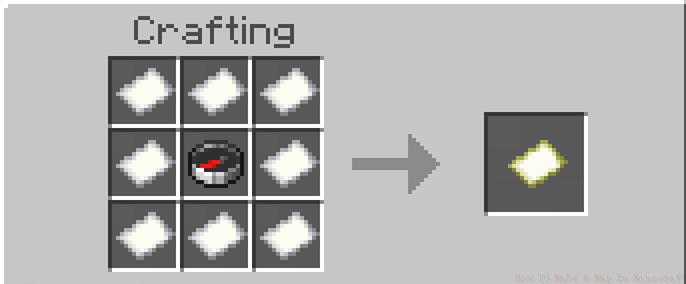
Standard map crafting arrangement using compass and paper
An alternative crafting method exists that requires only nine paper sheets. Arrange all nine papers in the crafting grid using the standard pattern to produce what’s known as an Empty Map. The critical distinction with this variant is the absence of the player position tracker functionality. This version simply displays the geographical layout without indicating your current location, as illustrated in the subsequent image reference.
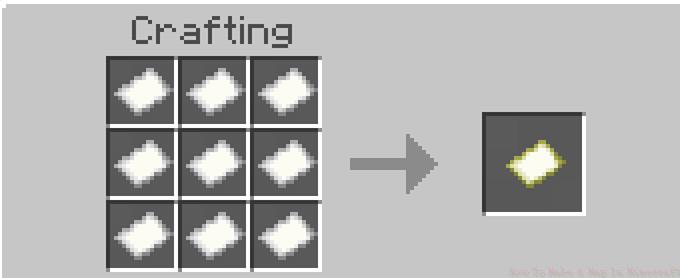
Empty map creation using paper-only recipe
If you accidentally craft an empty map without the tracking feature, the situation is easily remedied. Simply create a compass separately, then return to the crafting table with both items. Combine the empty map with the compass in the crafting interface to add the crucial player location indicator.
Converting empty maps to tracked versions using compass combination
Newly created maps initially display only a limited area coverage that many players find restrictive. Fortunately, maps can be expanded up to four sequential times using appropriate materials and equipment. This scaling process requires utilizing a specialized Cartography Table workstation.
Position yourself at the Cartography Table interface and place your existing map in the upper left input slot. Insert a single paper sheet into the lower left slot. The output will generate in the middle right slot as an enlarged version of your original map.
Map expansion process using Cartography Table and paper
Each upgrade level doubles the map’s coverage area while reducing the detail resolution proportionally. The four available expansion stages progress as follows: starting map (1:1), first upgrade (1:2), second upgrade (1:4), third upgrade (1:8), and final upgrade (1:16). Strategic upgrading allows balancing between detailed local mapping and broader territorial coverage based on your current exploration needs.
Advanced players should note that map scaling follows specific mathematical progression. The initial map covers 128×128 blocks, expanding to 256×256, 512×512, 1024×1024, and finally 2048×2048 blocks at maximum size. Planning your upgrade sequence based on exploration priorities can save significant resources and time.
Map copying functionality provides tremendous utility for multiplayer scenarios and backup purposes. The duplication process requires your original map plus empty paper at the Cartography Table interface.
To create a copy, position both the original map and blank paper in the table’s input slots. The output generates an identical duplicate that shares all exploration data and markings from the source map.
Map duplication process creating identical copies
This copying mechanism proves invaluable when multiple players need identical navigation tools for coordinated expeditions. Additionally, maintaining backup copies protects against accidental loss or destruction of valuable mapped territories.
For optimal map management, establish a centralized cartography room in your base with labeled chests organizing maps by region and exploration status. This systematic approach ensures quick access to relevant maps when planning journeys or coordinating with other players.
Resource Optimization Strategy: Always craft empty maps initially when exploring new territories since they’re cheaper to produce. Upgrade to tracked versions only after identifying areas worth permanent mapping.
Common Error Prevention: Many players mistakenly use the wrong paper arrangement, resulting in useless maps. Double-check the crafting pattern before confirming, and keep spare materials for corrections.
Advanced Scaling Technique: Time your map upgrades strategically. Wait until you’ve explored most of the current map area before expanding to avoid wasting uncovered territory.
Multiplayer Efficiency: Designate one player as the primary cartographer to maintain map consistency across your group. Use the copying feature to distribute updated maps efficiently.
For comprehensive gameplay strategies beyond mapping, consult our Complete Guide covering all essential Minecraft mechanics and advanced techniques.
Action Checklist
- Gather 1 compass + 8 paper for standard maps or 9 paper for empty maps
- Craft at Crafting Table using correct pattern arrangement
- Upgrade maps up to 4 times at Cartography Table
- Copy maps for multiplayer sharing or backup purposes
- Organize maps systematically for efficient retrieval and use
No reproduction without permission:SeeYouSoon Game Club » How To Make A Map In Minecraft Master Minecraft map crafting, upgrading, and copying with expert strategies and common pitfalls