
TL;DR
- Dune: Awakening requires specific graphics setting adjustments to overcome launch performance issues
- Setting resolution to 1080p and using Fullscreen mode provides the most significant FPS improvements
- Updating GPU drivers and configuring NVIDIA Control Panel settings can eliminate most stuttering problems
- Monitoring system temperatures and managing background applications prevents performance degradation during extended sessions
- Combining in-game optimizations with system-level tweaks delivers the smoothest Arrakis experience
Dune: Awakening’s PC launch has presented significant performance hurdles that even high-end gaming rigs struggle to overcome. Despite extensive development cycles and multiple testing phases, players across all hardware configurations report consistent frame rate instability and technical issues that impact gameplay immersion.
The game’s demanding rendering of Arrakis’ vast desert landscapes and complex environmental effects pushes current hardware to its limits. Many users experience sudden FPS drops during intense sandstorm events or when navigating crowded player settlements, regardless of their system’s raw power.
Before diving into optimization, conduct a thorough assessment of your system against the developer’s minimum and recommended specifications. Falling short on even one critical component—particularly GPU VRAM or CPU core count—will severely compromise your ability to achieve stable performance. This initial compatibility check prevents frustration from attempting to run the game on inadequate hardware.

Dune: Awakening display settings
Navigate to the Graphics tab in Dune: Awakening’s settings menu to begin the optimization process. While the game attempts to auto-detect optimal settings based on your hardware, these presets often prioritize visual fidelity over performance stability, leading to the stuttering issues many players encounter.
For immediate performance improvements, prioritize these critical display settings that directly impact frame rate consistency:
Display configuration fundamentals
A common mistake is maxing out every setting, which overwhelms even powerful GPUs. Instead, strategically balance quality settings—prioritize texture quality and shadow resolution while reducing post-processing effects that contribute minimally to visual experience but heavily impact performance.
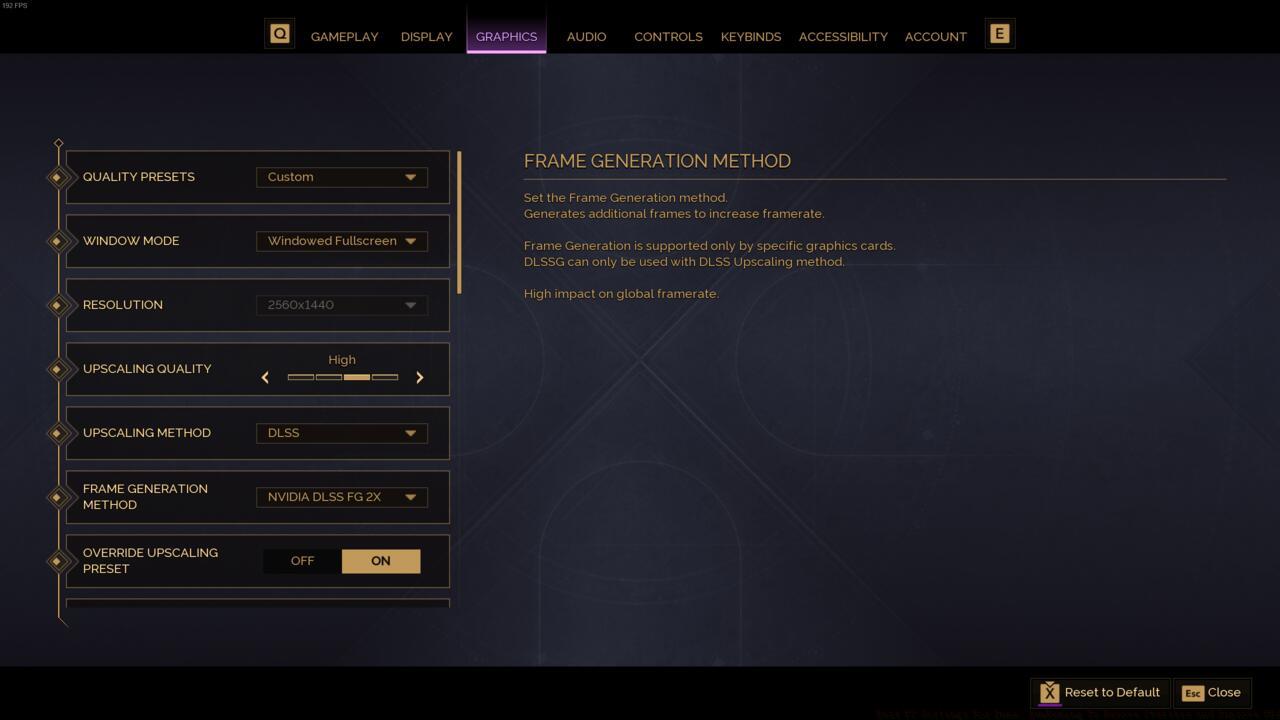
Dune: Awakening graphics settings
Beyond in-game settings, system-level optimizations can provide substantial performance gains. Begin with your GPU control panel—NVIDIA users should access the NVIDIA Control Panel to create a dedicated profile for Dune: Awakening with optimized settings.
Configure these critical NVIDIA Control Panel parameters for maximum performance:
Many players overlook background application management, but closing resource-intensive programs like web browsers with multiple tabs can free up significant CPU and memory resources. Discord overlay and other gaming utilities, while convenient, introduce measurable performance penalties in demanding titles like Dune: Awakening.
The Nvidia Control Panel settings for Dune: Awakening
For players continuing to experience crashes or severe stuttering despite optimization efforts, several advanced troubleshooting techniques can identify and resolve underlying issues. Monitor your system temperatures during gameplay—thermal throttling often manifests as gradual performance degradation over extended sessions rather than immediate frame drops.
If crashes persist after driver updates, verify your system’s stability through stress testing applications. Memory instability or power supply issues frequently cause unexplained crashes in demanding games that don’t appear during normal computer use.
Long-term performance maintenance involves regular driver updates and monitoring game patches that address performance issues. The developers have committed to ongoing optimization, so staying current with patches can resolve problems that settings adjustments cannot fix.
For those looking to expand their gaming expertise beyond performance optimization, our Complete Guide to Battlefield 6 provides comprehensive strategic insights. Similarly, mastering weapon systems through our Weapons Unlock guide and understanding character roles via the Class Guide can enhance your overall gaming proficiency.
Action Checklist
- Verify system meets minimum requirements and update GPU drivers to latest stable version
- Configure in-game display settings: 1080p resolution, Fullscreen mode, refresh rate cap matching monitor
- Optimize NVIDIA Control Panel settings with dedicated game profile for maximum performance
- Close background applications and disable overlays before launching game
- Monitor system temperatures during gameplay and adjust fan curves if thermal throttling occurs
No reproduction without permission:SeeYouSoon Game Club » Best PC Settings For Dune: Awakening To Remove Stutters And Improve FPS Expert PC optimization guide to eliminate stuttering and maximize FPS in Dune: Awakening