
TL;DR
- The Last of Us Part 2 offers industry-leading accessibility options surpassing most AAA titles
- Players can customize difficulty, controls, visuals, and audio to match individual needs and abilities
- Proper configuration prevents common setup mistakes that undermine accessibility benefits
- Advanced settings enable fine-tuning for specific gameplay scenarios and challenges
- Comprehensive support resources provide ongoing assistance throughout your gaming journey
Naughty Dog’s The Last of Us Part 2 represents a significant advancement in PlayStation 4 gaming, delivering not just compelling narrative but unprecedented accessibility customization. This critically acclaimed sequel recognizes that gaming audiences encompass diverse skill levels, physical capabilities, and sensory processing abilities. Players approach the experience with varying familiarity with stealth mechanics, action sequences, and controller operation.
The game’s accessibility suite enables granular adjustments across multiple dimensions – from combat difficulty scaling to interface modifications that accommodate different visual and auditory needs. These features transform how players interact with the intense survival-horror environment, ensuring everyone can experience Ellie’s emotional journey regardless of their gaming background or physical constraints.
What distinguishes this implementation is its holistic approach to player comfort and capability matching. Unlike many titles that offer basic difficulty toggles, The Last of Us Part 2 provides targeted solutions for specific challenges players might encounter.
Players can modify numerous gameplay aspects through four primary accessibility categories. Combat settings allow independent adjustment of enemy aggression, resource scarcity, and player vulnerability. Navigation aids include enhanced listening mode, traversal assistance, and objective highlighting that reduces frustration during exploration sequences.
Visual customization options address color blindness, motion sensitivity, and text readability. These include high-contrast mode, interface scaling, and subtitle customization with speaker identification. Control schemes offer alternative input methods, button remapping, and sensitivity adjustments for both camera and aiming mechanics.
The audio accessibility layer provides visual cues for critical sound information, adjustable mix levels for different sound types, and compatibility with various hearing assistance technologies.
Begin your accessibility configuration during the initial setup phase, but remember these settings remain adjustable throughout your playthrough. Start with the presets that match your general playstyle, then fine-tune individual elements as you encounter specific challenges. Many players benefit from enabling navigation assistance early, as it significantly reduces backtracking and missed objectives.
Common configuration mistakes include over-relying on difficulty reduction rather than using targeted accessibility features. For example, players struggling with combat might better benefit from aim assistance or enemy attack indicators rather than simply lowering the difficulty setting. Another frequent error involves neglecting to adjust subtitle settings for optimal readability before beginning story-heavy sections.
Advanced optimization involves creating situational profiles – you might use different settings for combat-heavy versus exploration-focused chapters. Experienced players often create custom configurations that maintain challenge while addressing specific accessibility needs, such as maintaining high enemy difficulty while enabling traversal assistance for platforming sequences.
This overview highlights the most impactful accessibility configurations, but the complete system offers dozens of additional fine-tuning options. For players seeking comprehensive gameplay assistance, our Complete Guide offers additional strategic frameworks that complement these accessibility features.
Our dedicated guide hub provides spoiler-free walkthroughs that integrate accessibility recommendations for specific gameplay scenarios. Beginners will find essential tips for navigating the game’s challenging environments while utilizing the full spectrum of assistance options.
Collectible hunters can access detailed location guides that account for various navigation needs. The community continues to develop new configuration strategies as players discover innovative ways to customize their experience.
Difficulty Options
The Last of Us Part 2 revolutionizes difficulty settings by offering unprecedented granular control over gameplay elements. Unlike traditional games with fixed difficulty presets, this system empowers you to create a truly personalized experience by independently adjusting six distinct gameplay aspects on individual 5-point scales. This sophisticated approach means you can craft scenarios like making stealth mechanics extremely forgiving while maintaining high enemy aggression and abundant resources simultaneously. Crucially, Naughty Dog has removed all PlayStation trophy requirements tied to difficulty settings, encouraging players to utilize these tools without fear of missing out on achievements.
Challenge (Overall challenge from Very Light To Survivor–Very Hard, basically)
- Very Light: Perfect for narrative-focused players who want minimal combat friction while exploring the story-rich environments
- Light: Reduced challenge level with more frequent resources and less threatening enemy encounters
- Moderate: Balanced gameplay experience with strategic resource limitations and standard enemy behavior
- Hard: Demanding combat scenarios with scarce resources and highly dangerous opponents
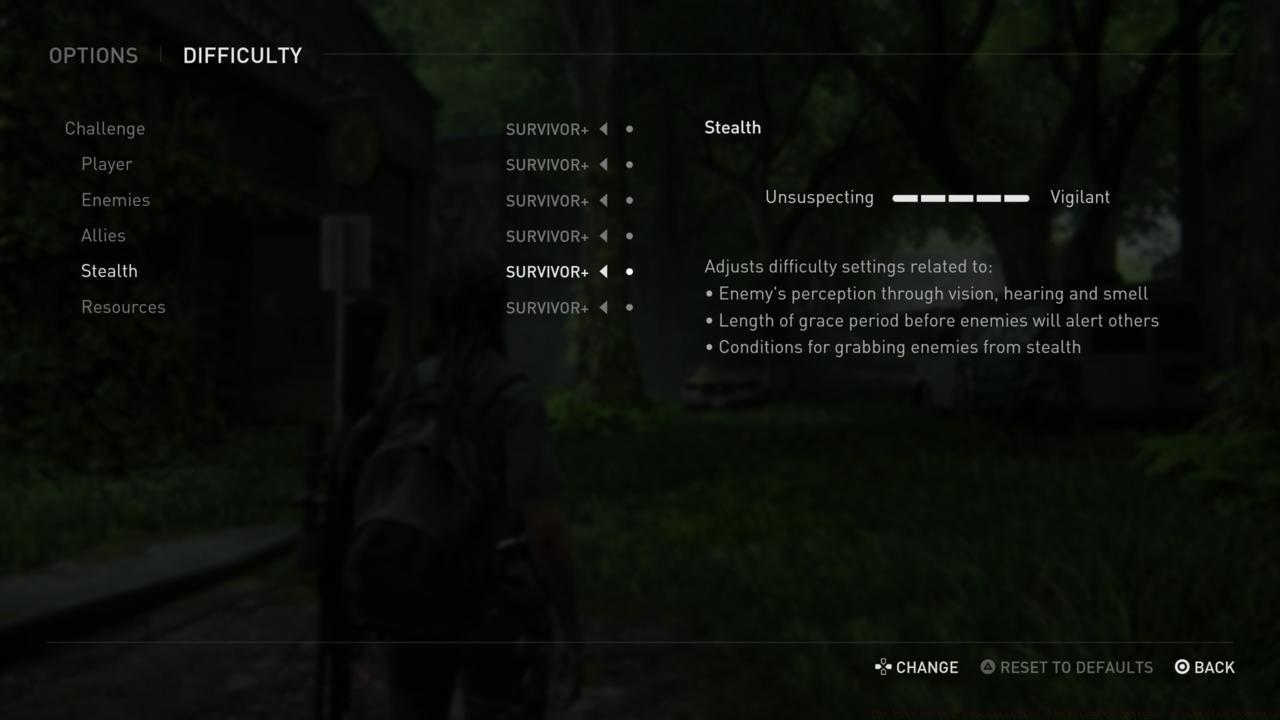
Player (Resilient to Vulnerable)
These settings directly impact your character’s survivability and combat resilience:
- Amount of damage the player takes from enemies
- Frequency of mid-encounter dynamic checkpoints
Enemies (Passive to Aggressive)
Fine-tune enemy behavior and combat intelligence:
- Accuracy of enemy gunfire and frequency of projectiles
- Aggression of enemies advancing and flanking
- Complexity of enemy melee combos
- Movement speed of certain high-threat enemies
- Custom tuning to specific combat encounters
Allies (Aggressive to Passive)
Control your companions’ combat effectiveness:
- Aggressiveness of allies in combat
- Frequency at which allies kill enemies
Stealth (Unsuspecting or Vigilant)
Adjust stealth mechanics to match your preferred playstyle:
- Enemy’s perception through vision, hearing and smell
- Length of grace period before enemies will alert others
- Conditions for grabbing enemies from stealth
Resources (Common or Scarce)
Manage the game’s resource economy:
- Quantity of ammunition and supplies found in the world
- Durability of melee weapons dropped by enemies
- Yield of certain crafting recipes
Controls
Beyond standard camera inversion and sensitivity adjustments, The Last of Us Part 2 includes sophisticated assistance systems designed to help players overcome various control challenges. These features are particularly valuable for players transitioning from other gaming genres or those with physical limitations affecting controller dexterity.
The Camera Assist automatically repositions the camera in alignment with your movement direction. This feature proves especially beneficial for players unfamiliar with third-person action games or those struggling with simultaneous left and right stick coordination.
Similarly, an Aim Assist gently guides your targeting reticle toward enemies while providing subtle resistance when moving away from targets. This creates a more intuitive aiming experience without completely removing skill-based elements.
The Last Of Us Part 2 also features a Lock-On Aim, which automatically locks onto enemy targets when aiming, defaulting to center-mass targeting. You can then utilize the Right Stick for precision targeting of headshots or leg shots. The Auto-Target enhancement automatically transitions your aim to subsequent enemies, even when they’re outside your immediate field of view.
HUD
The game offers complete HUD customization, allowing you to toggle every interface element for enhanced immersion. You can selectively enable or disable pop-up notifications including tutorials, hints, dodge prompts, attack prompts, and pickup prompts.
A particularly innovative feature for completionists is the Collectible Tracking icon, which displays special indicators for previously collected items during subsequent playthroughs—a feature that should become standard in modern gaming.
Subtitles
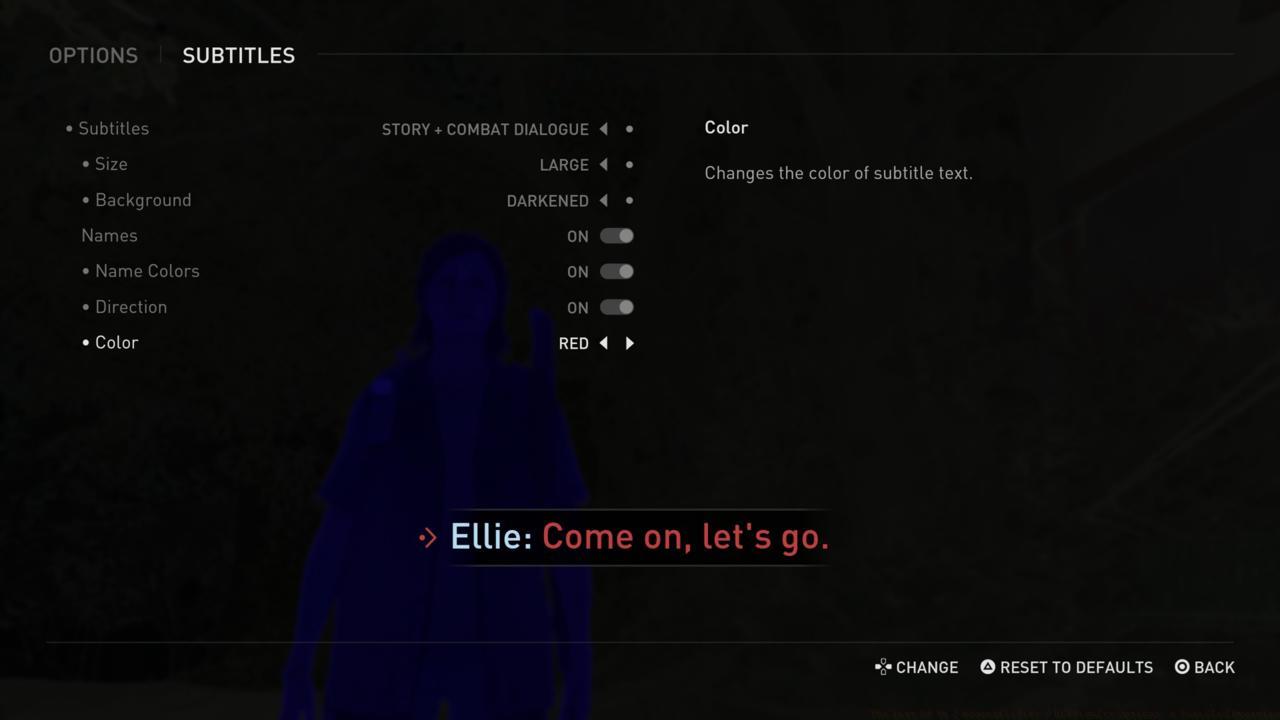
Addressing common readability issues, The Last Of Us Part 2 provides extensive subtitle customization. You can adjust text size (small, medium, large), apply text backgrounds for better contrast, select from multiple text colors (white, yellow, blue, red, green), enable speaker identification, and activate directional arrows pointing toward speaking characters.
Audio
The audio system offers independent volume control for speech, music, cinematics, and effects, along with device-specific audio output configurations. Notably, the game includes comprehensive text-to-speech functionality for visually impaired players—typically prompted during initial setup.
Additional text-to-speech options within the Accessibility menu provide auditory cues that enable blind or low-vision players to navigate environments and participate in combat effectively. The implementation represents a significant advancement in gaming accessibility.
Accessibility
Alternate Controls
A secondary control menu within the Accessibility section offers alternative input methods for specific mechanics like boat steering and guitar playing. This section also lets you configure input requirements for hold, press, or tap button actions during combos, quicktime events, aiming, sprinting, etc.
Additional control enhancements include automatic weapon swapping during ammunition depletion and automatic item collection functionality.
Magnification And Visual Aids
This menu enables HUD scaling and color modification, including dedicated colourblind modes (Protanopia, Deuteranopia, and Tritanopia).
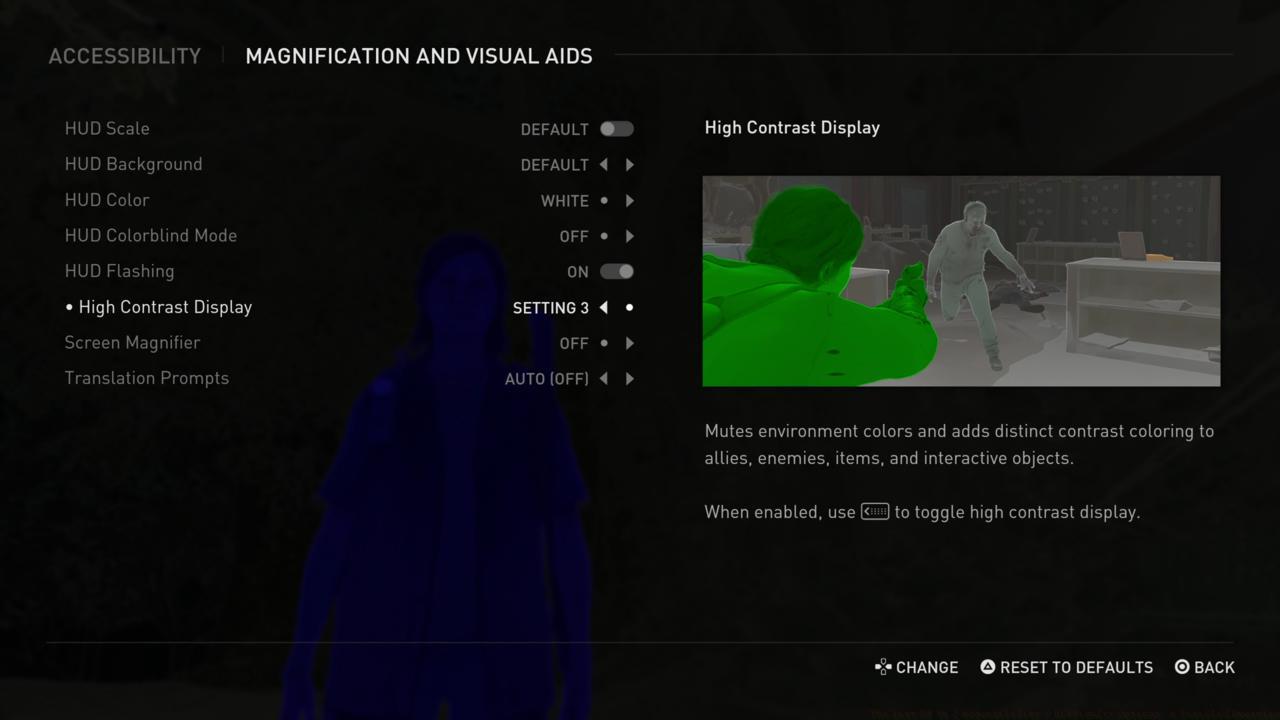
The High Contrast Display mode desaturates environmental textures while applying bold, distinct colors to allies, enemies, and items. While designed for visually impaired players, this feature proves invaluable for locating collectibles in visually dense environments. During subsequent playthroughs for missed collectibles, we strongly recommend enabling this setting—toggleable via the touchpad.
Additionally, the Screen Magnifier allows you to zoom specific screen areas using touchpad controls, with full positional adjustment capability.
Motion Sickness
The Last of Us Part 2 employs extensive post-processing to achieve its cinematic visual style. Players can adjust Camera Shake and Motion Blur intensity, modify the Camera Distance in third-person perspective, and even expand the Field Of View.
For motion-sensitive players, the Persistent Centre Dot provides a stable visual reference point to reduce discomfort during camera movement.
Navigation And Traversal
While prioritizing immersion through minimal waypoint markers, The Last Of Us Part 2 offers Navigation Assistance and Traversal Assistance that automates climbing, vaulting, and sprinting actions when necessary.
The Ledge Guard prevents fatal falls from ledges, while Infinite Breath eliminates drowning risks during underwater sequences.
For players who enjoy combat but dislike puzzles, the Skip Puzzle Option automatically completes puzzle sequences. This feature particularly assists blind or low-vision players since “some puzzle progression may not be fully accessible”.
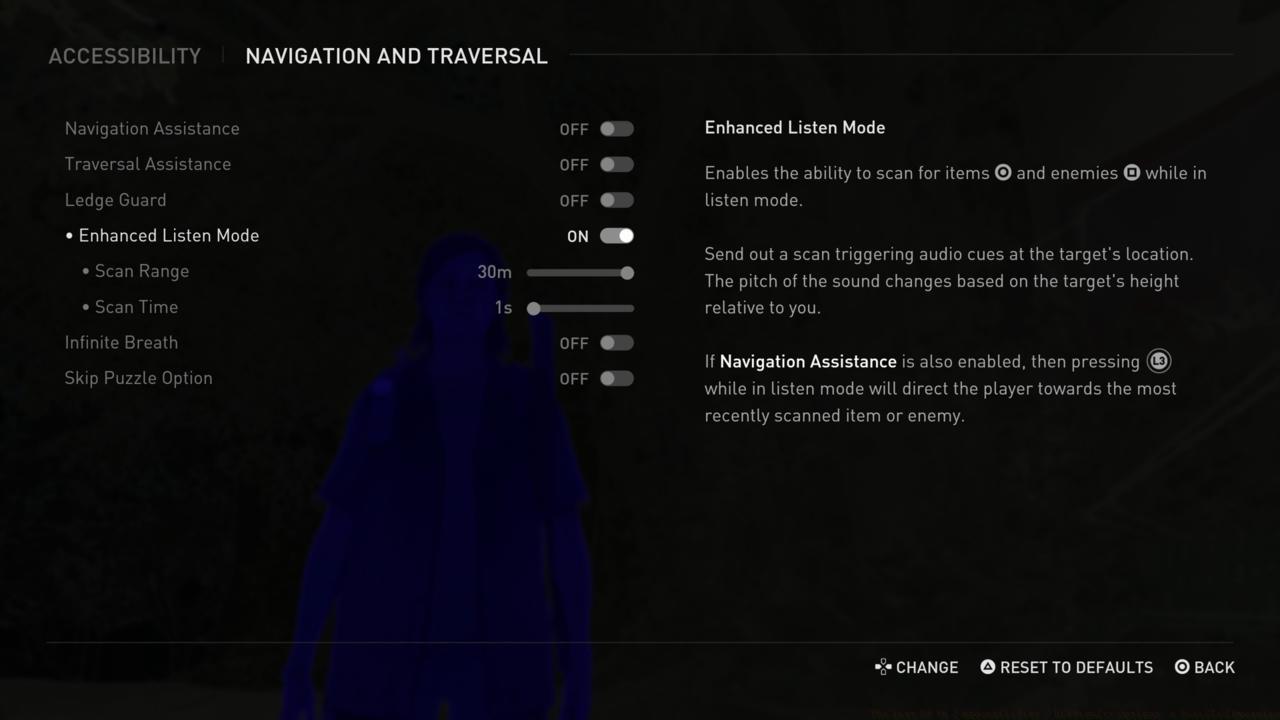
The standout feature in this category is Enhanced Listen Mode, which emits dual-frequency pings to scan surroundings for enemies and items. Similar to high contrast display, this tool proves extremely effective for ensuring no collectibles are overlooked.
Combat Accessibility
The final configuration menu allows further refinement of both player character and enemy behaviors. You can simplify combat encounters using Enemies Don’t Flank and Reduced Enemy Accuracy.
Player enhancements include Enhanced Dodge and Invisible While Prone. Additional options include complete Weapon Sway elimination and a Slow Motion toggle for precise aiming and evasion. The extensive customization options carry no trophy penalties, encouraging experimentation.
These comprehensive accessibility features in The Last Of Us Part 2 provide substantial support for players requiring assistance. If you’re interested in the game but need support, these options offer meaningful assistance. For additional guidance, explore our comprehensive Battlefield 6 Complete Guide for similar in-depth analysis of modern gaming features.
Battlefield 6 revolutionizes player experience through its sophisticated difficulty adjustment system, providing unprecedented control over your gaming journey. Unlike traditional games with fixed difficulty tiers, BF6 implements a multi-dimensional approach that spans five distinct scales across various gameplay elements. This granular customization empowers you to tailor specific aspects like stealth mechanics, resource availability, and enemy intelligence independently, creating a truly personalized combat environment.
Core Difficulty Framework
The system’s foundation rests on separate five-point scales for combat intensity, resource scarcity, enemy behavior, and player survivability. This means you can configure a scenario where stealth detection is extremely forgiving while maintaining high-intensity firefights, or create resource-abundant survival situations against highly intelligent opponents. The flexibility extends to class-specific balancing, ensuring each specialization feels appropriately challenging.
Strategic Customization Benefits
One of the most significant advantages is the ability to reduce frustration in areas where you struggle while maintaining challenge in your strengths. New players often benefit from setting resource availability to abundant while keeping enemy AI at moderate levels, allowing them to learn game mechanics without constant ammunition anxiety. Veterans can create “hardcore-plus” experiences by maximizing all difficulty parameters for the ultimate test of skill.
Trophy System Liberation
A groundbreaking change from previous military shooters is the complete decoupling of difficulty settings from achievement systems. PlayStation trophies and Xbox achievements remain fully accessible regardless of your chosen configuration, eliminating the pressure to endure unsatisfying challenge levels simply for completionist goals. This player-friendly approach encourages experimentation with different combinations to find your ideal gameplay rhythm.
Challenge (Comprehensive difficulty spectrum from Very Light to Hardcore)
Practical Application Scenarios
Each difficulty tier significantly alters how you approach Conquest matches and Assignment completion. On Very Light, you can focus on learning map layouts and objective mechanics, while Hard difficulty demands mastery of cover usage, ammunition conservation, and squad coordination. The progression between levels isn’t linear—moving from Light to Moderate represents a more significant jump in challenge than from Moderate to Hard.
Common Configuration Mistakes
Many players undermine their experience by setting resource scarcity too high while maintaining low enemy difficulty, creating frustrating inventory management without corresponding combat satisfaction. A better approach is matching resource availability to your chosen combat intensity for consistent challenge pacing.
Player (Resilience Spectrum from Highly Durable to Vulnerable)
This sophisticated setting category adjusts your character’s survivability parameters and recovery capabilities.
Strategic Implications
The resilience setting dramatically influences tactical decisions and engagement styles. At the Vulnerable end of the spectrum, positioning and cover become critically important, rewarding careful planning and situational awareness. Conversely, Resilient configurations allow for more aggressive playstyles and risk-taking maneuvers during intense firefights.
Custom Build Recommendations
For players focusing on specialized weapon loadouts, matching your resilience to your preferred engagement distance is crucial. Snipers often benefit from higher vulnerability settings that emphasize positioning over durability, while assault specialists may prefer resilient configurations that support close-quarters combat.
Advanced Optimization Tips
Experienced players should consider creating multiple custom difficulty presets for different gameplay scenarios. A “training” configuration with abundant resources and moderate enemies works well for learning new maps, while a “challenge” preset with scarce resources and intelligent opponents provides intense late-game experiences.
The player setting interacts significantly with NATO faction capabilities and Pax Armata gameplay mechanics. Understanding these relationships helps create difficulty combinations that enhance rather than frustrate your battlefield experience.
Among the most impactful visual customization options is the High Contrast Display setting, which transforms environmental textures into muted backgrounds while applying vibrant, clearly defined colors to allies, enemies, and interactive objects. While originally designed for players with visual impairments, this feature proves exceptionally valuable for anyone hunting collectibles in the game’s densely detailed environments. During subsequent playthroughs when searching for missed notes and artifacts, enabling this option significantly reduces the time spent scanning cluttered areas. The touchpad toggle allows instant activation when needed, then quick return to standard visuals.
Another powerful visual aid is the Screen Magnifier function, accessible through the same settings menu. This tool enables precise examination of distant text, environmental details, or hidden items by projecting an adjustable zoom window controlled via touchpad. The magnifier’s position can be fluidly repositioned across the screen, making it ideal for deciphering small text or identifying hard-to-spot resources in shadowy areas.
The Last of Us Part 2 employs extensive post-processing techniques to create its cinematic visual style, but these effects don’t suit every player. Some individuals experience discomfort or nausea from certain visual treatments, while others simply prefer cleaner image presentation without the filmic filters.
Within the visual settings menu, players can fine-tune multiple parameters including Camera Shake intensity, Motion Blur levels, third-person Camera Distance, and overall Field Of View adjustments. Expanding the field of view provides broader peripheral awareness, which can be crucial during tense combat situations where environmental awareness matters.
For players susceptible to motion-induced discomfort, the Persistent Centre Dot serves as an essential visual anchor point. This constantly visible reference marker helps maintain orientation and reduces disorientation when navigating through the game’s complex environments. Many players report this simple addition dramatically improves their ability to play for extended sessions without discomfort.
The Last Of Us Part 2 prioritizes immersion by avoiding obvious waypoint markers, but recognizes that navigation assistance benefits many players. The Navigation Assistance system provides subtle directional cues without breaking immersion, while Traversal Assistance automates climbing, vaulting, and context-sensitive sprinting actions. These features streamline movement through environments while preserving the game’s atmospheric quality.
Environmental hazards pose significant threats throughout the journey, but optional safeguards can mitigate these dangers. Enabling Ledge Guard prevents accidental fatal falls from climbable surfaces, while Infinite Breath removes the time pressure from underwater sequences. Both options maintain narrative tension while eliminating potential frustration points for players who find these mechanics challenging.
Puzzle sequences provide thoughtful breaks from combat but may not appeal to all players. The Skip Puzzle Option allows immediate progression past these sections when enabled. While particularly beneficial for players with visual impairments who might struggle with visual puzzle elements, this feature also serves those who prefer to focus exclusively on the game’s narrative and combat elements. The developers explicitly note that certain puzzle mechanics may present accessibility barriers, making this bypass option essential for inclusive gameplay.
Arguably the most powerful accessibility feature is Enhanced Listen Mode, which revolutionizes environmental awareness. This advanced mode emits two separate sonar pings that differentiate between hostile entities and collectible items within your vicinity. Similar to the high contrast display, this tool becomes indispensable during completionist playthroughs where missing resources becomes frustrating.
Combat encounters can be finely calibrated through enemy behavior modifications in the final settings category. The Enemies Don’t Flank option prevents opponents from executing sophisticated positioning maneuvers, while Reduced Enemy Accuracy decreases the marksmanship of hostile forces. These adjustments allow players to experience the game’s tense combat scenarios without the extreme difficulty that might otherwise create barriers to progression.
Many players overlook the strategic combination of these settings—using Enhanced Listen Mode to identify enemy positions while employing Reduced Enemy Accuracy creates a tactical advantage that maintains challenge while reducing frustration. For those struggling with specific combat sequences, temporarily enabling these options can provide the slight edge needed to advance through challenging sections, then disabled once mastery is achieved. This approach to dynamic difficulty adjustment represents one of the most player-friendly implementations in modern gaming.
Action Checklist
- Review all four accessibility categories before starting your playthrough
- Configure navigation assistance and subtitle settings as foundation options
- Test combat settings in early encounters and adjust based on performance
- Create situational profiles for different gameplay segments (combat, exploration, stealth)
- Consult advanced resources like our Weapons Unlock guide for weapon-specific accessibility tips
- Begin with Moderate difficulty and customize individual aspects based on your specific challenges
- Enable Camera Assist and Aim Assist if you struggle with dual-stick coordination
- Configure subtitle settings for optimal readability based on your display and vision capabilities
- Activate High Contrast Display and Enhanced Listen Mode for collectible hunting
- Experiment with combat accessibility features like Enhanced Dodge and Reduced Enemy Accuracy
- Start with Moderate overall challenge to establish baseline gameplay feel
- Experiment with individual difficulty sliders to address specific skill gaps
- Create specialized presets for different playstyles (stealth, assault, support)
- Test resilience settings against different weapon types to find optimal combinations
- Enable High Contrast Display for collectible hunting sessions, then toggle as needed
- Configure motion sickness prevention settings including Persistent Centre Dot and reduced Camera Shake
- Activate Navigation and Traversal Assistance for smoother environmental navigation
- Experiment with Enhanced Listen Mode pings to master enemy and item detection
- Fine-tune combat difficulty using enemy behavior modifiers based on personal skill level
No reproduction without permission:SeeYouSoon Game Club » The Last Of Us 2 Accessibility / Difficulty Options: A Detailed Overview