
TL;DR
- Minecraft seeds generate predictable worlds using complex mathematical algorithms
- Find your seed via commands or settings depending on your platform and version
- Seed maps reveal world structures and biomes but don’t track player modifications
- Use online tools like Chunkbase to visualize your world before exploring
- Apply seed maps strategically for efficient resource gathering and base planning
Minecraft Seed Maps transform your exploration experience by revealing hidden structures, rare resources, and optimal base locations throughout your generated world.
While newly created Minecraft worlds appear completely randomized, sophisticated mathematical algorithms work behind the scenes to ensure consistent terrain generation. These algorithms guarantee that mountains maintain realistic formations, rivers flow naturally, and biomes transition logically rather than abruptly colliding. The predictability of Minecraft seeds enables numerous practical applications, including recreating identical worlds across different servers or sharing exceptional world generations with fellow players. Among the most valuable uses involves leveraging seed data to produce comprehensive seed maps. This guide will demystify seed mechanics, demonstrate retrieval methods, and showcase the powerful capabilities of seed mapping tools.
Contrary to common belief, Minecraft maps operate within defined parameters rather than offering infinite randomness. The game utilizes approximately 18.4 quintillion potential seeds, each generating distinct world configurations. Some seeds produce remarkably similar terrain, while others create dramatically different landscapes. This number coincidentally matches the planetary count in No Man’s Sky, as both games employ 64-bit number spaces ranging from 0 to 18.4 quintillion (2^64).
Minecraft’s sophisticated generation algorithm minimizes floating blocks and terrain inconsistencies, with the seed essentially instructing the game which specific mathematical procedure to execute during world creation.
Important distinction: seeds determine initial world generation only—they don’t preserve player modifications or constructions. Unlike save states that capture your building progress, seeds won’t recreate that first wooden shelter you constructed during your initial gameplay session. World saves can expand to multiple gigabytes through extensive exploration, while seeds remain compact numerical values.
Each seed consistently regenerates its corresponding world, though compatibility considerations exist across Minecraft versions. Both Bedrock and Java editions now handle seeds similarly, but seed maps will display variations as Mojang updates world generation mechanics. For instance, seeds from Minecraft 1.14 (2019) won’t include Cherry Grove biomes introduced in version 1.20.
Retrieving your Minecraft world seed involves different methods depending on your platform and edition. Begin by identifying your specific version—this information appears directly beneath the Minecraft logo on the main screen, indicating either Java or Bedrock edition. The version number displays in the bottom-left corner. Platform differences (Xbox, PC, iOS, etc.) generally don’t impact seed retrieval procedures.
For Minecraft Java Edition players, access your seed by pressing Enter to open the chat window, then type /seed and execute the command. Bedrock Edition users can locate their seed by navigating to Settings, then Game Settings, where the seed value appears in the world information section. Players on official Realms or dedicated servers may need to download their world file and access it locally to retrieve the seed value.
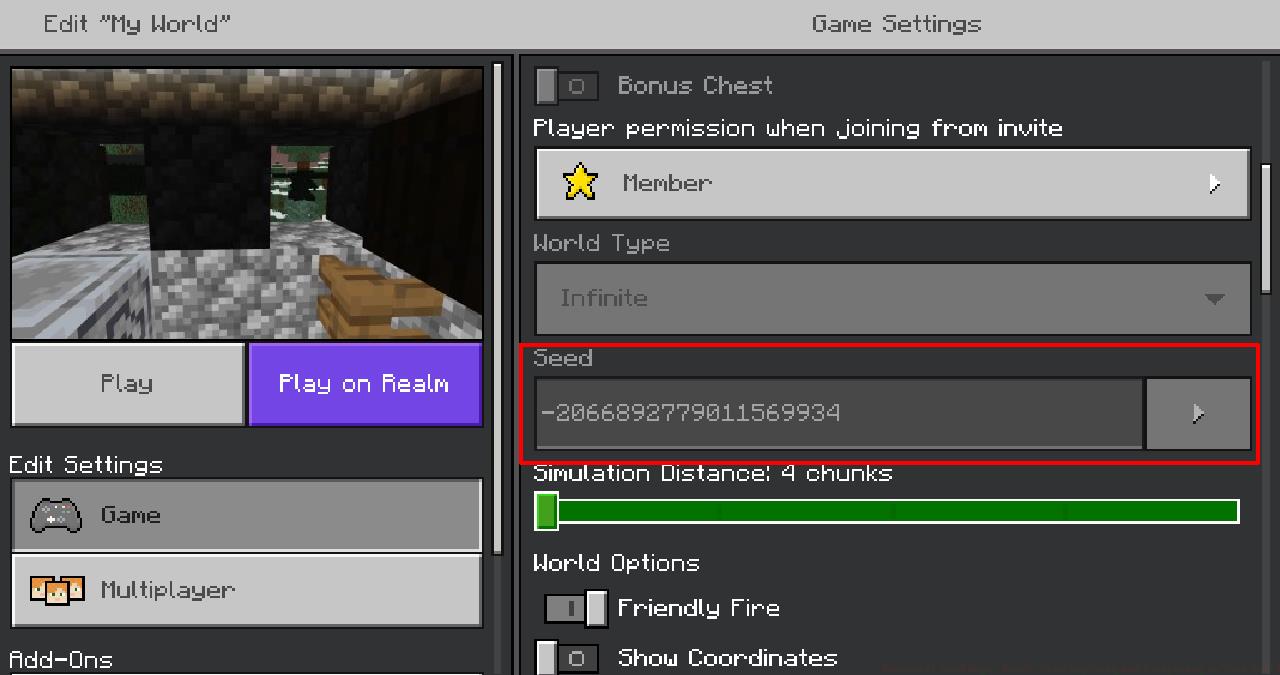
Pro Tip: Always document your seed immediately upon world creation. Many players lose access to valuable seeds after extensive gameplay because they neglected to record this crucial information early.
Common Mistake: Attempting to use Java Edition seed retrieval methods on Bedrock platforms, which results in failed commands and frustration.
Now that we’ve established Minecraft seed fundamentals and retrieval techniques, let’s explore seed maps. As the terminology suggests, these are comprehensive cartographic representations of your Minecraft world, generated exclusively from your world’s seed numerical value.
Similar to how Minecraft seeds ignore post-generation modifications, seed maps don’t substitute for in-game mapping systems. Your crafted maps reflect structural changes and provide real-time positioning, while seed maps function more as atlases than GPS navigation tools.
Strategic Advantage: Seed maps excel at revealing naturally generated structures like villages, temples, and strongholds that remain consistent across world regenerations using the same seed.
Advanced Application: Competitive players utilize seed maps to plan optimal resource gathering routes and identify strategic base locations before committing to extensive construction projects.
Multiple online platforms specialize in generating seed maps from Minecraft world seeds. These tools typically offer both 2D and 3D visualization options, allowing players to explore their worlds from multiple perspectives before investing time in exploration.
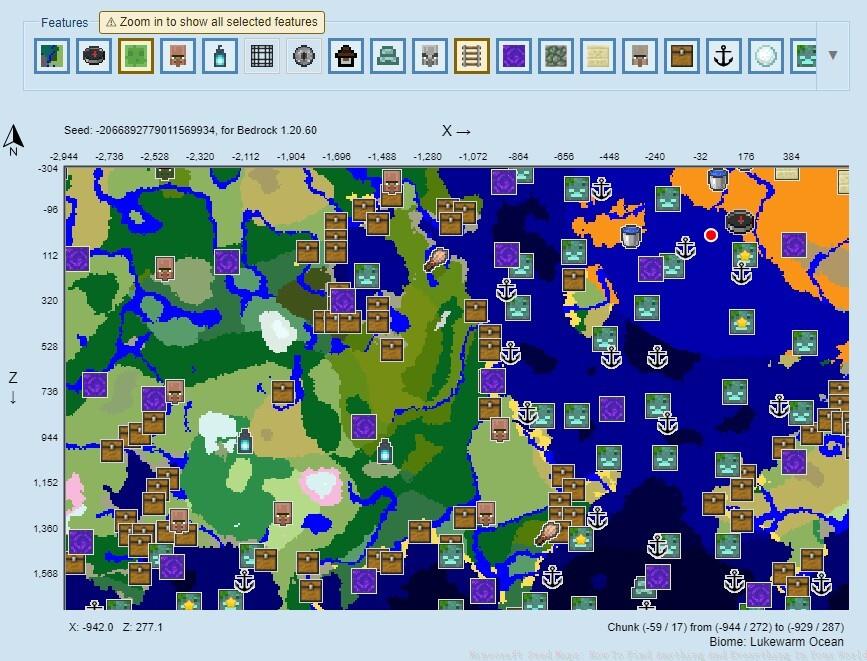
Chunkbase.com
Platform Recommendations: Chunkbase remains the most comprehensive seed mapping service, supporting both Java and Bedrock editions across multiple versions. Alternative platforms include Minecraft Seeds HQ and Seed Map for specialized visualization needs.
Optimization Tip: Always verify that your selected seed mapping tool matches your Minecraft version. Using outdated mapping services can result in inaccurate biome and structure locations due to generation algorithm changes.
Effectively utilizing seed maps requires understanding both their capabilities and limitations. These tools excel at revealing naturally generated content but cannot display player-made modifications or real-time world changes.
Structure Discovery: Seed maps precisely locate villages, desert temples, ocean monuments, and woodland mansions, enabling targeted exploration rather than random searching.
Biome Planning: Advanced players use seed maps to identify optimal biome boundaries for specialized farms and resource collection systems.
Multiplayer Coordination: Server administrators and team-based players leverage seed maps to distribute base locations efficiently and plan coordinated exploration routes.
Time Management: By pre-identifying points of interest, players can reduce aimless wandering by 60-80%, significantly accelerating progression through game stages.
For players seeking to master other aspects of modern gaming, our Complete Guide to Battlefield 6 offers comprehensive strategic insights. Those focused on loadout optimization should consult our Weapons Unlock guide, while team composition strategies are detailed in the Class Guide for optimal squad configurations.
Action Checklist
- Identify your Minecraft edition and version number from the main screen
- Retrieve your world seed using platform-appropriate methods
- Document your seed in a secure location for future reference
- Select a seed mapping service that matches your Minecraft version
- Input your seed and generate a comprehensive map of your world
- Identify key structures, biomes, and resource concentrations
- Plan efficient exploration routes and strategic base locations
No reproduction without permission:SeeYouSoon Game Club » Minecraft Seed Maps: How To Find Anything And Everything In Your World Master Minecraft seed maps to discover hidden structures, rare biomes, and optimize your exploration strategy