
TL;DR
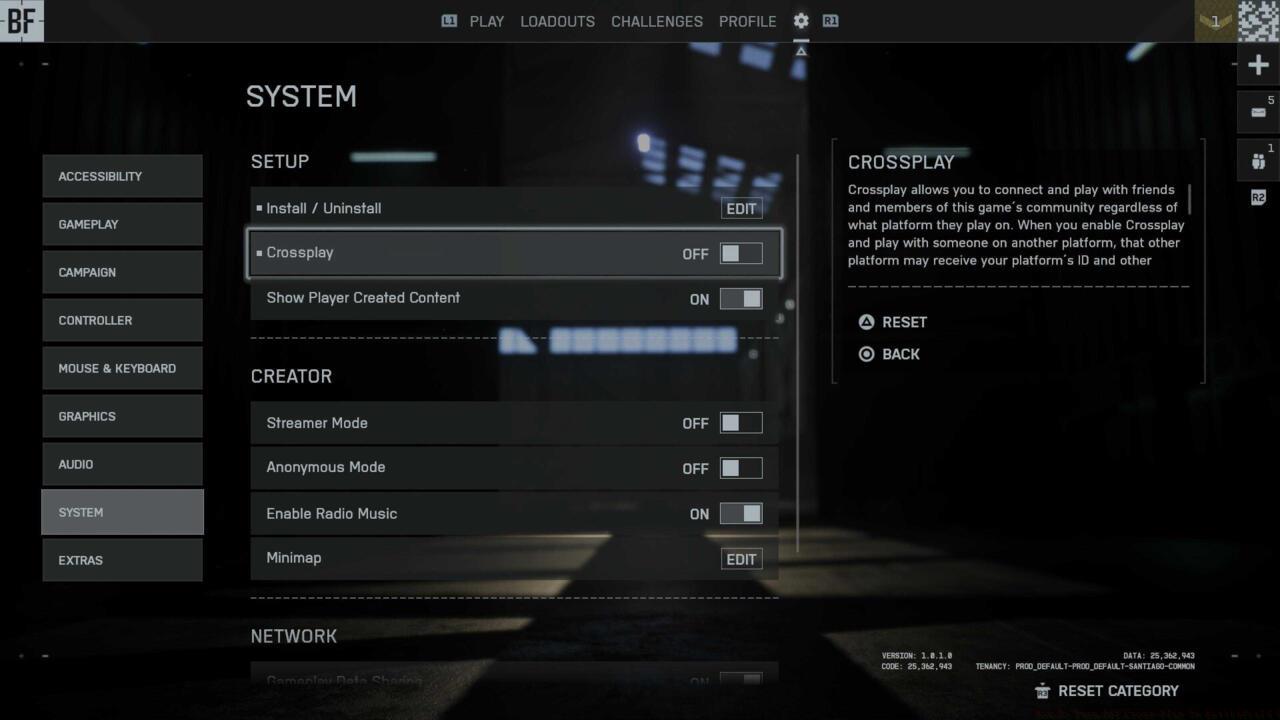
- Console players can disable cross-play in System settings within 30 seconds
- Disabling cross-play limits matchmaking to same-platform players in your region
- PC players cannot disable cross-play and remain in the unified player pool
- Bot backfilling occurs when insufficient same-platform players are available
- Strategic toggle management balances competitive fairness with matchmaking efficiency
For console gamers seeking to avoid PC competition, mastering Battlefield 6 cross-play controls provides essential competitive management. The platform integration system fundamentally reshapes how you experience multiplayer engagements across different hardware ecosystems.
Cross-platform functionality enables unprecedented connectivity between PlayStation, Xbox, and PC gaming communities within BF6 multiplayer environments. This integration creates unified battlefields where diverse player bases converge in massive-scale combat scenarios across game modes like Conquest and Breakthrough.
Input method disparities create significant gameplay implications. Mouse and keyboard precision often provides aiming advantages that can frustrate controller users during intense firefights. Understanding these mechanical differences helps inform your cross-play decision-making process for optimal competitive experiences.
Deactivating cross-platform matchmaking in Battlefield 6 requires straightforward navigation through console interface menus. The entire configuration process typically completes in under half a minute once you familiarize yourself with the pathway.
Access the main menu and proceed to Settings, then navigate to the System tab where you’ll locate the cross-play toggle switch. Changing this setting to off immediately modifies your matchmaking parameters for subsequent gaming sessions.
Critical limitation: This configuration option exclusively appears on console versions of BF6. PC users remain permanently integrated into the cross-play ecosystem without option to segregate themselves from console participants.
Common configuration errors include overlooking the System submenu or attempting to modify settings during active matchmaking. Ensure you access these options from the main menu rather than in-game pause screens to guarantee proper functionality.
Disabling cross-platform functionality introduces significant matchmaking constraints that directly impact your multiplayer experience. When activated, the system restricts your player pool exclusively to users on your specific console platform within geographical proximity.
The primary advantage involves creating a more balanced competitive environment where all participants utilize similar control schemes. This eliminates the perceived disadvantage console players often experience against mouse-aiming opponents in precision-heavy engagements.
However, reduced player availability frequently leads to extended queue times between matches, particularly during off-peak hours or in less populated regions. The matchmaking system compensates for player shortages by integrating AI-controlled bots to maintain full server populations.
Strategic consideration: Evaluate your playtime patterns against regional activity levels. Peak evening hours typically sustain healthy same-platform lobbies, while early morning sessions may suffer from bot-dominated matches. For comprehensive Battlefield 6 tactics, consult our Complete Guide covering advanced gameplay mechanics.
Sophisticated Battlefield 6 players develop dynamic cross-play strategies based on their current gaming objectives. When pursuing competitive rankings or challenging Assignments, disabling cross-play may provide the level playing field necessary for optimal performance.
Session planning represents a crucial element in cross-play management. Before disabling the feature, verify friend roster status and intended gameplay duration to avoid unnecessary matchmaking restrictions during cooperative sessions.
Performance monitoring helps identify when cross-play settings impact your gameplay metrics. Track your K/D ratios, objective completion rates, and match outcomes across different configurations to data-inform your preferences.
Weapon performance varies significantly between input methods, making certain armaments more effective in cross-play disabled environments. Explore our Weapons Unlock guide to optimize your loadout for controller-specific gameplay advantages.
Class selection strategies should adapt to your cross-play configuration. Specific specialist roles and equipment combinations prove more effective in same-platform matches. Discover optimal configurations in our Class Guide for enhanced battlefield effectiveness.
Action Checklist
- Navigate to Settings → System menu from main screen
- Locate cross-play toggle and switch to desired position
- Evaluate matchmaking queue times and player quality
- Monitor bot population percentages in matches
- Adjust settings based on time of day and player activity
No reproduction without permission:SeeYouSoon Game Club » How To Turn Off Cross-Play In Battlefield 6 Master Battlefield 6 cross-play settings with console-specific controls, matchmaking impacts, and strategic advantages