
TL;DR
- Each Battlefield 6 class has two Training Paths: default and advanced with superior passive bonuses
- Unlocking requires completing specific Assignment challenges involving score earning and gadget usage
- Portal Mode with official rules enables efficient challenge completion against bots
- Advanced paths significantly enhance class capabilities and enable specialized playstyles
- Manual equipment of new Training Paths is required after unlocking
Training Paths represent the foundational progression system for class development in Battlefield 6, offering strategic depth beyond basic weapon loadouts. These specialized skill trees provide exclusive passive bonuses that complement your Class Active Ability, creating synergistic effects that dramatically influence combat effectiveness.
When you begin playing Battlefield 6, every class automatically comes equipped with a default Training Path. These initial paths offer balanced benefits, but the real game-changing advantages come from unlocking the advanced secondary paths. Each class has exactly one additional Training Path available, typically featuring more powerful passive bonuses that can transform how you approach each engagement.
The strategic implications of Training Path selection cannot be overstated. Your chosen path directly impacts match performance, team contribution, and overall battlefield effectiveness. Understanding this system is crucial for maximizing your class potential and adapting to different combat scenarios.
To examine all available Training Paths for your classes in Battlefield 6, navigate to the Loadouts menu and select your currently active Training Path. This option appears as a triangular icon positioned to the left of your primary and secondary weapon selection boxes.
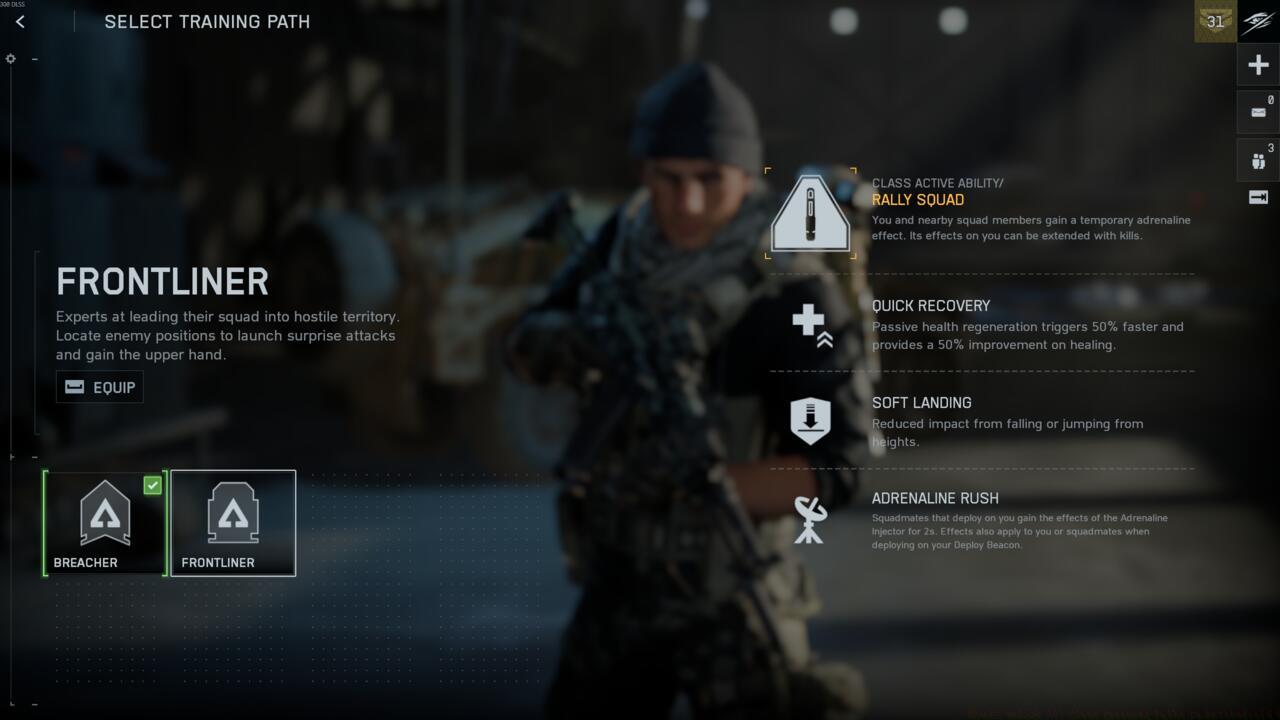
The Training Path menu for the Assault class in Battlefield 6
Within the “Select Training Path” interface, you can review your default Training Path with its complete bonus breakdown alongside the locked advanced path. By hovering your cursor over the locked Training Path icon, the game directs you to the Challenges menu, where specific completion requirements are displayed.
While Battlefield 6’s menu system can be challenging to navigate, we’ve streamlined the process by providing comprehensive challenge breakdowns below. This eliminates the frustration of searching through multiple menus to understand progression requirements.
How to unlock Frontliner Training Path for Assault
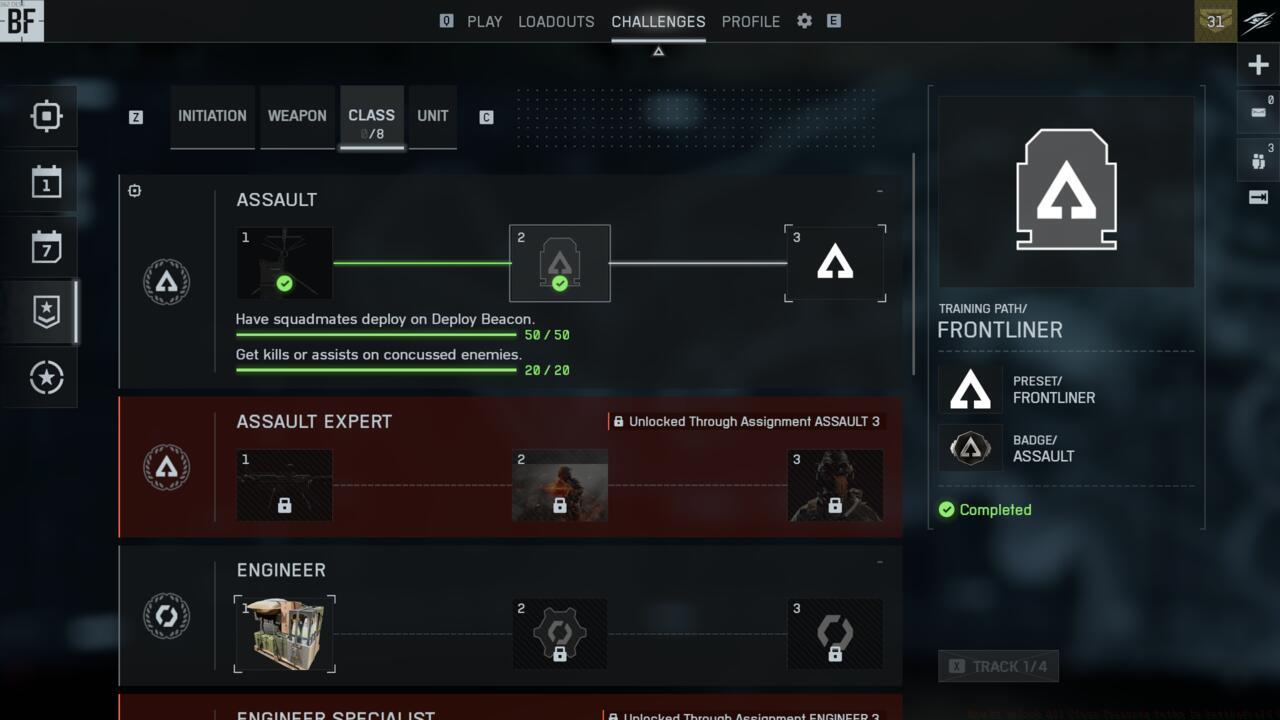
The Assault Training Path challenges
- Assault Challenge 1 (unlocks the Deploy Spawn Beacon):
- Earn 10,000 score
- Get 30 kills while using the Adrenaline Injector
- Assault Challenge 2 (unlocks Frontliner Training Path):
- Have 50 squadmates deploy on the Deploy Spawn Beacon
- Get 20 kills or assists on concussed enemies
For optimal Adrenaline Injector kills, activate the ability during close-quarters engagements on objective points. The spawn beacon should be placed in concealed but strategically valuable positions near capture zones to maximize squad deployment efficiency.
How to unlock Combat Engineer Training Path for Engineer
The Engineer Training Path challenges
- Engineer Challenge 1 (unlocks the Supply Crate):
- Repair vehicles for 2,000 damage
- Earn 10,000 score
- Engineer Challenge 2 (unlocks Combat Engineer Training Path):
- Deal 5,000 damage to ground vehicles with launchers
- Deal 2,000 damage to ground vehicles with Anti-Vehicle Mines
Vehicle repair progression accelerates significantly when focusing on heavily damaged tanks and transport vehicles during intense firefights. For anti-vehicle damage, prioritize maps with high vehicle density and use terrain advantages for ambush opportunities.
How to unlock Fire Support Training Path for Support
The Support Training Path challenges
- Support Challenge 1 (unlocks M320A1 SMK):
- Heal teammates for 5,000 health with Support
- Earn 10,000 score
- Support Challenge 2 (unlocks Fire Support Training Path):
- Get 200 revives as Support
- Deploy the Deployable Cover 25 times
Healing progression benefits from staying near objective hotspots where teammates frequently take damage. For revives, utilize smoke grenades to create cover and prioritize squad members to maintain team combat effectiveness.
How to unlock Spec Ops Training Path for Recon
The Recon Training Path challenges
- Recon Challenge 1 (unlocks C-4 Explosives):
- Spot 250 enemies in objective areas with Recon Gadgets
- Earn 10,000 score
- Recon Challenge 2 (unlocks Spec Ops Training Path):
- Get 50 headshots over 150 meters as Recon
The 150-meter headshot requirement demands strategic positioning on long-sightline maps. Utilize high-magnification scopes and practice leading moving targets at extreme distances to master long-range precision shooting.
To unlock any Training Path for your chosen class in Battlefield 6, completion of both standard Assignment challenges is mandatory. These typically combine general score accumulation with class-specific gadget utilization requirements that test your mastery of specialized roles.
Several Training Path challenges present substantial difficulty spikes that require dedicated effort. For instance, securing kills with the Adrenaline Injector as Assault or achieving 50 headshots beyond 150 meters as Recon represent significant time investments, often consuming multiple gaming sessions.
For accelerated progression, Battlefield 6’s Portal Mode offers an efficient alternative. Navigate to the Community game mode section and filter for servers with official rules enabled, guaranteeing that your experience points and challenge advancements register properly. These sessions typically match you against numerous AI-controlled opponents, enabling streamlined challenge completion without the competitive pressure of human adversaries.
Monitoring your challenge advancement in Battlefield 6 requires actively tracking specific objectives. This functionality displays your current progress immediately when accessing the Challenges tab during matches. To track a challenge, hover over it and press A on Xbox, X on PlayStation, or your designated tracking keybind on PC (typically indicated by a “track” prompt in the lower-right corner of the challenges interface).
Once you successfully unlock a new Training Path, manual equipment through your class loadout menu becomes necessary. Following activation, the passive enhancements remain continuously active during all matches utilizing that specific Battlefield 6 class.
Strategic planning for challenge completion can reduce overall time investment by 30-40%. Focus on completing multiple challenges simultaneously by selecting complementary objectives and optimizing your gameplay approach across different match types and map environments.
Action Checklist
- Access Loadouts menu and select Training Path (triangle icon) to view requirements
- Track specific challenges through Challenges menu for real-time progress monitoring
- Complete class-specific Assignment challenges focusing on score and gadget usage
- Utilize Portal Mode with official rules for efficient bot farming
- Manually equip unlocked Training Paths in loadout menu
No reproduction without permission:SeeYouSoon Game Club » How To Unlock All Class Training Paths In Battlefield 6 Master Battlefield 6 class progression with advanced Training Paths and strategic challenge completion