
TL;DR
- Use Steam overlay notes to create custom no-scope crosshairs for AWP
- Adjust crosshair thickness using cl_crosshair_sniper_width console command
- Position overlay elements carefully to maintain game visibility
- Practice muscle memory for consistent no-scope accuracy
- Combine methods for optimal AWP performance in different scenarios
Games and Esports Articles CS 2
The AWP remains one of Counter-Strike 2’s most powerful and recognizable weapons, capable of eliminating opponents with a single well-placed shot. However, this precision instrument presents a significant tactical limitation: the complete absence of a crosshair when firing without scoping in. This design choice forces players to rely on instinct and practice rather than visual aids for close-quarters engagements.
Seasoned players understand that mastering no-scope shots requires developing muscle memory and spatial awareness. The weapon’s mechanics deliberately remove aiming assistance to balance its one-shot kill potential, creating a skill gap that separates casual users from expert marksmen.
How to create an AWP crosshair in CS2 using Steam overlay
Counter-Strike 2 players can leverage the Steam client’s integrated note-taking functionality to create persistent visual markers that serve as improvised crosshairs. This clever workaround utilizes the platform’s overlay system to maintain reference points during unscoped firing.
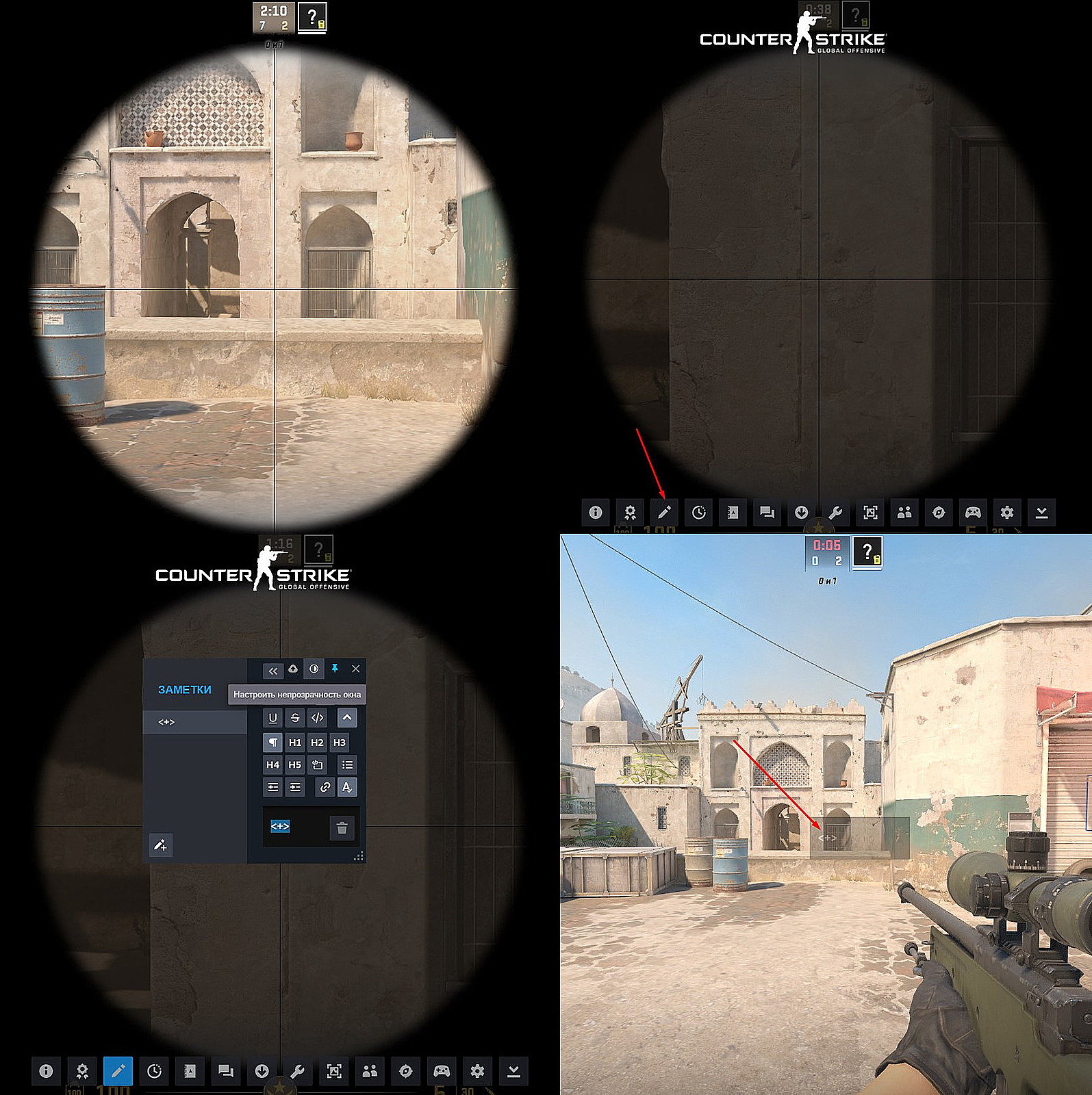
- Start CS2 and enter a practice session, then zoom in with your AWP to establish your center point
- Activate the Steam Overlay using the default Shift+Tab key combination
- Locate and select the notes feature, identifiable by the pencil icon in the bottom navigation menu
- Input a simple symbol that functions as your aiming reference—the plus sign (+) works effectively for most players
- Carefully resize the notes window to align your created symbol precisely with the scoped AWP crosshair center
- Secure the overlay element by pinning it to the top layer and reducing opacity to approximately 20% for minimal visual obstruction
- Close the overlay interface by selecting the X in the upper corner; your custom crosshair should remain visible during gameplay
Valve launches second wave of invites with access to CS2 beta in September
How to create AWP crosshair via console in CS2
Previous Counter-Strike iterations allowed players to exploit console command positioning bugs that created rectangular outlines on screen edges. Valve intentionally removed this functionality in CS2 to maintain gameplay integrity and prevent unintended advantages.
How to make thick crosshair lines in CS2
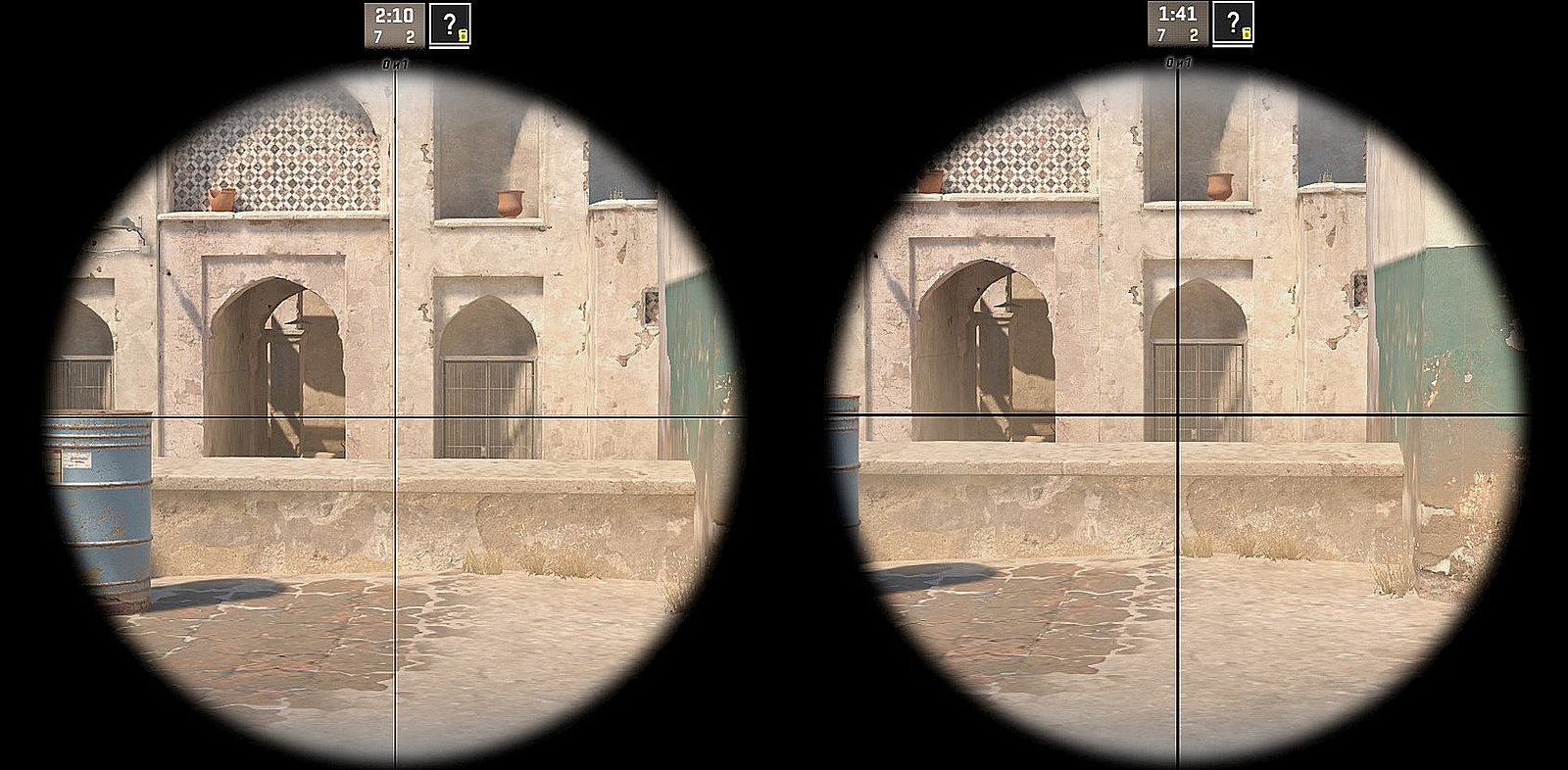
While you cannot create entirely new crosshair elements through console commands, you can significantly enhance the existing scoped crosshair’s visibility. The cl_crosshair_sniper_width X parameter allows precise control over your sniper crosshair thickness during aimed shots.
The default setting uses a value of 1, but competitive players often increase this to values between 3 and 5 for improved target acquisition. The command accepts any integer from 2 up to 500, though values above 10 typically create excessively thick lines that obscure precision aiming.
S1mple’s meme phrase goes viral on Juventus TikTok: 2.7 mln views in 2 days
The visual comparison below demonstrates the substantial improvement in visibility between the standard thin crosshair (left display) and the enhanced version using cl_crosshair_sniper_width 3 (right display). Notice how the thicker lines provide better reference points without significantly obstructing your target view.
Professional CS2 players develop sophisticated no-scope techniques that combine mechanical skill with strategic positioning. The most effective approach involves practicing flick shots and pre-aiming at common engagement angles where opponents might appear unexpectedly.
Advanced practitioners recommend spending at least 15-20 minutes daily in deathmatch modes specifically practicing AWP no-scope shots. This dedicated training builds the muscle memory needed to consistently land unscoped shots during high-pressure situations.
Common mistakes include over-reliance on the custom crosshair rather than developing genuine aiming skill, positioning the overlay element too prominently thus blocking critical visual information, and failing to adjust sensitivity settings to complement your no-scope aiming style.
How to play retake, surf/KZ, DM, and other community servers in CS2 beta. How to download and install custom map in CS2
Missed surfing in CS2 beta?
Action Checklist
- Practice AWP no-scope shots for 15 minutes daily in deathmatch modes
- Configure Steam overlay crosshair using plus symbol at 20% opacity
- Adjust sniper crosshair width to value 3-5 using console command
- Test crosshair positioning in offline practice before competitive matches
- Develop muscle memory by practicing flick shots at common engagement angles
No reproduction without permission:SeeYouSoon Game Club » How to make AWP no-scope crosshair in CS2. How use AWP crosshair in CS2 with console Master AWP no-scope aiming in CS2 with Steam overlay tricks and console commands