
TL;DR
- Layered Armor provides pure cosmetic customization without affecting your character’s stats or abilities
- Current sets are primarily available through Amiibo, Deluxe Edition, or paid DLC purchases
- The system covers your hunter, Palico, and Palamute with distinct visual options for each
- Equipping requires specific menu navigation through the Change Appearance option
- Strategic mixing of pieces creates unique looks while awaiting expanded free content
Discover how to apply cosmetic layered armor to transform your character’s appearance in Monster Hunter Rise on Nintendo Switch while maintaining optimal combat performance.
Monster Hunter Rise offers extensive armor crafting options for gameplay optimization, but fashion-conscious hunters often face difficult choices between statistical advantages and aesthetic preferences. Layered Armor elegantly resolves this dilemma by providing purely visual overlays that don’t impact your equipped armor’s defensive capabilities or skill bonuses. This cosmetic system allows complete visual customization while preserving your carefully constructed build’s effectiveness against formidable monsters.
As a purely aesthetic enhancement system, Layered Armor provides zero statistical benefits or combat advantages. Its sole purpose is to enable personal expression through visual customization while you retain the practical benefits of your underlying equipment. The system extends beyond your main character to include both Palico companions and Palamute mounts, ensuring your entire hunting party maintains cohesive visual themes.
Currently available Layered Armor options are primarily accessible through special editions, Amiibo functionality, or digital purchases. Understanding acquisition methods helps hunters prioritize which cosmetic investments align with their visual preferences and budget considerations.
- Sinister Seal Armor Set via Magnamalo Amiibo: This menacing Magnamalo-themed cosmetic ensemble features a streamlined silhouette compared to the bulkier functional Sinister Armor crafted from monster materials.
- Kamurai Armor Set through Deluxe Collector’s Edition or $15 Deluxe Kit DLC: Embrace the wandering warrior aesthetic with this ronin-inspired cosmetic collection that evokes classic samurai imagery.
- Fox Mask Armor Piece available as $1.49 paid DLC: This facial cosmetic piece draws inspiration from traditional Japanese kitsune representations in art and folklore.
- Theater Wig obtainable via $1.49 paid DLC: A sophisticated hairpiece designed for female characters that projects an air of nobility and refinement.
- Wyverian Earrings accessible as $1.49 paid DLC: This distinctive head cosmetic grants your hunter elongated Wyverian ears similar to characters like Hinoa and Minoto.
- Forest Cat from Pre-Order Bonus (currently unavailable): This cosmetic transformation makes your Palico companion appear more untamed and wilderness-adapted.
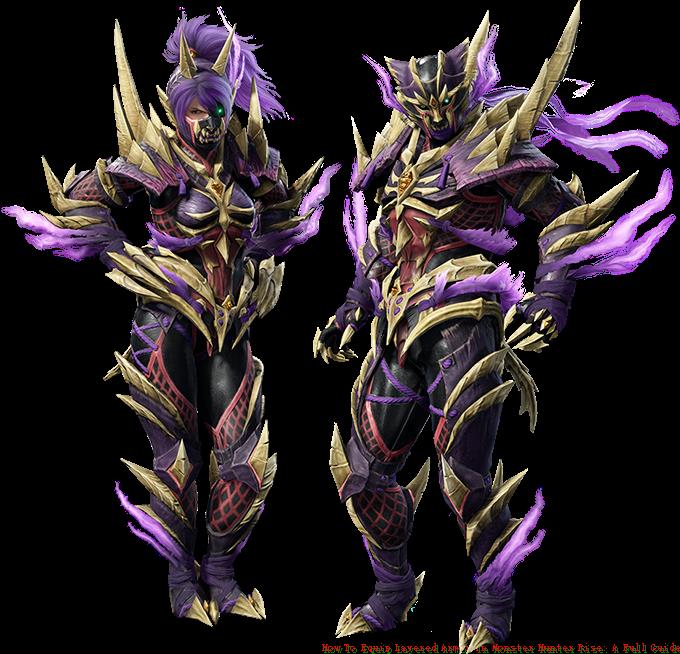
Sinister Seal Armor
Pro Tip: Monitor Capcom’s official communications for potential future Layered Armor releases, as the series historically expands cosmetic options through free title updates and event quests alongside paid DLC.
Applying Layered Armor requires specific menu navigation that differs from standard equipment management. Follow this systematic approach to ensure your cosmetic preferences display correctly during hunts and in hub areas.
Begin by accessing the main menu while in Kamura Village or any gathering hub location. Navigate to the ‘Equipment’ section, then select ‘Change Appearance’ rather than the standard ‘Change Equipment’ option. This distinction is crucial—using the wrong menu will only modify your functional gear rather than cosmetic overlays.
Within the Change Appearance interface, you’ll find separate tabs for your hunter, Palico, and Palamute. Select the appropriate character, then browse available Layered Armor pieces. The interface clearly indicates owned versus locked items, helping you plan future acquisitions.
Common Mistake: Many players mistakenly attempt to apply Layered Armor through the Change Equipment menu, resulting in frustration when visual changes don’t appear. Always use Change Appearance specifically for cosmetic modifications.
Beyond basic equipping, experienced hunters employ sophisticated Layered Armor techniques to maximize visual impact. Learning these advanced strategies enhances both your customization options and overall gaming experience.
Mix and match individual pieces from different sets to create unique combinations that reflect your personal style. The Fox Mask pairs exceptionally well with the Kamurai chest piece for a mystical ronin appearance, while the Wyverian Earrings complement nearly any armor style for subtle fantasy embellishment.
Budget-conscious hunters should prioritize the Deluxe Kit if considering multiple purchases, as it provides a complete armor set rather than individual pieces, offering better value per cosmetic dollar spent.
Future Content Insight: Based on Monster Hunter World’s expansion pattern, expect additional Layered Armor options through free updates, event quests, and collaboration content. These typically become available as you progress through high-rank quests and endgame content.
Companion Coordination: Don’t neglect your Palico and Palamute when planning cosmetic setups. Coordinated themes across your entire hunting party create visually striking presentations during multiplayer sessions. For comprehensive gameplay guidance, check out our Complete Guide to master all systems.
Action Checklist
- Access Equipment Box in Kamura Village or gathering hub
- Select ‘Change Appearance’ NOT ‘Change Equipment’
- Choose character type (Hunter, Palico, or Palamute)
- Browse owned Layered Armor pieces and preview combinations
- Apply selected pieces and confirm changes
- Test appearance in preview and during actual hunts
No reproduction without permission:SeeYouSoon Game Club » How To Equip Layered Armor In Monster Hunter Rise: A Full Guide Master Monster Hunter Rise Layered Armor: Complete cosmetic system guide with acquisition methods and pro tips