
TL;DR
- Complete the prologue to unlock multiplayer functionality in Rift Town
- Enable cross-play in Gameplay settings to connect across all supported platforms
- Use game codes for specific invites or adjust privacy settings for security
- Matchmaking terminals become portable after initial setup for on-the-go team formation
While Outriders delivers an exceptional solo campaign experience, the cooperative multiplayer component elevates gameplay to new heights when tackling challenging encounters with allies. The game’s design philosophy encourages both playstyles, allowing seamless transitions between solo and group content.
Outriders maintains broad platform accessibility across Xbox Series X|S, PlayStation 5, Xbox One, PlayStation 4, PC, and Google Stadia. More importantly, the game implements comprehensive cross-play functionality, enabling connections between friends regardless of their chosen gaming ecosystem. This eliminates platform segregation concerns, though activating this feature requires specific configuration steps that we’ll detail comprehensively.
Multiplayer engagement remains locked until players complete the introductory prologue sequence. This narrative segment concludes with your character’s transformation into a fully Altered being and class selection. Upon finishing this mission, you gain access to Rift Town, the first major social hub where cooperative play becomes available.
You maintain two primary options for team formation: hosting sessions where others join your world or entering existing games. Both approaches require interacting with the matchmaking terminal located in Rift Town’s garage or utilizing the Lobby interface options for “Join A Random Team” or “Play With Friends.” By default, the system restricts connections to your native platform ecosystem.
To activate cross-platform functionality, navigate to the Options menu and select the Gameplay tab. Scroll downward until locating the “Enable Crossplay” toggle and switch it from “Off” to “On.” This simple adjustment dramatically expands your potential teammate pool across all supported systems.
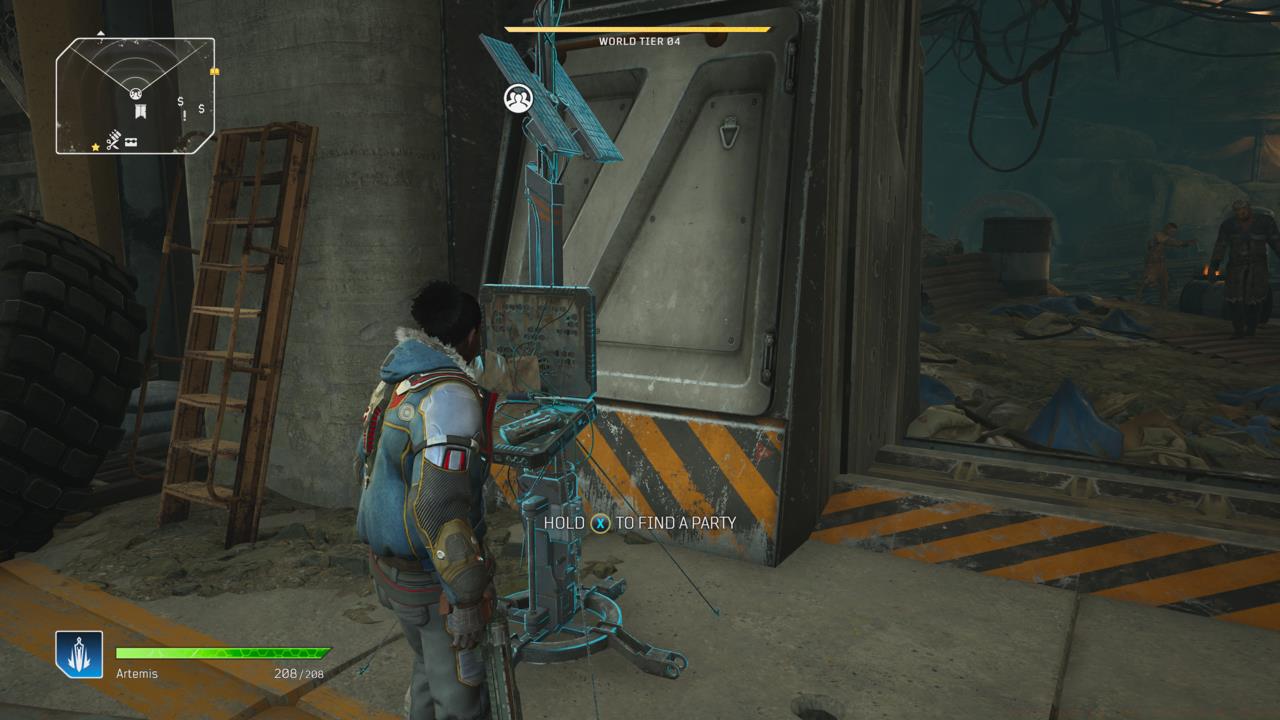
The matchmaking terminal is located in Rift Town’s garage, just past the hub’s assortment of venders.
Once cross-play activates, the matchmaking interface displays new options for “Generate Your Game Code” and “Join Using A Game Code” within the cross-play section. The former creates a unique identifier that friends on alternative platforms input to access your session, while the latter allows entry into others’ games using provided codes. This system functions similarly to squad management in our Class Guide for optimal team composition.
The Gameplay settings screen also houses your Default Game Privacy configuration. Initially set to “Open,” this permits any player utilizing the “Join A Random Team” function from either Rift Town’s terminal or the Lobby to enter your game spontaneously. For enhanced security and controlled access, adjust this to “Friends Only” or “Closed.” The former restricts entry to your platform-specific friend list without requiring invitations, while the latter mandates explicit invites for all participants.
Following the prologue completion, Outriders maintains full cross-play support throughout the entire campaign. You can experience the complete story solo, exclusively with teams, or blend both approaches dynamically. Additionally, you won’t remain tethered to Rift Town for matchmaking purposes—once you advance beyond the initial hub, the terminal becomes portable equipment that establishes itself at any campsite you and your squad occupy, much like the mobile arsenal systems discussed in our Weapons Unlock guide.
For optimal performance, ensure your network connection maintains stable latency below 150ms to prevent synchronization issues during intense combat scenarios. Consider coordinating class selections with teammates to create complementary ability synergies that maximize your squad’s combat effectiveness against Outriders’ challenging enemy encounters.
Many players overlook the importance of adjusting game privacy settings before engaging in matchmaking, resulting in unexpected joiners disrupting their gameplay flow. Establish your preferred privacy level during initial setup to maintain control over your gaming session. Additionally, regularly verify that cross-play remains enabled after game updates, as patches sometimes reset this configuration.
When experiencing connection difficulties, first attempt switching cross-play off and back on, then restart the game. This simple troubleshooting step resolves most matchmaking issues. For advanced coordination, establish communication protocols with your team regarding engagement strategies and loot distribution, similar to the tactical approaches outlined in our Complete Guide to squad-based gameplay.
Team composition significantly impacts mission success rates. Aim for balanced class distribution rather than multiple players selecting the same specialization. The Technomancer’s support capabilities pair exceptionally well with Devastator frontline tactics and Trickster mobility, creating versatile combat formations.
Action Checklist
- Complete the prologue mission to unlock multiplayer functionality
- Navigate to Rift Town garage and access the matchmaking terminal
- Enable cross-play in Gameplay settings menu
- Adjust default game privacy settings to preferred security level
- Generate game codes for cross-platform invites or input codes to join friends
No reproduction without permission:SeeYouSoon Game Club » How To Enable Outriders’ Cross-Play Multiplayer Master cross-platform multiplayer setup, privacy controls, and advanced matchmaking strategies in Outriders