
TL;DR
- Halo Infinite’s ranked Arena playlist is the only way to control input-based matchmaking
- Solo/Duos queue enables input selection while Open queue does not
- Complete 10 placement matches to establish your initial competitive ranking
- Input selection affects controller vs mouse/keyboard opponents, not platform cross-play
- Strategic queue selection impacts team composition and competitive fairness
While you cannot completely disable cross-platform matchmaking in Halo Infinite, you do have significant control over the input methods used by your opponents. This nuanced approach to competitive settings provides a middle ground between full platform segregation and unrestricted cross-play.
The multiplayer beta launch of Halo Infinite demonstrated exceptional stability, particularly impressive given its immediate implementation of comprehensive cross-play functionality. Players across Xbox One, Xbox Series X|S, and PC platforms can seamlessly join forces without any technical barriers, creating a unified gaming ecosystem where platform choice no longer restricts who you can team up with.
This cross-platform integration significantly expands the player population for matchmaking, eliminating the traditional silos that separated gaming communities based on hardware. However, competitive integrity concerns emerge from the inherent differences between control schemes. Mouse and keyboard users typically enjoy superior aiming precision and reaction speed compared to controller players, creating an uneven playing field. To counterbalance this, controller users receive aim assistance that helps bridge the responsiveness gap. Many veteran players argue that Halo’s core gameplay identity stems from its console heritage, making controller input feel more authentic. Regardless of perspective, the current system leaves some competitors feeling disadvantaged based on their preferred control method.
Unlike contemporary competitive titles like Battlefield 2042 or Call of Duty: Vanguard, Halo Infinite lacks a straightforward cross-play toggle in its current iteration. However, players seeking matches exclusively against opponents using identical input devices can access this functionality through the ranked gameplay system. Here’s your comprehensive guide to navigating the Ranked Arena playlist and optimizing your matchmaking preferences.
The Ranked Arena playlist provides the only current method to influence whether you encounter cross-play matchmaking or compete exclusively against players using your input type.
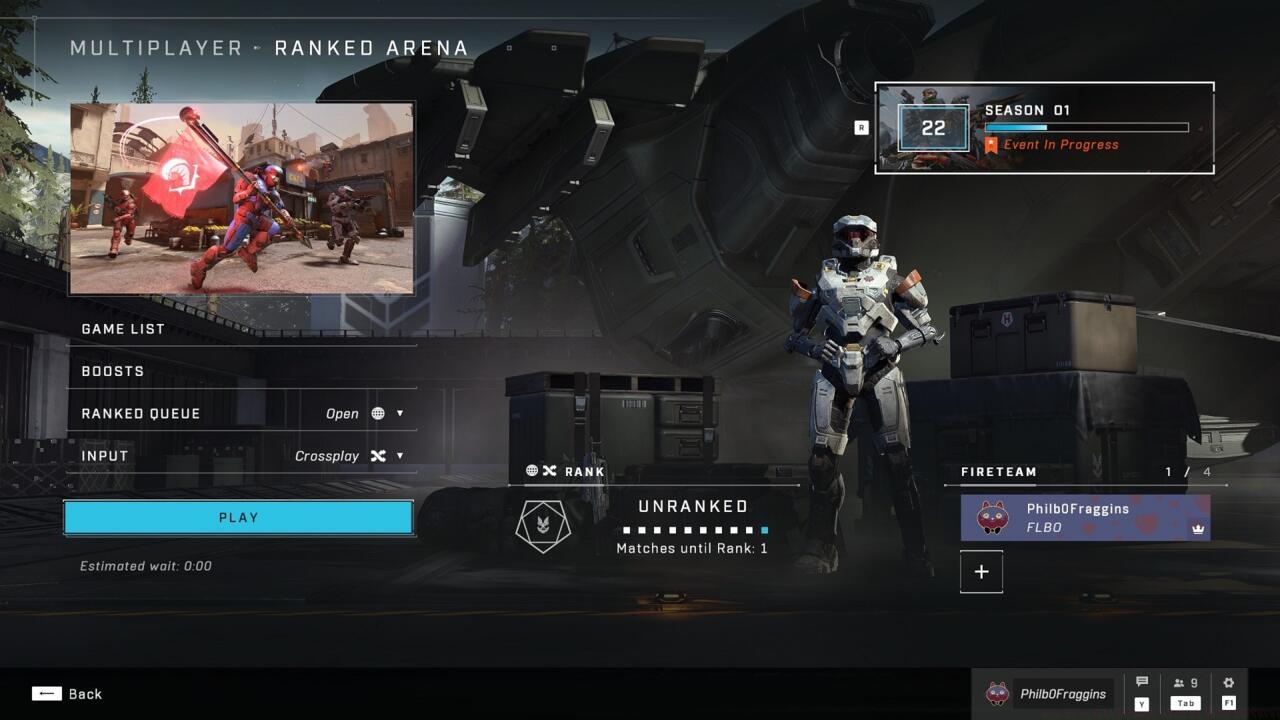
The Ranked Arena playlist provides the primary method for controlling your competitive matchmaking experience in Halo Infinite.
Current beta customization options remain limited, but the Ranked Arena playlist stands as the exception for determining your opponent pool. Located at the multiplayer menu’s bottom section, this competitive mode matches you against players of comparable skill levels. Before receiving your official ranking, you must complete 10 placement matches that assess your performance across various skill metrics.
Pro Tip: Approach your placement matches strategically rather than treating them as casual games. Your performance during these initial 10 games significantly impacts your starting rank, potentially saving you dozens of matches climbing from lower tiers. Consider warming up in social playlists before attempting placement matches to ensure peak performance.
Within the Ranked Arena environment, you select between the global Open queue or the more restricted Solo/Duos queue. The critical distinction lies in team structure management. Solo/Duos queue specifically caters to individual players or two-person squads, with matchmaking ensuring you encounter similarly unorganized opponents. This prevents the frustrating scenario where solo queue players face coordinated four-stack teams that typically dominate through superior communication and strategy. Conversely, the Open queue places no restrictions on team compositions, potentially matching you against fully organized squads regardless of your team size.
Common Mistake: Many players mistakenly believe input selection works in both queues. Remember that input-based matchmaking exclusively functions within the Solo/Duos queue, making it the mandatory choice for players seeking control over opponent input methods.
To modify the input methods used by your opponents, you must specifically select the Solo/Duos queue option.
The Input configuration menu represents the closest approximation to disabling cross-play currently available in Halo Infinite.
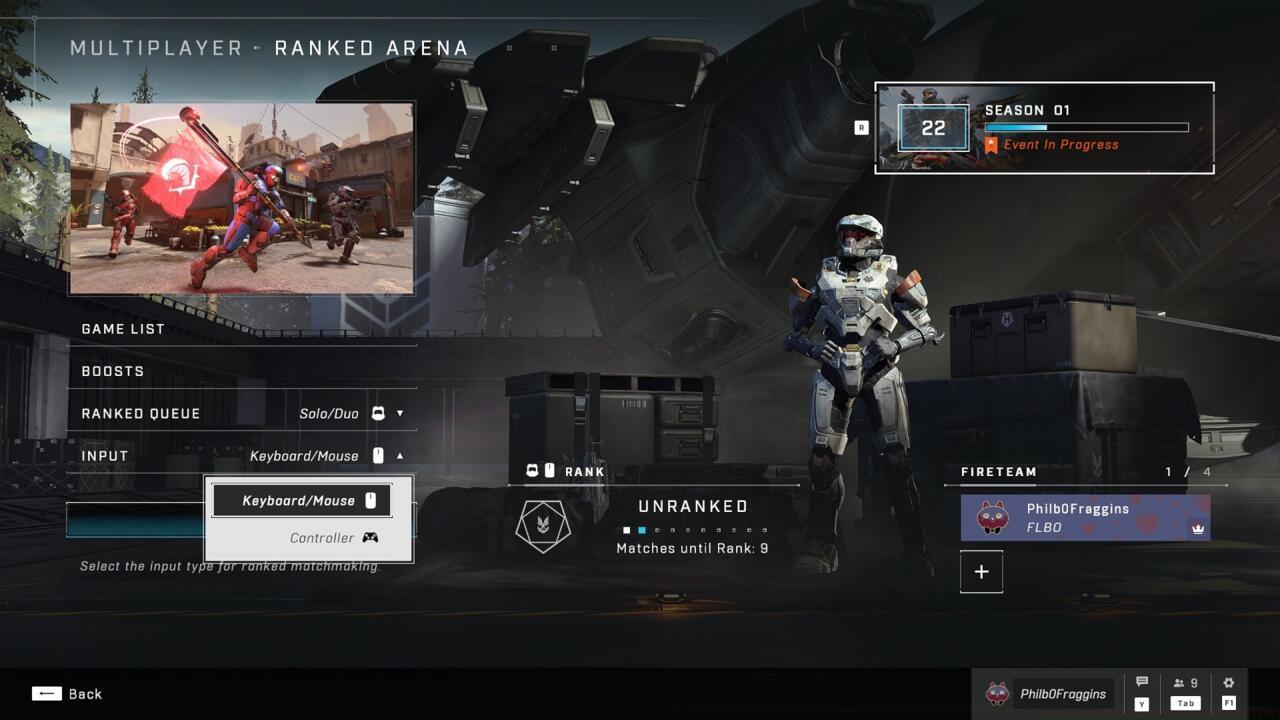
The Input selection interface provides the essential control mechanism for competitive matchmaking preferences.
After selecting Solos/Duos from the primary dropdown, an additional menu becomes accessible directly beneath it. This secondary interface allows you to specify the input type for all match participants—either mouse and keyboard or controller. Importantly, this configuration doesn’t disable cross-play functionality. You’ll still encounter players from PC, Xbox One, and Xbox Series X|S platforms. The critical distinction is that you’re determining whether these players utilize mouse or controller input, ensuring competitive parity regarding control schemes rather than hardware platforms.
Advanced Insight: Controller players typically perform better in close-quarters combat scenarios where aim assist provides significant advantages, while mouse and keyboard users excel in long-range precision engagements. Understanding these dynamics can help you select the optimal input environment for your playstyle. For comprehensive weapon strategies that complement your input choice, check out our BF6 Weapons Unlock Guide to maximize your effectiveness.
Your ranking determination directly correlates with your selected queue type and performance within that specific competitive environment. The matchmaking system evaluates your skill separately for each queue, meaning your Open queue rank remains independent from your Solo/Duos performance. This separation allows players to maintain different skill ratings based on their preferred playstyle and team composition preferences.
Action Checklist
- Navigate to Multiplayer menu and select Ranked Arena playlist at bottom
- Complete 10 placement matches to establish your initial competitive ranking
- Choose Solo/Duos queue for input-based matchmaking control
- Access secondary dropdown to select controller or mouse/keyboard matchmaking
- Select appropriate class loadout for your input method using our BF6 Class Selection Guide
No reproduction without permission:SeeYouSoon Game Club » How To Disable Cross-Play In Halo Infinite Master Halo Infinite's ranked matchmaking system and optimize your competitive experience with input-based matchmaking