
TL;DR
- Skate supports full cross-play across all platforms by default with automatic matchmaking
- Add cross-platform friends through Social & Spectate menu using EA usernames or IDs
- Cross-progression ensures seamless save data transfer between different gaming systems
- Friend requests must be accepted in the Requests tab to complete cross-platform connections
- Progress syncs instantly allowing flexible platform switching without data loss
Navigating EA’s Skate multiplayer ecosystem requires understanding its robust cross-platform infrastructure. The game’s architecture eliminates traditional platform barriers, creating unified player communities across console and PC environments.
After extensive development cycles, the Skate franchise revival delivers modern connectivity standards. Players explore San Vansterdam’s sandbox world with unprecedented freedom, performing tricks and social interactions across gaming ecosystems. The cross-platform implementation reflects contemporary gaming trends where player choice takes priority over hardware limitations.
Cross-play functionality activates automatically upon game launch, requiring no manual configuration. This design philosophy ensures immediate accessibility while maintaining competitive balance across input methods. Platform-specific matchmaking pools merge into unified player populations, significantly reducing queue times and enhancing community engagement.
Connecting with friends across different gaming platforms follows a streamlined EA account-based system. Unlike platform-native friend systems, Skate leverages Electronic Arts’ unified identity management for cross-platform socialization.
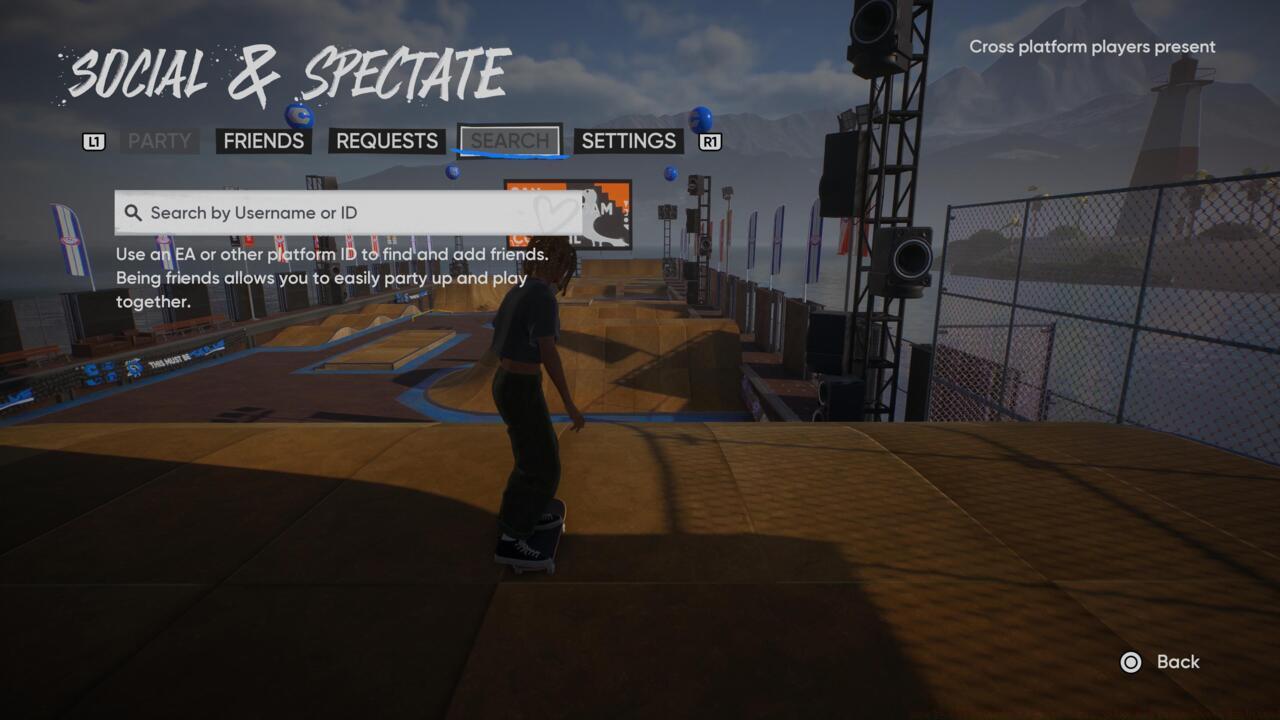
Access the Social & Spectate menu to initiate cross-platform friend connections and manage pending requests.
- Navigate to Social & Spectate in the main menu interface
- Input your friend’s EA username or unique identification code
- Select the correct profile and initiate Add EA Friend protocol
Friend invitation management occurs through dedicated interface tabs. Outbound requests display in Sent section while incoming connections populate Requests. This bidirectional system prevents connection errors and ensures mutual consent for cross-platform interactions.
Common setup mistakes include incorrect username formatting and privacy setting conflicts. Verify your friend’s exact EA account details before sending requests, as character case sensitivity and special symbols impact search accuracy. Platform-level privacy settings may block cross-platform invitations, requiring adjustment in system-level permissions.
Successful EA friend connections unlock persistent cross-platform sessions. The system maintains these relationships across gaming sessions, eliminating repetitive setup procedures for recurring playdates.
Skate’s cross-progression system employs cloud-based save synchronization across all supported platforms. This technology ensures your skateboarding journey progresses uniformly regardless of hardware transitions between gaming sessions.
The architecture automatically uploads progression data to secure EA servers following significant gameplay milestones. Manual saves trigger immediate synchronization while automatic checkpoints queue for periodic updates during low-network-usage periods.
Platform switching requires no additional configuration—simply log into your EA account on the target system. The game automatically detects existing profiles and prompts data restoration from cloud backups. This process typically completes within 30-60 seconds depending on internet connection stability.
Progression carries include unlocked gear, completed challenges, custom skatepark designs, and social connections. Cosmetic items and statistical achievements sync bidirectionally, allowing flexible play session distribution across available platforms without progression fragmentation.
Advanced users should monitor synchronization status in the game’s settings menu. Network interruptions may create temporary data conflicts, though the system automatically resolves most discrepancies through timestamp-based prioritization algorithms.
Action Checklist
- Verify EA account linkage with your gaming platform account
- Access Social & Spectate menu from main navigation
- Input friend’s exact EA username or ID for cross-platform search
- Monitor Requests tab for incoming friend invitations
- Test cross-progression by switching platforms and verifying save data
No reproduction without permission:SeeYouSoon Game Club » How To Add Friends In Skate – Crossplay And Cross-Saves Explained Master cross-platform multiplayer and seamless progression in EA's Skate reboot with practical setup guides