
TL;DR
- Access companions through Wardrobe menu’s dedicated companion tab
- Unlock new companions through critter feeding, Star Path events, and character quests
- Switch companions instantly without gameplay penalties or cooldowns
- Companions provide cosmetic enhancement but no mechanical advantages
- Strategic collection requires daily critter interactions and event participation
Disney Dreamlight Valley offers extensive customization options for your adventuring experience, including the ability to select various animal companions and Disney characters to accompany you throughout your journey. These companions serve as delightful visual enhancements that personalize your gameplay without affecting core mechanics.
The game’s charm lies in its rich Disney-themed content and nostalgic references, with companion selection representing one of its most engaging personalization features. These adorable followers provide constant company as you explore different biomes and complete various activities, creating memorable moments that enhance the overall experience.
You can acquire numerous companions through multiple methods: building trust with wildlife by offering their favorite foods, participating in limited-time Star Path seasonal events, or completing specific story missions involving iconic Disney supporting characters. The diverse acquisition methods ensure players have consistent goals to work toward throughout their gameplay.
Navigate to your character’s inventory interface and locate the Wardrobe customization section. Within this menu, identify the companion selection icon positioned prominently among the top-row options—this dedicated panel houses your entire collection of unlocked companions.
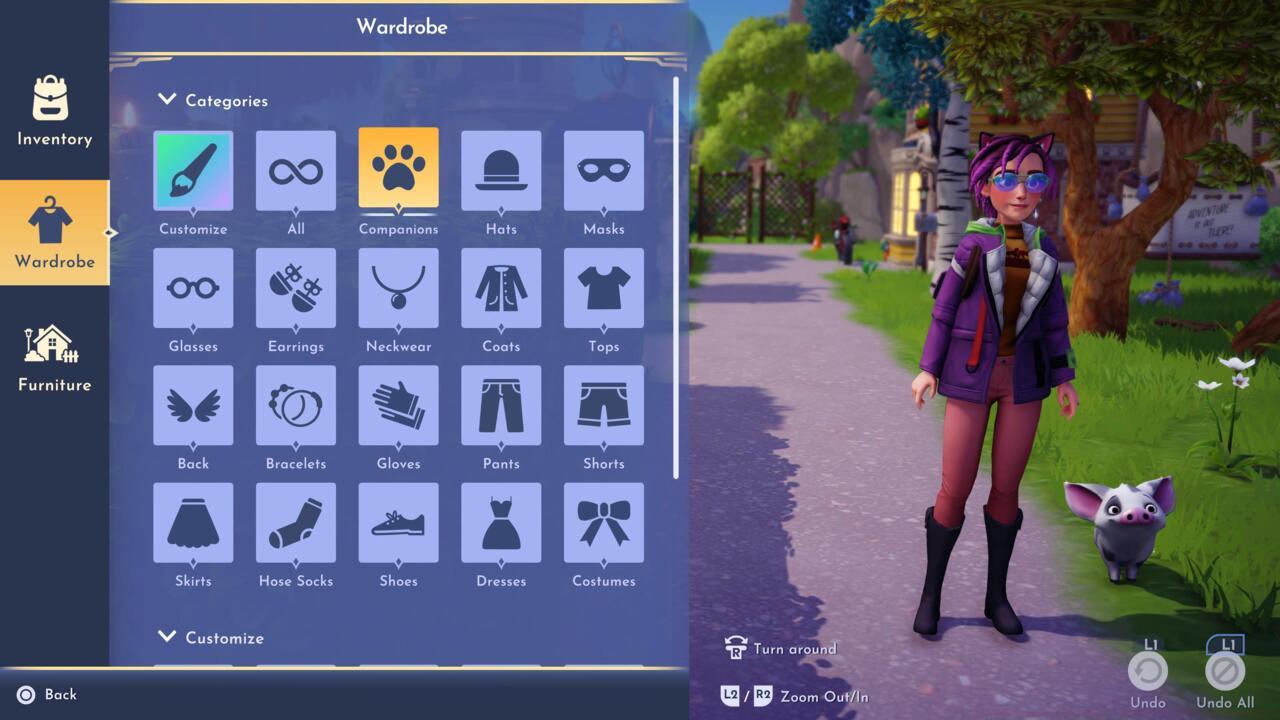
Click the Companions square to see all of your collection companions.
This comprehensive display shows every companion you’ve obtained through your Dreamlight Valley adventures, including purchased companions, earned critter friends, and special event rewards. Simply select your preferred companion from this organized gallery to immediately begin exploring with your new partner.
For optimal navigation efficiency, utilize controller shortcuts or keyboard hotkeys to quickly access the companion menu. Advanced players recommend setting favorite companions for rapid switching during different gameplay sessions or themed activities.
Maximize your companion collection by establishing daily routines for critter interactions—each animal type has specific preferred foods and optimal feeding times. Seasonal Star Path events typically introduce exclusive companions unavailable through other methods, making timely participation crucial for completionists.
Avoid common mistakes like neglecting daily critter feeding opportunities or missing limited-time event windows. Many players underestimate the time investment required for certain companion unlocks, particularly those tied to multi-stage character quests or rare critter appearances.
Companion selection directly influences your valley’s aesthetic but doesn’t provide gameplay advantages—choose based on personal preference rather than strategic considerations. For comprehensive gaming guidance beyond companion management, explore our Complete Guide covering broader gameplay mechanics.
Strategic players should prioritize companions that match their preferred valley themes or personal Disney favorites. The collection system encourages ongoing engagement through its variety of acquisition methods and visual customization options.
Action Checklist
- Access Wardrobe menu and navigate to companion tab
- Review your collected companions and select new follower
- Establish daily critter feeding routine for new unlocks
- Participate in active Star Path events for exclusive companions
- Complete character quests for story-based companion rewards
No reproduction without permission:SeeYouSoon Game Club » Disney Dreamlight Valley: How To Change Your Companion Master companion selection in Disney Dreamlight Valley with advanced collection strategies and customization tips