
TL;DR
- Access time settings through Settings > Graphics menu to find the Offset Time of Day slider
- Time changes are purely visual and don’t affect character schedules or gameplay mechanics
- Use time manipulation for optimal DreamSnaps photography and strategic valley decorating
- Always reset to (+0) position when finished to sync back with real-world time
- Experiment freely as changes are reversible and won’t impact quest progression
Disney Dreamlight Valley operates on a sophisticated real-time synchronization system that mirrors your local time zone. This creates an immersive experience where daytime and nighttime cycles correspond to reality, but it also presents challenges for players with limited gaming windows. The game’s time manipulation feature addresses this by offering visual customization without disrupting core gameplay elements.
The time adjustment system functions as a cosmetic overlay rather than an actual time warp. While you can transform your valley’s appearance from bright daylight to starry night instantly, the underlying game mechanics continue tracking real-world time. This means character routines, shop schedules, and time-sensitive activities remain anchored to your actual local clock.
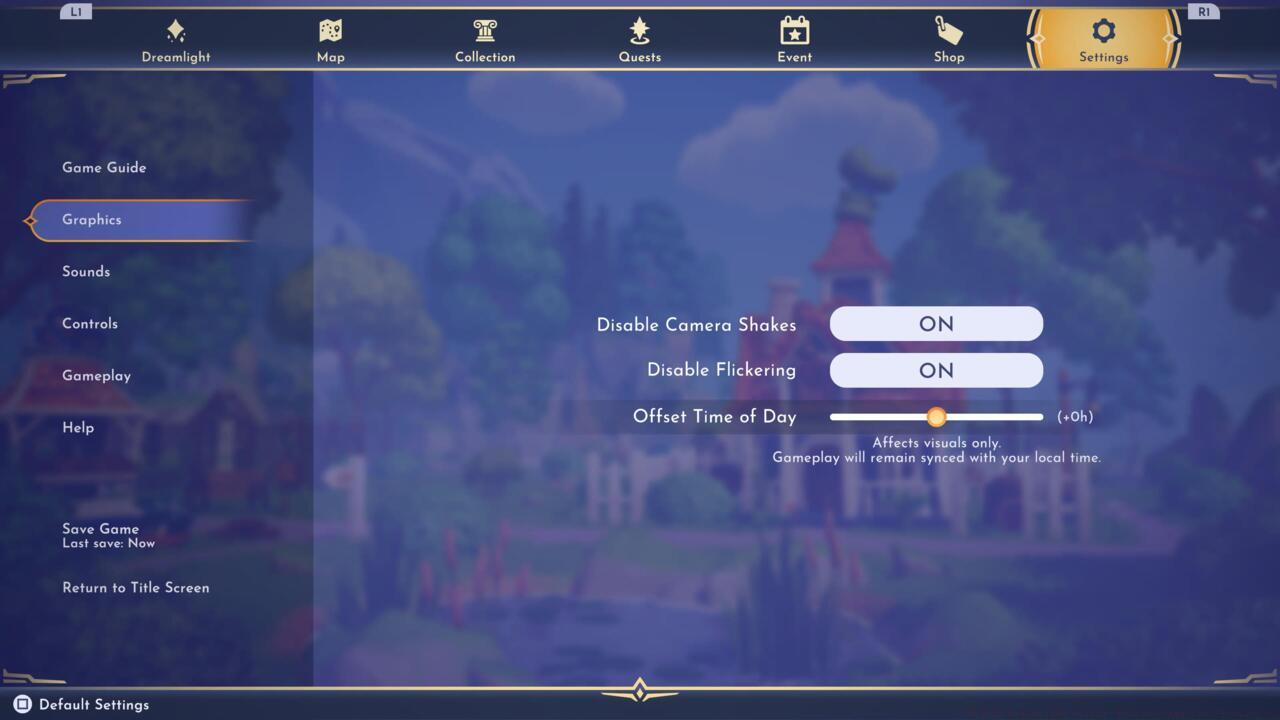
Visual time adjustments available through the graphics settings menu.
Many players mistakenly believe time changes affect character availability or quest progression. In reality, villagers maintain their standard sleep patterns based on actual time, so adjusting visual settings won’t make sleeping characters magically appear. Understanding this distinction helps manage expectations and prevents frustration when planning gameplay sessions.
Navigating to the time control settings requires precise menu traversal. Begin by accessing the main pause menu, then proceed to the Settings tab rather than Options or Help sections. Within Settings, scroll past audio and control configurations to locate the Graphics category, where the time adjustment slider resides.
The “Offset Time of Day” slider provides remarkable flexibility, allowing you to shift visual time representation up to twelve hours forward or backward from current reality. The central neutral position marked (+0) indicates synchronization with your actual local time. Moving the slider left creates earlier daylight conditions, while shifting right produces later evening appearances.
For optimal results, make incremental adjustments while observing the immediate visual changes in your valley. The transformation occurs seamlessly without loading screens, providing instant feedback on your adjustments. When completing your session, always return the slider to the (+0) position to restore normal time correlation.
A common mistake involves forgetting to reset the time offset, which can cause confusion during subsequent play sessions. Establish a habit of checking the slider position before starting major activities to ensure intended visual conditions.
DreamSnaps photography challenges benefit tremendously from strategic time manipulation. For spooky-themed submissions, setting the slider to maximum darkness enhances atmospheric shots, while cheerful themes demand bright midday lighting. Plan your photography sessions around these adjustable conditions rather than waiting for ideal natural lighting.
Valley decoration efficiency improves dramatically when you coordinate visual time with your creative vision. Nighttime decorating works best for illuminated items and magical elements, while daylight showcases vibrant colors and natural landscapes. Consider the specific area’s theme—forest regions might benefit from morning mist effects, while beach areas shine during golden hour simulations.
Advanced players should note that time changes don’t affect resource respawn rates or character interaction availability. This knowledge prevents wasted effort trying to manipulate gameplay through visual time adjustments. Instead, focus on the genuine advantages: perfect lighting for screenshots and consistent visual conditions for extended decorating sessions.
For comprehensive gameplay strategies beyond time management, explore our Complete Guide for expert tips and comprehensive walkthroughs.
Weapon customization and character development remain crucial elements in gaming mastery. Check out our Weapons Unlock guide and Class Guide for additional gaming expertise that complements your Dreamlight Valley knowledge.
Time manipulation serves as a powerful tool when understood and applied correctly. The reversible nature of changes encourages experimentation, allowing you to discover ideal visual conditions for various activities without permanent consequences.
Action Checklist
- Access main menu and navigate to Settings > Graphics to locate time slider
- Experiment with slider positions while observing immediate visual changes in your valley
- Utilize specific time settings for DreamSnaps photography based on theme requirements
- Coordinate decorating sessions with appropriate visual time conditions for optimal results
- Always reset slider to (+0) position after completing time-sensitive activities
No reproduction without permission:SeeYouSoon Game Club » Disney Dreamlight Valley: How To Change The Time Of Day Master time manipulation in Disney Dreamlight Valley with practical tips for optimal gameplay and photography