
TL;DR
- Access ship cargo via cockpit terminal near pilot’s seat for item transfers
- Install regular cargo for maximum capacity or shielded variants for contraband protection
- Balance cargo weight with ship performance – excessive mass reduces maneuverability
- Crimson Fleet vendors offer specialized shielded cargo modules for smuggling
- Multiple cargo modules can be combined but require strategic attachment planning
Effective cargo management represents one of the most critical systems in Starfield’s interstellar exploration gameplay. As you accumulate resources, weapons, and valuable artifacts across countless planets, your personal inventory quickly reaches capacity limits, making ship storage expansion essential for continued adventuring.
Cargo Terminal Location and Functions
The primary cargo interface is strategically positioned within your vessel’s cockpit area. This terminal, typically located adjacent to the pilot’s control station, serves as the central hub for all inventory management operations between your character and the spacecraft.
- Locate the cargo terminal beside the pilot’s seat and interact using the X button to initiate item transfers from personal inventory to ship storage compartments.
- When engaging with merchants and traders, utilize the LB button to directly access and sell commodities stored within your ship’s inventory without manual retrieval.
- Critical security consideration: Contraband items require specialized shielded cargo containers to avoid automatic detection during security scans. Unprotected illegal goods will trigger immediate alerts at controlled spaceports and orbital stations.
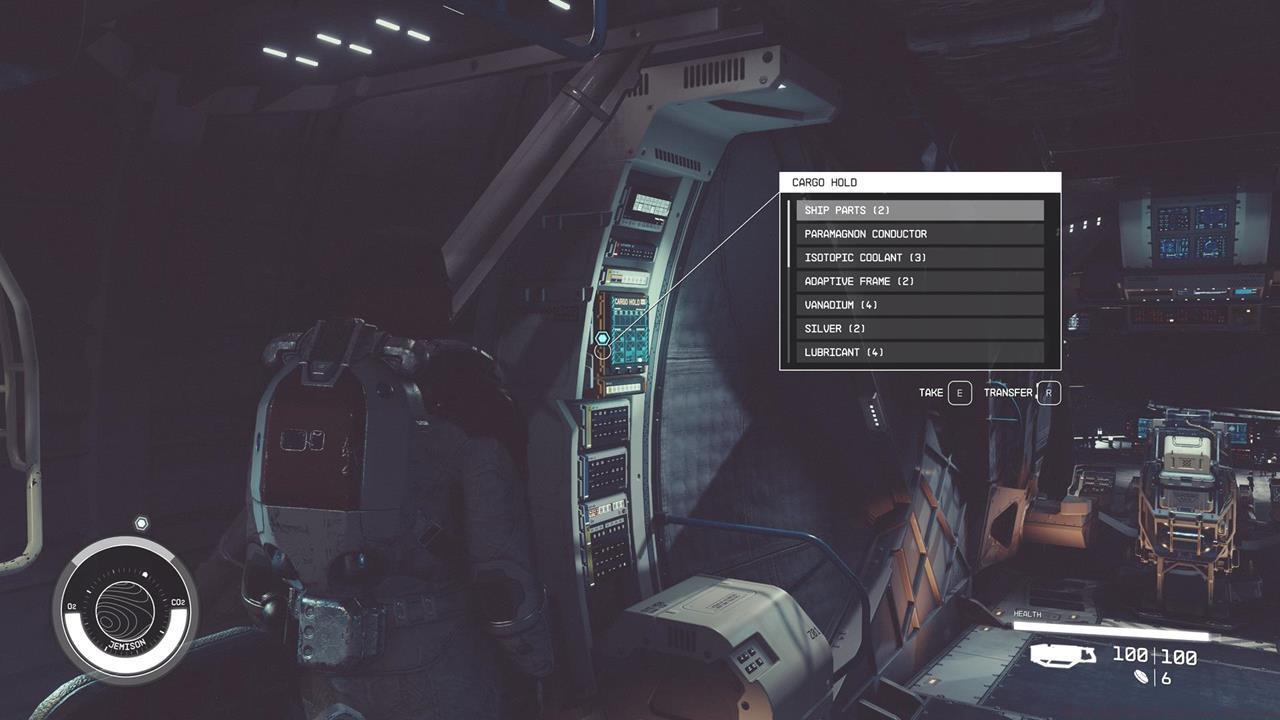
For the vast majority of ships in the game, the cargo hold terminal is near the pilot’s seat in the cockpit.
Expanding your vessel’s storage capacity requires strategic engagement with ship services technicians found at major spaceports and orbital stations. These specialists provide access to the Ship Builder interface where you can purchase and install various cargo module configurations to suit your specific gameplay needs.
Regular vs Shielded Cargo Comparison
Cargo modules available through ship technicians come in two primary classifications with distinct advantages and specialized applications:
- Standard cargo containers – Offer superior storage capacity per credit spent and represent the most cost-effective solution for general hauling requirements.
- Shielded cargo units – Provide reduced physical storage space but incorporate advanced scanning countermeasures to conceal contraband from security inspections.
Notably, certain premium spacecraft like the legendary Mantis vessel come pre-equipped with shielded cargo capabilities by default. Players seeking additional specialized smuggling equipment may need to establish connections with the Crimson Fleet faction to access their exclusive vendor networks.


Left: Shielded cargo holds have a lower capacity, but they help you avoid contraband detection; Right: Regular cargo holds have a higher capacity, and is perfect if you just want to haul a ton of items.
While Starfield imposes no technical limit on the number of cargo modules installed, strategic considerations must guide your expansion decisions to maintain optimal spacecraft performance across various operational scenarios.
Strategic Installation Considerations
Successful cargo system implementation requires understanding several critical technical and performance factors that influence your vessel’s capabilities:
- Basic cargo modules require no Piloting skill investment, though advanced high-capacity variants demand increased Starship Design proficiency for installation authorization.
- Attachment mechanics utilize “snap” connection points (visible as circular interface icons) that must align with compatible attachment surfaces on habitation modules or structural components.
- Contraband detection probability calculations incorporate both the quantity of shielded storage and the total mass of illegal goods being transported.
- Mass management awareness: Cargo containers represent the heaviest category of ship components. Excessive accumulation significantly increases overall vessel mass, directly impacting grav jump range, acceleration rates, and tactical maneuverability during space combat encounters.
Now that you’ve mastered cargo expansion techniques, consider complementing your vessel’s capabilities by exploring crew capacity enhancement strategies. For comprehensive guidance on optimizing all aspects of your Starfield experience, including advanced weapons systems and strategic class specializations, our complete resource library offers extensive tactical documentation.
Action Checklist
- Locate cargo terminal adjacent to pilot’s seat and practice transfer mechanics
- Visit ship services technician at major spaceport to access Ship Builder interface
- Assess cargo needs: regular modules for maximum capacity or shielded for contraband
- Plan module placement using snap points on compatible habitation units
- Balance cargo mass with ship performance metrics to maintain combat effectiveness
No reproduction without permission:SeeYouSoon Game Club » Starfield – How To Increase Ship Cargo Master ship cargo management in Starfield with expert strategies for storage expansion and contraband smuggling