
Master The Alters’ scanner system with advanced techniques, strategic probe placement, and optimization tips for efficient resource discovery.
Understanding the Scanner’s Role in Resource Acquisition
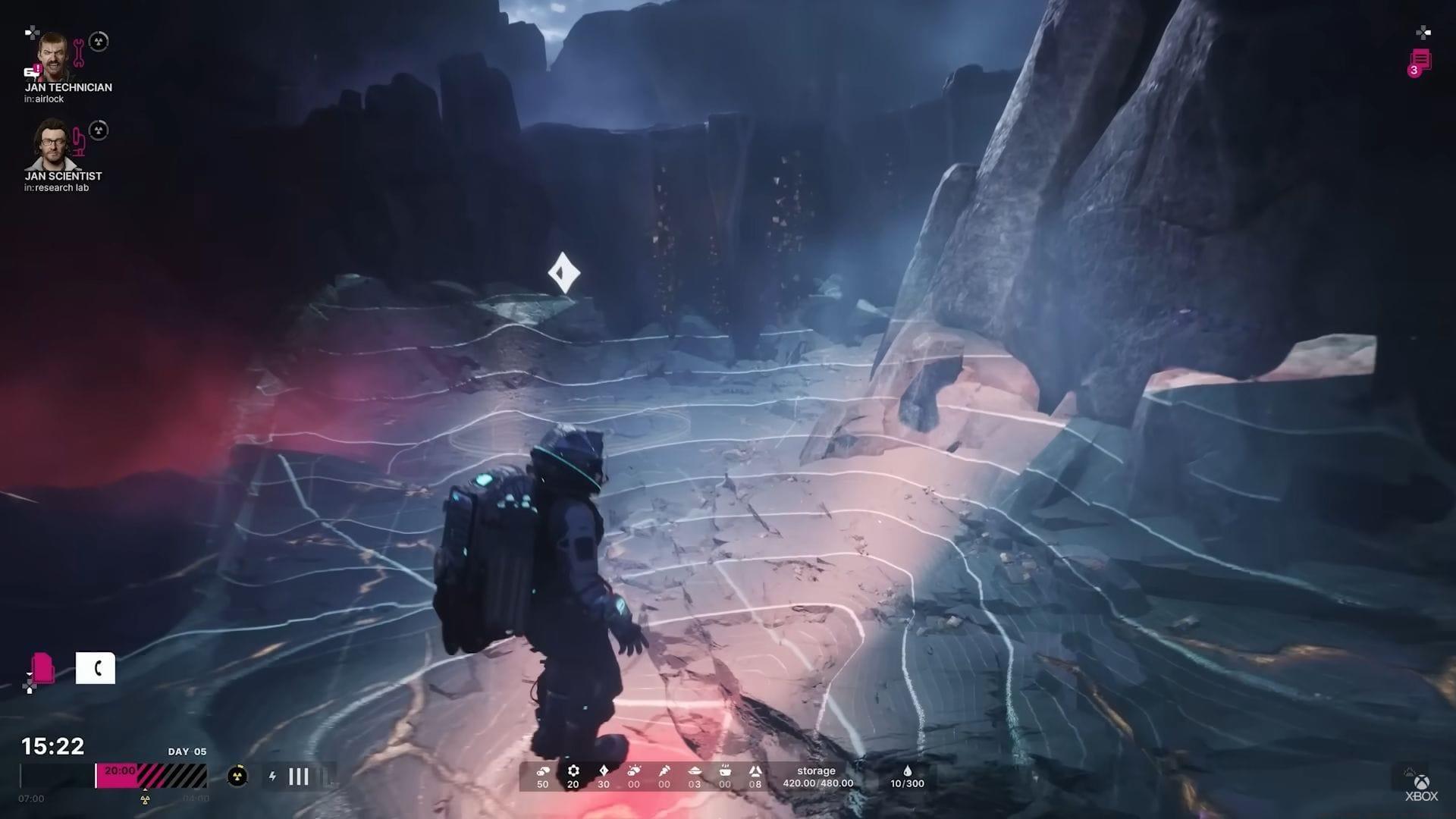
The scanner in The Alters is not merely a detector; it’s a precision targeting system essential for sustainable expansion. Simply locating a zone rich in metals, organic matter, or other vital resources is only the first step. To establish a functional outpost that efficiently harvests these materials, you must pinpoint the concentrated epicenter of the deposit. This guide will transform you from a hopeful prospector into a methodical surveyor.
Why Pinpoint Accuracy Matters: Outposts placed over the true resource center yield significantly higher and more consistent extraction rates. Placing one even a short distance away can result in depleted veins and the costly need to relocate your operation. Think of the scanner as your geologist’s tool, mapping the subterranean density to find the sweet spot.
Scanner Activation and Basic Probe Mechanics
When you’ve visually identified a potential deposit area, engage your tool wheel (LB on controller, Q on keyboard) and select the Scanner. Your first critical task is probe deployment. These devices must be planted into the terrain to form a closed geometric scan zone.
Probe Placement Fundamentals: The system requires a minimum of three probes to create a valid scan area, typically forming a triangle. You can expand this shape with up to six probes total for a larger initial sweep. A common mistake is placing probes too far apart on uneven ground, which can create a distorted scan zone that misses the target depth. For your first attempts, start with a tight, equilateral triangle formation on relatively flat ground to get a clear reading.
Remember, the scanner will not activate unless the probes connect to form a complete, closed shape. The game provides subtle visual feedback—a faint energy line connecting the probes—to confirm the zone is sealed.
Interpreting Scan Results and Advanced Techniques
Once activated, the scanner generates a real-time underground map displayed on your interface. A network of lines will overlay the scanned area. Interpreting the colors is key: White or pale blue lines indicate low resource density—you are in the periphery. As you move your probe formation closer to the concentrated source, these lines will intensify to a deep, vibrant red.
Using the Directional Pulse: If you’re disoriented and the scan results are unclear, use your suit’s directional pulse by holding X. This emits a sonar-like wave that highlights the general direction of higher density. Strategic Tip: Use this function sparingly, as it consumes a significant portion of your suit power. It’s best used when you have a large scan zone with uniformly white lines, indicating you need to relocate your entire probe set.
Probe Management Strategies: You carry a limited number of probes. To reclaim them, hold Y (or right-click on PC). An advanced tactic is to leave a single probe at the edge of your last scan as a marker, collecting the others to form a new, adjacent shape. This creates a breadcrumb trail of your search pattern.
The system smartly handles overlapping scans. If your new probe formation intersects a previously scanned area, only the new, unexplored sector is analyzed. This prevents redundant data collection and saves time.
Strategic Scanning and Optimization
Efficient Scanning Patterns: Don’t just place probes randomly. For large deposit fields, use a systematic approach. The “leapfrog” method is highly effective: Scan a zone, then place your next triangle so one side overlaps with the previous scan’s hottest (reddest) edge. This methodically funnels you toward the center.
Common Pitfalls to Avoid:
- Ignoring Terrain: Placing probes on steep cliffs or impassable rocks can make it impossible to reach the center marker even if you find it.
- Wasting the Pulse: Using the directional pulse before analyzing the initial scan colors is a frequent rookie error. Always read the map first.
- Running Out of Probes: Forgetting to collect probes before moving far away strands them. Develop a routine: collect, move, redeploy.
Optimization Tips for Advanced Players:
- If you have a squad, coordinate! One Alter can collect probes from a concluded scan while another deploys the next set.
- Scan during periods of high planetary activity (if applicable in your game phase) as some lore suggests deeper deposits may be easier to detect.
- Before committing to an outpost, use a final, very small triangle scan directly on the marked center. If it returns instantly solid red, your precision is perfect.
Also read: How to get all endings in The Alters
Success Confirmation and Outpost Establishment
Your perseverance pays off when the scanner interface flashes a distinct droplet icon and a large, persistent holographic symbol is projected onto the landscape. This is the game’s definitive signal that you have locked onto the resource nucleus.
At this moment, two things happen automatically: all deployed probes in the vicinity are retrieved and returned to your inventory, and the outpost placement interface engages. You are now ready to build your extraction operation at the most optimal location possible.
Mastering the scanner turns a chaotic search into a predictable science. By applying these techniques—methodical probe placement, strategic pulse use, and pattern-based searching—you’ll secure resources faster and build a more robust network of outposts across the alien landscape.
Check out more articles on the game below:
- How to make food for your crew in The Alters
- The Alters trophy list: All achievements and how to unlock
- Where to mine minerals in The Alters
- Is The Alters a co-op title?
No reproduction without permission:SeeYouSoon Game Club » How to use Scanner in The Alters Master The Alters' scanner system with advanced techniques, strategic probe placement, and optimization tips for efficient resource discovery.