
Master Death Stranding 2 save mechanics with comprehensive quick save, manual save, and load strategies for optimal progress control
Understanding Death Stranding 2’s Save System Fundamentals
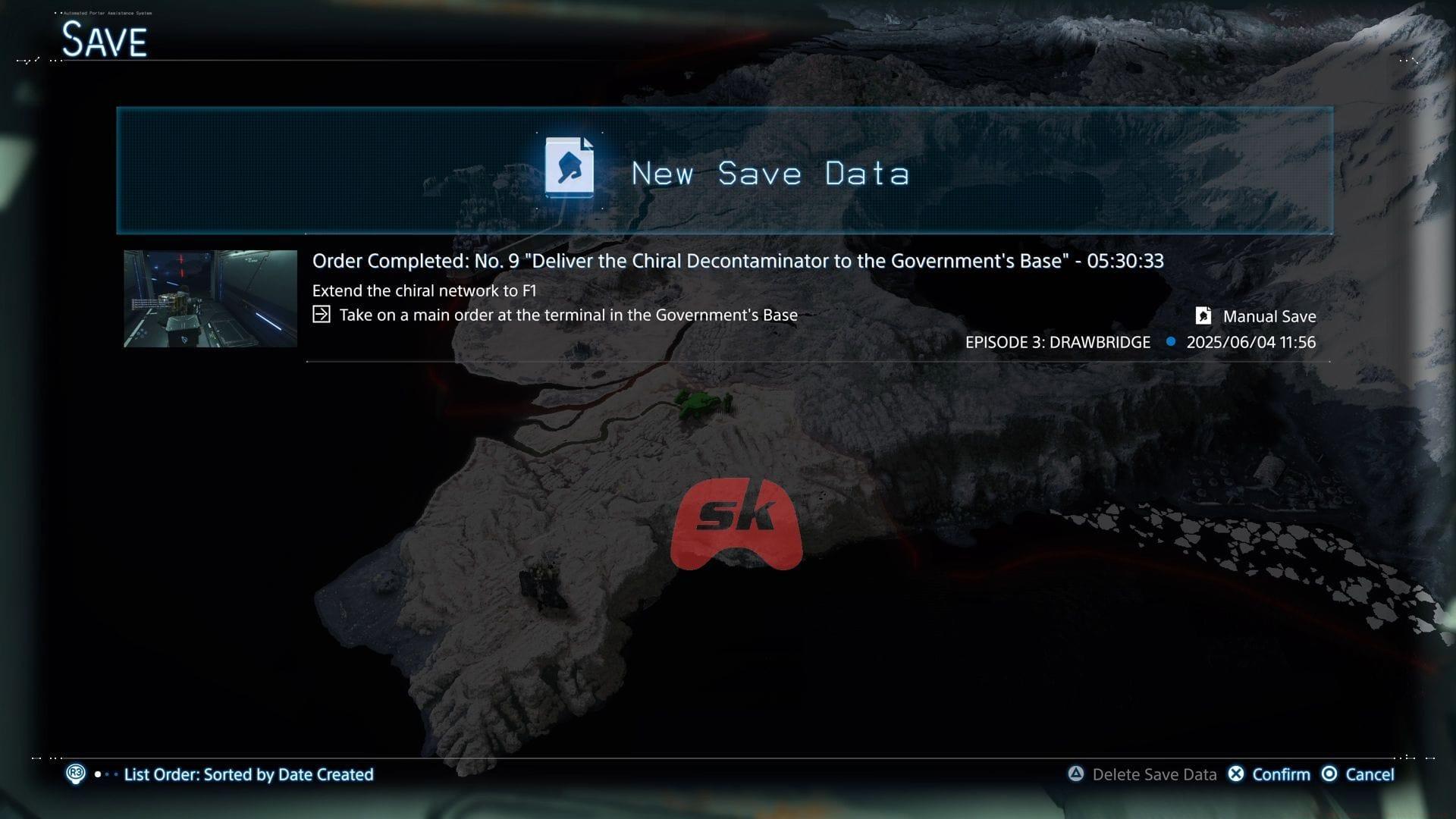
Mastering Death Stranding 2’s save mechanics provides critical control over your progression journey. While the game automatically preserves your progress during significant story milestones, relying solely on autosave leaves you vulnerable during high-risk situations. The autosave triggers at predetermined checkpoints, but these may not align with your immediate needs when facing unpredictable threats like BTs (Beached Things), navigating hostile territories, or attempting challenging deliveries.
Experienced players quickly learn that proactive save management separates successful porters from those facing frustrating setbacks. The game’s save system offers two distinct approaches: rapid quick saves for immediate protection and comprehensive manual saves for long-term strategy. Understanding when to deploy each method forms the foundation of effective progress security in Kojima’s expansive world.
Quick Save: Your Emergency Progress Protection
Quick saving represents your fastest defense against unexpected gameplay setbacks. This streamlined process requires just three controller inputs for instant progress protection. Initiate by pressing the Options button to activate the Ring Terminal interface. Immediately follow by tapping the left directional pad arrow to unveil the Ring Menu. Scan to the interface’s bottom-right quadrant where the Quick Save icon awaits activation.
Finalize the sequence by pressing Triangle to execute the save command. Your current game state secures within seconds, making this ideal for last-minute protection before uncertain encounters. Strategic quick save deployment proves invaluable when ominous BT detection alerts sound, when approaching MULE camps, or before attempting complex terrain navigation that could result in cargo damage or Sam’s demise.
Also read: All Death Stranding 2 difficulty levels, explained
Manual Saves: Strategic Save File Management
For players prioritizing absolute control and experimentation opportunities, manual saves deliver comprehensive progress management. Navigate to the Ring Menu and descend to the System category, then choose the Save function. The interface presents a crucial decision point: overwrite existing data or generate fresh preservation files. Selecting New Save Data establishes distinct progression snapshots, enabling branching narrative exploration and consequence-free experimentation.
Death Stranding 2 generously provides 25 manual save slots, facilitating extensive strategic archiving. This capacity allows methodical players to maintain pre-boss encounter backups, preserve decision points before story-altering choices, and catalog various gameplay approaches. Consider establishing save file naming conventions or rotational systems to track significant milestones, ensuring you can revisit pivotal moments without sacrificing current progression.
Loading Game Progress: Two Approaches Explained
When revisiting preserved game states, return to the Ring Menu’s System section where two distinct loading methods await. Load Latest Save Data instantly retrieves your most recent preservation point, perfect for quick recovery after unexpected failures or accidental missteps. This streamlined approach minimizes downtime when you simply need to revert recent actions without complex file navigation.
The alternative Load function unveils your complete save library, enabling precise selection from up to 25 archived game states. This method proves invaluable when testing alternate narrative paths, reattempting challenging sequences with different strategies, or comparing outcomes from previous decision points. Advanced players frequently maintain multiple timeline branches using this selective loading capability, effectively experiencing the game’s narrative possibilities without permanent commitment to single choices.
Advanced Save Strategy and Common Pitfalls
Seasoned Death Stranding 2 porters develop sophisticated save rotation habits to maximize their 25-file capacity. Establish a three-tier system: maintain several recent quick saves for immediate backtracking, preserve strategic manual saves before major story events, and archive milestone completions for nostalgic revisits. Avoid the common mistake of overwriting all files sequentially, which eliminates your safety net for earlier game sections.
Critical save opportunities include pre-BT territory entry, before boss engagements, after significant delivery completions, and when carrying rare or fragile cargo. Additionally, save before attempting complex structures like bridges or zip-line networks that require substantial resource investment. Remember that while quick saves offer convenience, manual saves provide superior long-term security—balance both approaches based on your immediate needs and risk assessment.
Check out: All Death Stranding 2 settings explored
No reproduction without permission:SeeYouSoon Game Club » How to save game in Death Stranding 2 Master Death Stranding 2 save mechanics with comprehensive quick save, manual save, and load strategies for optimal progress control