
TL;DR
- Craft banners using 6 colored wool blocks and 1 stick in specific crafting table arrangement
- Collect wool efficiently by shearing sheep with shears rather than killing them for renewable supply
- Apply complex patterns using looms and dyes to create unique designs for bases and landmarks
- Use banners as territorial markers in multiplayer servers and for decorative building accents
- Understand edition differences – Bedrock allows bleaching while Java requires strategic color planning
Banners serve multiple strategic purposes throughout your Minecraft adventures, from marking territory to decorating structures, but mastering their creation unlocks their full potential. These customizable items become essential tools for organized gameplay and creative expression.
Among the most versatile decorative elements available, banners offer extensive personalization through color combinations and pattern overlays. They also function as key components in specialized recipes, making banner proficiency valuable for advancing players. Understanding the complete crafting methodology provides significant gameplay advantages.
The fundamental banner recipe requires just two primary components, though wool color selection determines your banner’s base appearance. Since the recipe demands multiple wool units, resource management becomes crucial for large-scale banner production. The complete crafting sequence follows this pattern:
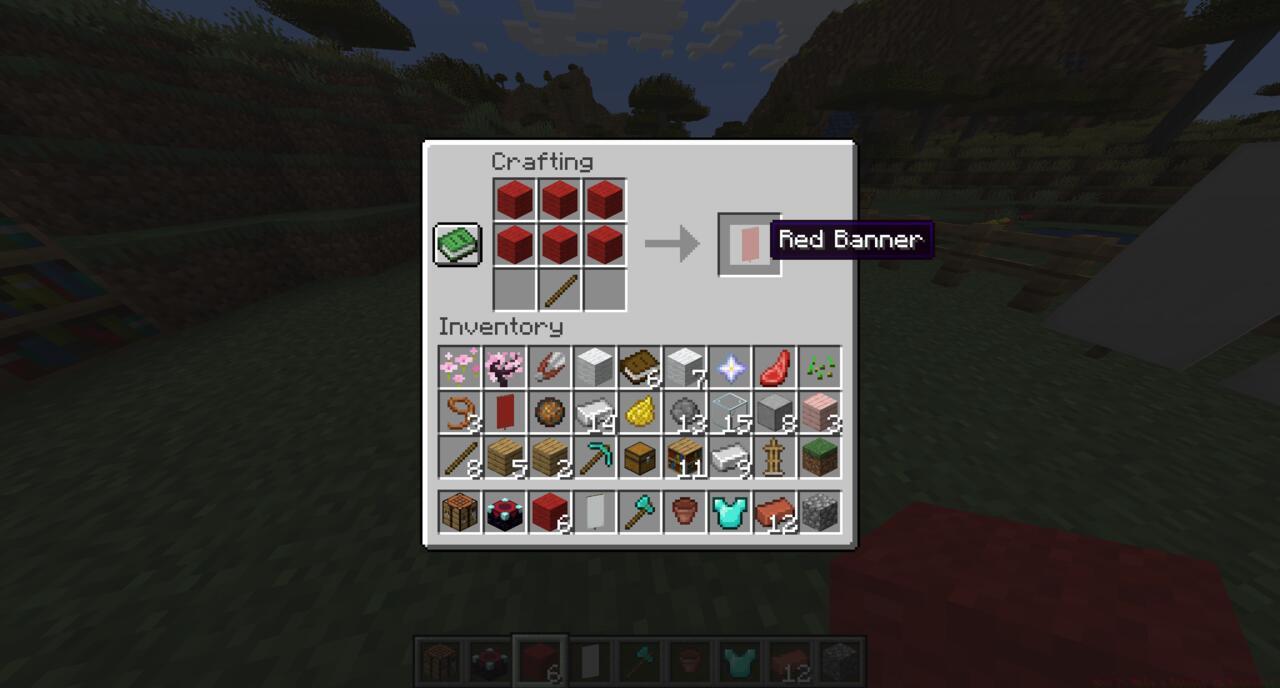
The crafting recipe for a banner in Minecraft
Acquiring sufficient wool blocks presents the most significant initial challenge for banner creation. For optimal efficiency, use shears to harvest wool from sheep rather than killing them, ensuring renewable resource access. Then apply dyes to transform white wool into your desired colors. Our comprehensive Complete Guide covers resource management strategies that apply directly to Minecraft material collection. With dyes prepared, use your crafting table to color wool blocks before assembling them into banners.
Beyond basic colored banners, Minecraft offers sophisticated pattern application through loom blocks. By combining banners with various dyes in specific arrangements, you can create intricate designs including stripes, gradients, symbols, and custom emblems. Pattern complexity increases with each additional layer, allowing for highly personalized creations.
The loom interface provides visual previews of potential patterns, enabling experimentation before committing resources. This tool dramatically simplifies the banner customization process compared to manual pattern coding. Advanced players often develop signature banner designs for faction identification or personal branding across their builds.
For players seeking to completely reset their banner’s appearance, Bedrock Edition offers bleaching functionality. Applying bleach at a crafting table reverts any banner to plain white while simultaneously removing all applied patterns. This feature proves invaluable when repurposing banners or correcting design mistakes. However, Java Edition users must plan color schemes carefully since bleaching remains unavailable in that version.
Strategic banner placement enhances both practicality and aesthetics. Use them as navigation markers in complex cave systems, territory demarcation in multiplayer servers, or decorative accents for building exteriors and interiors. Like mastering Weapons Unlock systems in other games, understanding banner mechanics provides competitive advantages in organized Minecraft gameplay.
Experienced Minecraft players integrate banners into sophisticated base organization systems. Create color-coded banners to mark different facility types – red for dangerous areas, green for farms, blue for storage rooms. This visual system streamlines navigation and enhances multiplayer coordination efficiency.
Avoid common beginner mistakes like using expensive dyes for basic banners or placing banners where mobs can destroy them. Instead, establish a wool farm early game and reserve rare dyes for special projects. Always carry spare banners during exploration to mark traversal routes and important locations.
For maximum resource efficiency, breed sheep in dedicated pens with various color specializations. This approach ensures consistent wool supply without constant exploration. Remember that banner patterns can be copied using another banner and the loom, saving valuable dye resources when creating matching sets for teams or builds.
Banner integration with other game mechanics unlocks additional functionality. They can shield patterns on shields, decorate maps when placed in item frames, and serve as waypoints in conjunction with lodestones. Similar to strategic considerations in Class Guide selections, strategic banner deployment significantly enhances overall gameplay effectiveness and organizational capabilities.
Action Checklist
- Establish sheep farm with shears for renewable wool supply
- Craft basic banner using 6 wool + 1 stick in crafting table
- Create loom and experiment with pattern layers using various dyes
- Develop color-coded banner system for base organization
- Apply strategic banner placement for navigation and territory marking
No reproduction without permission:SeeYouSoon Game Club » How To Make A Banner In Minecraft Master Minecraft banner crafting with expert techniques for customization, patterns, and strategic uses