
TL;DR
- HLTV provides remote Pick’Em access when you can’t launch CS2 directly
- Viewer Pass activation must be completed in-game before using remote methods
- The Pick’Em button is located above team lists on HLTV tournament pages
- Editing picks requires using the hidden trash bin icon, not drag-and-drop
- Success requires five correct predictions across tournament stages
Games and Esports Articles CS 2
Valve introduced the PGL Major Copenhagen 2024 Viewer Pass featuring the classic Pick’Em prediction system within CS2. A significant limitation exists since predictions can typically only be submitted through the game client itself. However, experienced players have discovered an effective workaround solution.
Many competitive gaming enthusiasts face situations where their primary gaming systems are unavailable when they need to submit Copenhagen Major predictions. While Steam doesn’t offer direct remote Pick’Em functionality, the HLTV platform provides this capability. Critical reminder: your Viewer Pass requires initial activation inside CS2, which cannot be accomplished through external methods. Here’s your comprehensive approach:
- Navigate to the tournament section on HLTV: Opening Stage, Elimination Stage. (Note: the second tournament phase currently lacks active Pick’Em functionality)
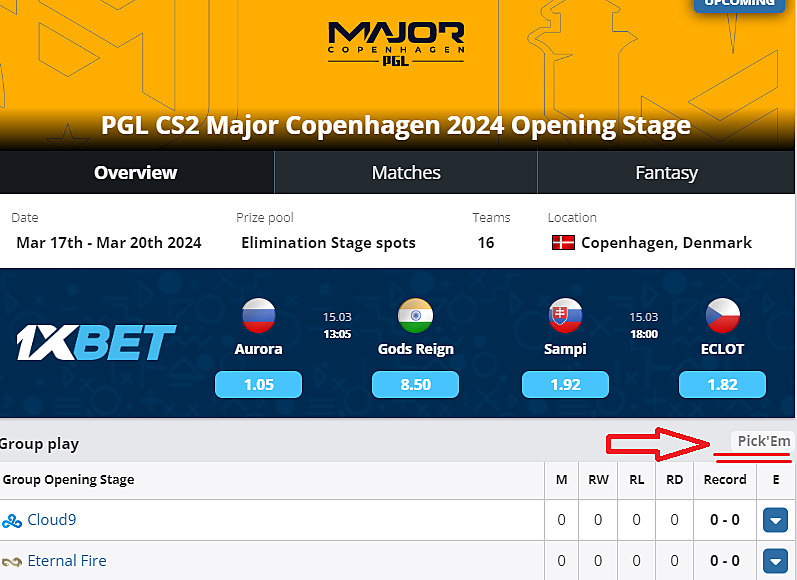
- Identify the Pick’Em selection button. This interface element can be challenging to spot, positioned directly above the competitor roster display on the right-hand panel (refer to the visual guide below).
- Submit your tournament predictions. Achieving the diamond coin reward requires accurately forecasting five match outcomes.
- Select Save to confirm choices, then synchronize selections with your Steam account.
- HLTV’s interface will provide subsequent instructions to complete the procedure.
Best Pick’Ems for PGL Major Copenhagen 2024. How to get Diamond Coin for first Major of CS2?
The first CS2 Major is almost here!
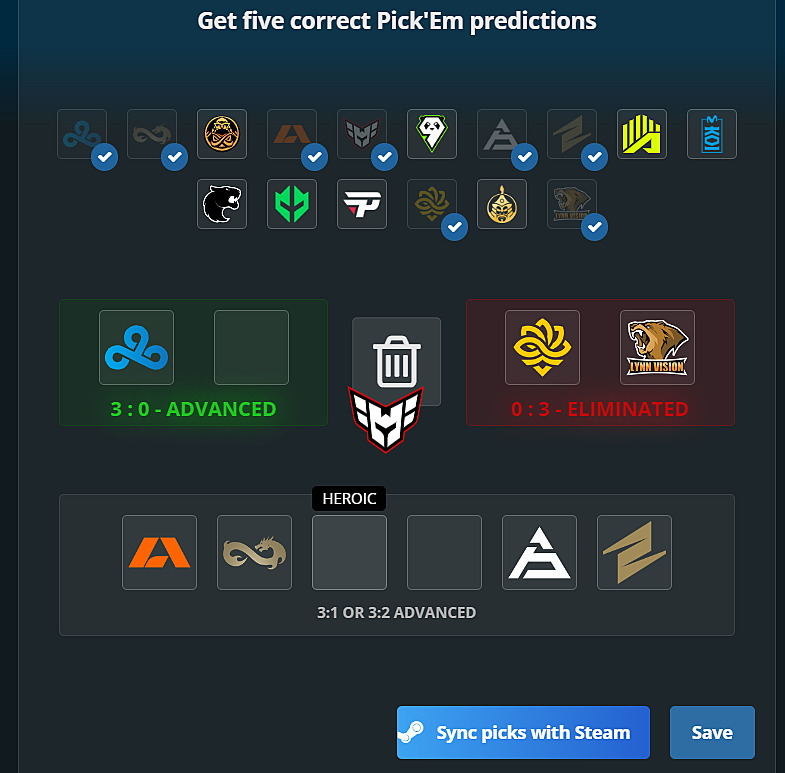
The Pick’Em prediction interface offers straightforward navigation, with one exception occurring when modifications become necessary after initial submission. Attempting to rearrange teams using the original drag-and-drop method proves ineffective. A concealed deletion icon appears centrally only when selecting a specific team. Drag the corresponding team emblem to this removal area. Subsequently create revised predictions, preserve changes, and select Steam synchronization.
Vitality President: “Let apEX end his career in ten years. That’s also the trajectory we want ZywOo to follow”
Pro Tip: When making your selections, consider team recent performance, map preferences, and head-to-head statistics rather than purely relying on overall rankings. Underdog teams often provide valuable upset opportunities that can differentiate your predictions from the majority.
Common Mistake: Many players forget that Pick’Em predictions lock at specific tournament stages. Mark these deadlines in your calendar to avoid missing submission windows, especially during rapid tournament progression.
Action Checklist
- Activate Viewer Pass in CS2 (must be done in-game initially)
- Access HLTV tournament pages for Opening and Elimination stages
- Locate and click Pick’Em button above team lists
- Make five strategic predictions based on team analysis
- Save selections and sync with Steam account
No reproduction without permission:SeeYouSoon Game Club » How to do Copenhagen Major Pick’Ems if you can’t enter CS2? Making Pick’Ems on mobile or another PC Complete guide to making CS2 Copenhagen Major Pick'Ems remotely using HLTV when you can't access your gaming PC