
TL;DR
- Switch Seikret Manual Controls from Type 1 to Type 2 in Options menu
- Type 2 provides traditional mount controls where movement requires direct input
- Auto-move function remains available for long-distance travel optimization
- Proper control configuration prevents unwanted movement during resource gathering
- Master both manual and auto-move modes for maximum hunting efficiency
Discover how to resolve erratic bird mount behavior that disrupts your Monster Hunter Wilds exploration and resource gathering activities.
Are you struggling with Seikret control responsiveness in Monster Hunter Wilds? Your Seikret serves as an essential avian companion, comparable to traditional fantasy mounts but with enhanced cargo capacity for weapons and collected resources. Many hunters discover that managing their feathered transport proves unexpectedly difficult compared to confronting massive monsters, with movement systems that frequently cause navigation frustration. Fortunately, this detailed guide provides comprehensive solutions to transform your mount handling experience.
The Seikret features an automated navigation system by default. When riding your mount, simply activate the auto-pilot function by pressing the directional pad’s up button on consoles or the tab key on PC. This command directs your Seikret to calculate and follow the most efficient route toward any designated map marker or established waypoint.
However, a significant control inconsistency emerges because the Seikret maintains forward momentum regardless of input in its default configuration. This persistent movement creates particular difficulties when attempting precise positioning for herbal collection or mineral mining operations.
The solution for optimizing Monster Hunter Wilds Seikret responsiveness originates from control scheme analysis by gaming expert Gaijin Hunter.
You can immediately adjust the Seikret Manual Controls configuration to Type 2 through the Options → Controls interface.
This correction requires accessing the Options menu then navigating to the Controls section. Examine the second settings tab to locate the Seikret Manual Controls parameter. The default Type 1 setting generates the continuous movement behavior—your mount sustains velocity without ongoing directional input.
Proceed to configure Seikret Manual Controls to Type 2. This adjustment creates input responsiveness mirroring standard character movement—meaning your avian companion only advances when you actively press movement keys or manipulate the control stick.
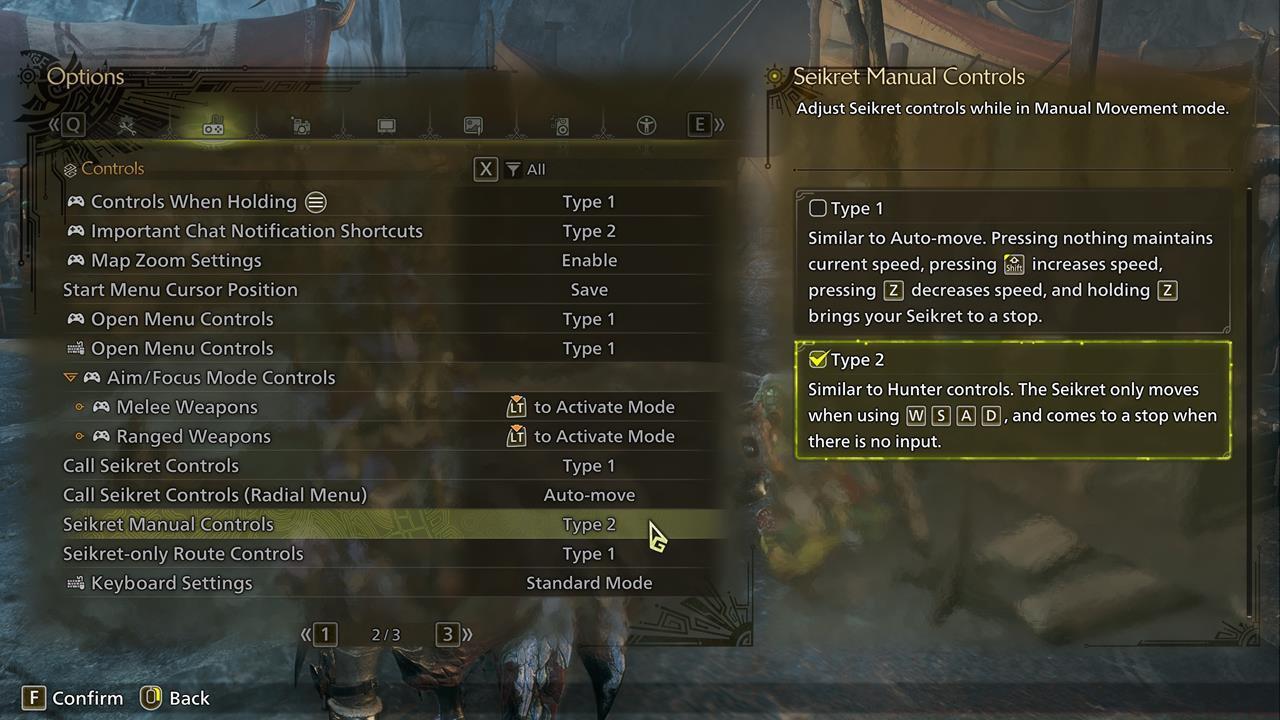
You can quickly change the Seikret Manual Controls to Type 2 via the Options -> Controls menu.
Following this modification, your Seikret’s handling characteristics should align with conventional mount systems found in other gaming titles. Now you can explore environments freely without experiencing navigation-induced frustration.
Beyond the basic control adjustment, experienced hunters should master both movement modes for optimal efficiency. The auto-move function remains invaluable for traversing long distances between hunting zones, while manual Type 2 control excels during precise navigation and resource collection.
Common Control Configuration Mistakes: Many players overlook the separate auto-move activation requirement after switching to Type 2 manual controls. Remember that the up D-pad button or tab key still engages automated pathfinding when needed.
Advanced Technique: Develop muscle memory for rapidly switching between control modes—use auto-move for distance coverage, then instantly revert to manual control when approaching gathering nodes or combat scenarios.
Pro Tip: When using manual Type 2 controls, your Seikret will immediately halt when releasing movement inputs, allowing perfect positioning for mining outcrops or herb gathering without overshooting your target.
Require additional strategic guidance as you battle terrifying creatures and explore uncharted territories? Our comprehensive Monster Hunter Wilds guides hub provides extensive support for all your hunting needs.
Action Checklist
- Access Options menu from pause screen
- Navigate to Controls settings section
- Locate Seikret Manual Controls in second tab
- Change setting from Type 1 to Type 2
- Practice manual control in safe area before hunting
No reproduction without permission:SeeYouSoon Game Club » Fix Your Monster Hunter Wilds Seikret Controls With This Button Remap Master Seikret movement controls in Monster Hunter Wilds with this comprehensive control scheme optimization guide