
TL;DR
- Access Gunsmith through Loadout menu by selecting weapon categories and tapping customization options
- Unlock all 10 loadout slots through strategic leveling progression reaching level 70 for final slot
- Level weapons efficiently using XP cards and active gameplay to unlock attachment progression system
- Create optimized builds by understanding attachment synergy and testing in different combat scenarios
- Complete camo challenges and customize blueprints for visual personalization and tactical advantages
Mastering weapon customization begins with understanding how to properly navigate to the Gunsmith interface in Call of Duty Mobile. Your loadout configuration directly impacts combat effectiveness across all game modes.
For newcomers to Call of Duty Mobile’s evolving ecosystem, the Gunsmith represents a critical strategic advantage. Originally pioneered in Modern Warfare 2019, this sophisticated system enables granular weapon modifications that can dramatically alter performance characteristics. Learning to leverage these tools effectively separates casual players from competitive contenders.
The Gunsmith functionality resides within the Loadout section, positioned centrally at the bottom of your primary navigation menu. After selecting the Loadout tab, you must choose between multiplayer or battle royale configurations, as each mode features distinct optimization requirements and tactical considerations.
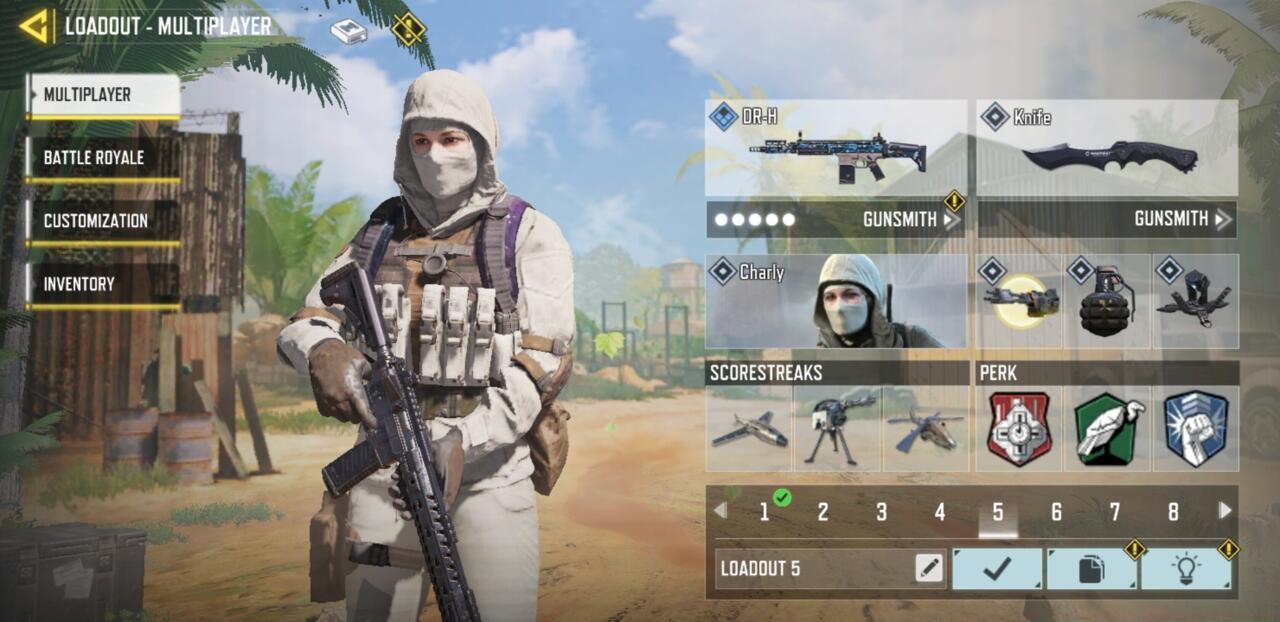
Multiplayer Loadout menu
Once inside your preferred loadout configuration, select either primary or secondary weapon slots to access the comprehensive armory. Weapons organize into distinct categories: Assault Rifles for medium-range engagements, Sniper Rifles for long-distance precision, LMGs for suppressive fire, SMGs for close-quarters combat, Shotguns for extreme proximity encounters, and Marksman Rifles bridging the gap between assault and sniper roles. After choosing your weapon platform, locate the Gunsmith button positioned beneath the weapon statistics panel on the right screen edge. This gateway opens the full customization suite where you can transform standard firearms into personalized instruments of warfare.
Call of Duty Mobile provides ten dedicated slots for custom loadout configurations, though access unfolds gradually through player progression. Initial availability limits you to just a few preset slots, requiring dedicated gameplay and level advancement to unlock the complete arsenal.
The progression system deliberately gates loadout availability to encourage mastery of core gameplay mechanics before advancing to specialized configurations. Your ninth loadout slot becomes accessible at level 46, while the tenth and ultimate slot unlocks upon reaching level 70. This structured approach ensures players develop fundamental skills while working toward expanded tactical flexibility.
Strategic slot management becomes crucial as you accumulate options. Avoid the common mistake of creating redundant loadouts—instead, design specialized configurations for specific map types, game modes, and combat scenarios. For instance, develop close-quarters builds for shipment maps, long-range setups for crossfire engagements, and balanced options for versatile performance across varied situations. This methodology ensures you’re prepared for any tactical challenge the battlefield presents.
Advanced players should prioritize unlocking all ten slots before focusing extensively on weapon-specific customization. The expanded loadout capacity enables rapid adaptation to changing combat conditions without requiring mid-match adjustments. Consider checking our comprehensive Class Guide to understand how weapon choices integrate with broader tactical systems.
Call of Duty Mobile incorporates significant progression elements, particularly regarding Gunsmith customization options. Initial access provides limited modification capabilities, requiring dedicated weapon leveling to unlock the full spectrum of attachments and enhancements.
The Gunsmith interface displays your selected weapon’s current proficiency level in the top-right corner. Selecting the “Upgrade” option reveals the attachment unlock roadmap, detailing which modifications become available at each progression milestone. This screen also enables weapon enhancement using accumulated Weapon XP cards.
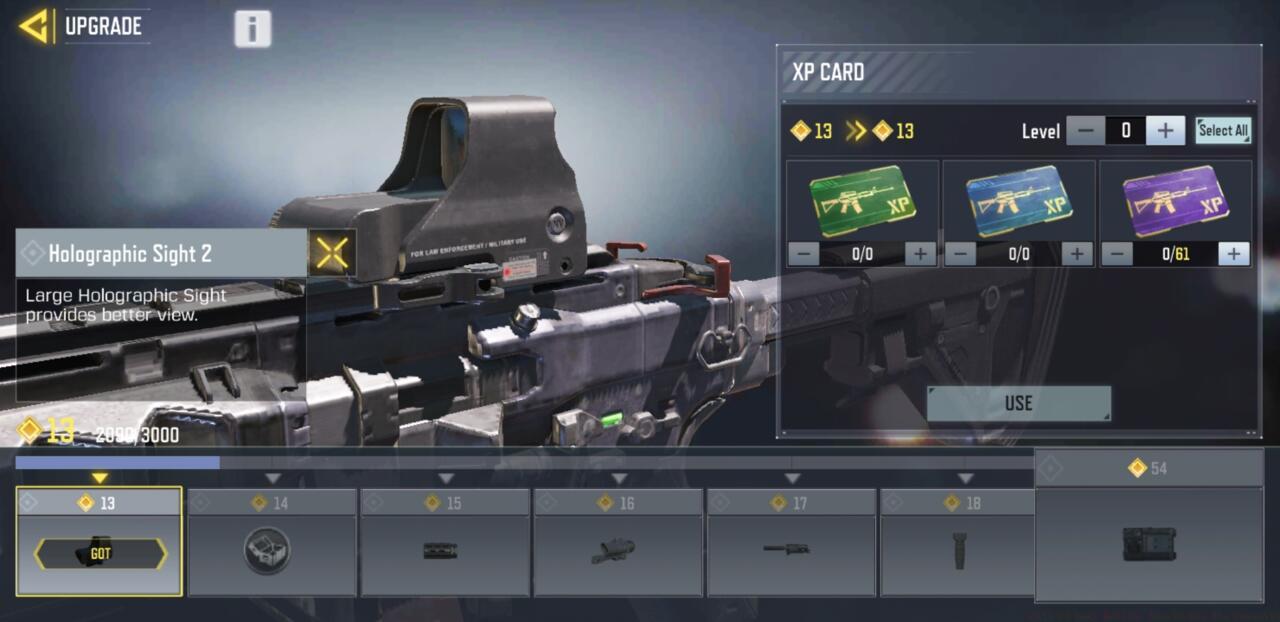
Gunsmith leveling with XP cards
Weapon XP cards distribute through multiple acquisition channels: battle pass progression rewards, consecutive daily login bonuses, and special event challenge completions. While these resources accelerate progression dramatically, the most efficient leveling method remains active weapon deployment during matches. Each elimination, objective capture, and match completion contributes directly to weapon experience.
Optimization strategy: Focus on leveling 2-3 primary weapons simultaneously rather than maxing one weapon before moving to another. This approach ensures you maintain competitive performance across different engagement ranges while progressing systematically. Avoid the common pitfall of abandoning partially-leveled weapons—commit to completing the progression cycle for your core arsenal to maximize tactical flexibility. For deeper weapon system understanding, explore our Weapons Unlock guide covering attachment synergy and statistical impacts.
Gunsmith screen
Beyond basic attachment application, sophisticated Gunsmith utilization requires understanding how modifications interact statistically and visually. Each attachment impacts multiple weapon attributes simultaneously, creating complex trade-off scenarios that require careful consideration.
Attachment synergy represents the cornerstone of effective Gunsmith operation. Rather than selecting modifications in isolation, consider how combinations create emergent properties. For example, pairing a monolithic suppressor (range increase) with an extended barrel (velocity boost) creates synergistic long-range performance enhancements exceeding individual attachment benefits.
Playstyle optimization demands alignment between your combat approach and weapon configuration. Aggressive rushers benefit from mobility-focused attachments like short barrels, skeleton stocks, and sleight of hand perks. Methodical players preferring controlled engagements should prioritize stability enhancements through foregrips, heavier barrels, and aiming stability stocks. Your loadout should reflect your natural combat rhythm while compensating for inherent weapon weaknesses.
Performance testing remains essential—never assume a build performs optimally without practical verification. Utilize the firing range to assess recoil patterns, then test in actual matches to evaluate real-world performance. Many players mistakenly create theoretically perfect builds that fail under combat pressure due to unanticipated handling characteristics or situational limitations.
Advanced tactic: Develop complementary weapon pairs within your loadouts. If your primary weapon excels at medium range, configure your secondary for extreme close-quarters effectiveness. This preparation ensures you maintain combat effectiveness regardless of engagement distance. For comprehensive tactical frameworks, reference our Complete Guide covering advanced combat methodologies.
Beyond statistical enhancements, Call of Duty Mobile’s Gunsmith incorporates extensive visual customization options allowing personal expression through weapon aesthetics. Camouflage applications, completionist rewards, and blueprint customizations provide both visual distinction and occasional tactical advantages.
Camo challenges present structured progression paths rewarding dedicated weapon mastery. Each weapon category features specific completion criteria—typically requiring elimination milestones, headshot accuracy, or objective-based accomplishments. Completing these challenges unlocks increasingly prestigious camouflage patterns demonstrating proficiency with specific armaments.
Camo challenges
Custom weapon blueprints offer pre-configured attachment combinations with unique visual themes. While these provide excellent starting points for customization, don’t hesitate to modify them to better suit your preferences. Many players overlook that blueprint weapons can be customized identically to standard variants—the visual theme remains while attachment configurations adapt to your requirements.
Pro tip: Some camouflages provide minor tactical benefits beyond aesthetics. Darker patterns offer slight concealment advantages in shadowed environments, while brighter camos can make weapon identification easier for teammates during chaotic engagements. Balance visual appeal with practical considerations for optimal performance.
Avoid the common mistake of pursuing visual customization before establishing functional builds. Prioritize performance-oriented attachments first, then enhance visual elements as your arsenal matures. This ensures combat effectiveness never sacrifices for appearance alone.
Action Checklist
- Navigate to Loadout menu and access Gunsmith for your primary weapons
- Create specialized loadouts for different game modes and map types
- Level 2-3 core weapons simultaneously using active gameplay and XP cards
- Test attachment combinations in firing range before deploying in matches
- Complete camo challenges while maintaining functional build performance
No reproduction without permission:SeeYouSoon Game Club » Call Of Duty Mobile: How To Use The Gunsmith Master Call of Duty Mobile's Gunsmith system with advanced customization strategies and optimization techniques