
TL;DR
- 25 top CS2 pros analyzed with consistent preference for performance over visual fidelity
- NVIDIA Reflex adoption surged from minimal usage to near-universal implementation
- Key settings: Boost Player Contrast enabled, MSAA 4x, Global Shadow High, most details Low
- Texture Filtering Bilinear and Ambient Occlusion disabled for competitive clarity
- Settings optimized for minimal input lag and maximum frame rate stability
Games and Esports Articles CS 2
CS2 data analyst and enthusiast Thour conducted extensive research compiling the most commonly utilized video configurations across 25 elite professional competitors. His methodology involved analyzing gameplay streams, tournament footage, and direct player interviews to establish the definitive competitive settings profile for 2024. The comprehensive findings were published on social media platform X.
The research encompasses multiple championship-level athletes including Ilya “m0NESY” Osipov from G2 Esports, emerging superstar Danil “donk” Kryshkovets representing Team Spirit, and veteran North American standout Jonathan “EliGE” Jablonowski from Complexity Gaming. These players represent the current competitive landscape where milliseconds determine match outcomes.
OverDrive about s1mple: “Genius talents and unique skills went to some hillbilly”
Pro Player Most Preferrable Video Settings in 2024
- Boost Player Contrast: Enabled – Enhances enemy visibility against complex backgrounds
- NVIDIA Reflex: Enabled – Critical for reducing system latency by up to 30ms
- MSAA: 4x – Provides clean edge smoothing without excessive performance cost
- Global Shadow: High – Essential for spotting enemy movement in dark areas
- Model/Texture: Low – Prioritizes frame rate consistency over visual detail
- Texture Filtering: Bilinear – Minimal performance impact with adequate texture clarity
- Shader Detail: Low – Eliminates distracting visual effects during intense combat
- Particle Detail: Low – Reduces screen clutter from explosions and smoke
- Ambient Occlusion: Disabled – Removes unnecessary lighting calculations
- HDR: Quality – Maintains color accuracy without significant performance penalty
- FSR: Disabled – Professionals prefer native resolution for maximum clarity
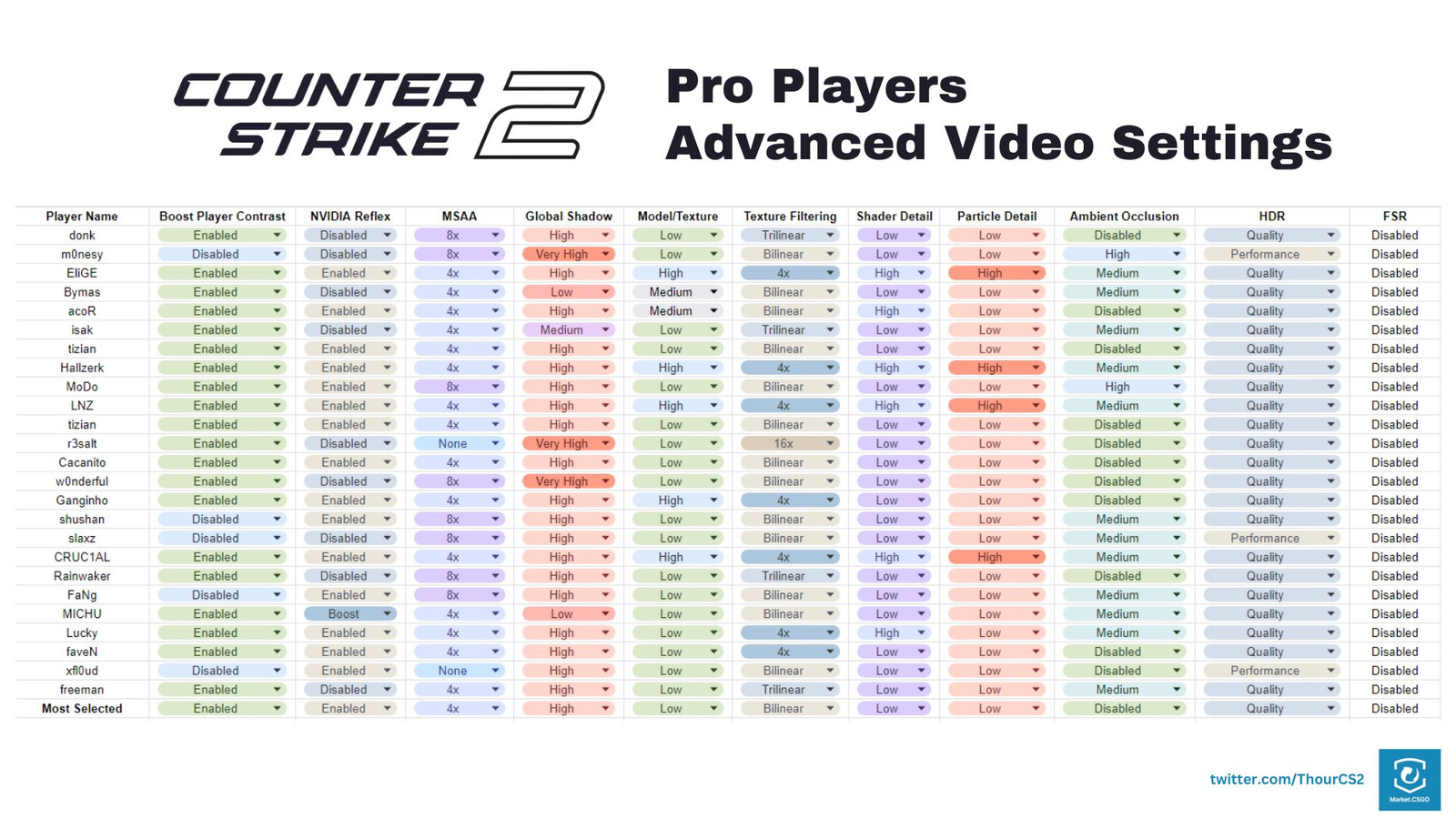
Professional configurations consistently demonstrate a clear hierarchy: input responsiveness takes absolute priority, followed by visibility enhancements, with visual fidelity receiving minimal consideration. This prioritization reflects the reality that competitive success depends on seeing opponents first and reacting fastest, not enjoying the most beautiful graphics. The settings profile creates a clean, distraction-free visual environment where enemy models stand out clearly against any background.
Thour’s comparative analysis reveals significant technological adoption shifts within the professional community. When conducting identical research during 2023, the majority of elite players avoided NVIDIA Reflex implementation due to compatibility concerns and perceived minimal benefits. The current landscape shows nearly universal adoption, representing one of the most dramatic settings evolution patterns in recent Counter-Strike history.
Valve expanded technology support in June by integrating AMD’s Anti-Lag feature, which provides comparable input reduction capabilities for Radeon graphics card users. This technological parity enables players across hardware platforms to achieve similar competitive responsiveness. Understanding these Complete Guide to performance optimization can dramatically improve gameplay experience.
Latest NVIDIA update locks refresh rate to 60 Hz in CS2, here’s temporary fix
The rapid adoption of latency-reduction technologies suggests professionals increasingly recognize the competitive value of minimizing input delay. As hardware capabilities advance, expect further convergence toward settings that maximize responsiveness while maintaining essential visual information. Players should regularly review their Weapons Unlock configurations alongside video settings to ensure optimal performance across all game systems.
Action Checklist
- Enable Boost Player Contrast and NVIDIA Reflex for competitive visibility and responsiveness
- Set MSAA to 4x and Global Shadow Quality to High for essential visual clarity
- Configure Model/Texture, Shader, and Particle Details to Low for maximum frame rate stability
- Disable Ambient Occlusion and FSR to eliminate performance overhead and visual distractions
- Reference professional configurations like m0NESY and donk while adjusting for your specific hardware
No reproduction without permission:SeeYouSoon Game Club » What are CS2 pro players’ most used video settings in 2024? M0NESY, donk, EliGE’s preferences Discover the optimized CS2 video settings used by top professionals like m0NESY and donk for competitive advantage