
TL;DR
- Access ship customization through technicians at spaceports using specific navigation controls
- Understand critical ship stats including hull integrity, reactor class, and weapon limitations
- Choose between quick manufacturer-specific upgrades or full Ship Builder customization
- Master attachment mechanics for structural components and combat systems
- Avoid common errors through proper placement and power management strategies
Starfield offers extensive ship personalization capabilities that transform your spacecraft from basic transport to specialized vessel. The customization system provides both streamlined upgrades for beginners and comprehensive building tools for experienced pilots.
To begin modifying your ship, locate a ship services technician at any major spaceport or settlement. These specialists provide access to the complete ship modification interface. When approaching them, select “I’d like to view and modify my ships” to access your fleet management screen.
Navigation controls are essential for efficient ship customization:
- Use LB and RB buttons to cycle through your owned and captured vessels
- Press A to enter the simplified upgrade interface for quick component swaps
- Press X to access the advanced Ship Builder for complete structural modifications
Pro tip: Always save your game before major modifications, as expensive mistakes can occur during complex rebuilds.
Understanding ship statistics is crucial for effective customization decisions. The overview screen displays comprehensive performance metrics that determine your vessel’s capabilities across exploration, combat, and transportation.
Hull Integrity represents your ship’s total health pool, calculated from the combined durability of all installed components. Damage to individual modules reduces overall hull strength, making reinforcement critical for dangerous missions.
Reactor Class determines power generation capacity, with Class-A being entry-level while Class-B and Class-C reactors require advanced Piloting skills to operate effectively.
Crew Capacity is influenced by cockpit design, habitation modules, reactor specifications, and weapon systems. Each crew member provides specific bonuses, making proper allocation essential for optimal performance.
Jump Distance measures interstellar travel capability in light years, primarily governed by grav drive performance but negatively impacted by total ship mass.
Shield Systems are limited to a single module, requiring strategic selection based on your preferred combat style and mission profiles.
Weapon Systems follow strict configuration rules with three categories: laser, ballistic, and missile systems. While you can install multiple units of the same weapon model, the game restricts you to three distinct weapon types simultaneously.
Cargo Capacity determines resource storage limitations, with specialized holds available for different material types and smuggling compartments for illicit goods.
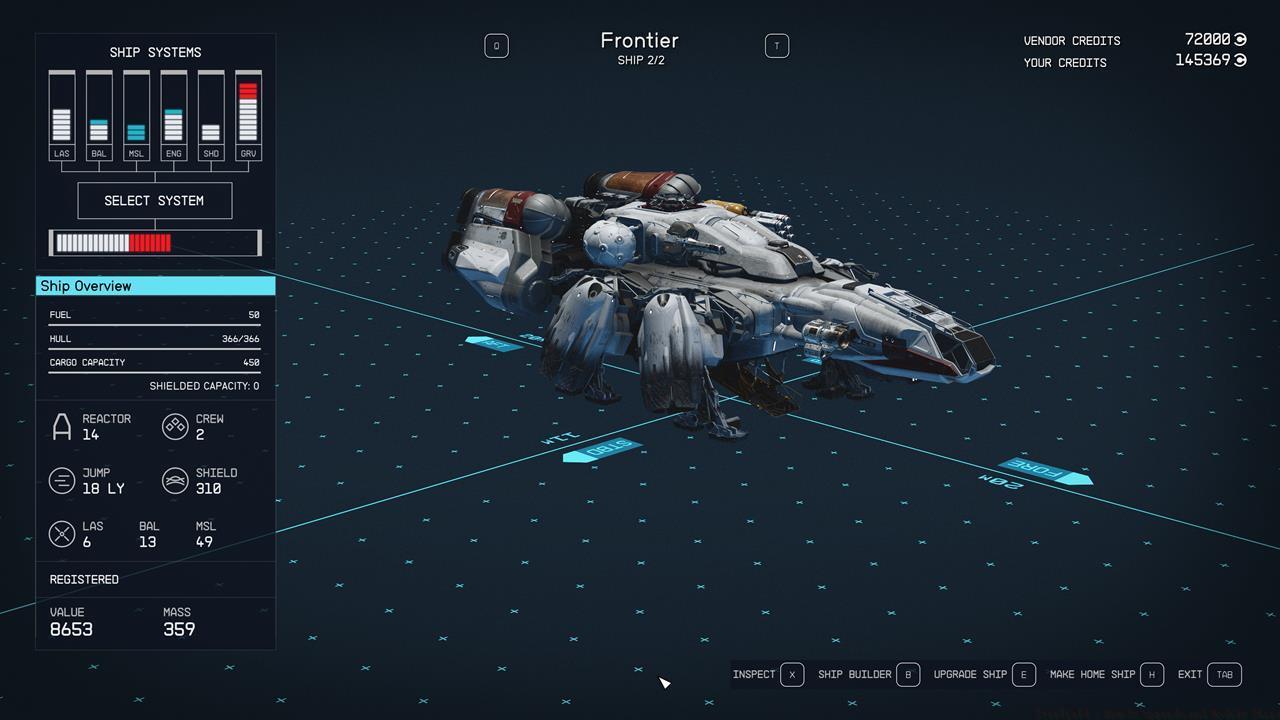
The ship menu shows the basic stats.
Advanced strategy: Balance your reactor output between systems during combat – transferring power from engines to weapons during engagements can dramatically increase combat effectiveness.
Starfield provides two distinct approaches to ship improvement: streamlined upgrades for efficiency and the comprehensive Ship Builder for complete customization. Understanding when to use each method saves both time and credits.
The simplified upgrade path activates when you press A after selecting a ship. This interface allows direct replacement of core systems including propulsion units, shield generators, grav drives, power reactors, and all three weapon categories.
Critical limitation: Non-weapon modules can only be upgraded within the same manufacturer’s product line. If your vessel uses White Dwarf 2000 engines, your upgrade options are limited to White Dwarf 2010, 2020, and 2030 models—similar to being locked into Nvidia GPU upgrades without AMD alternatives.
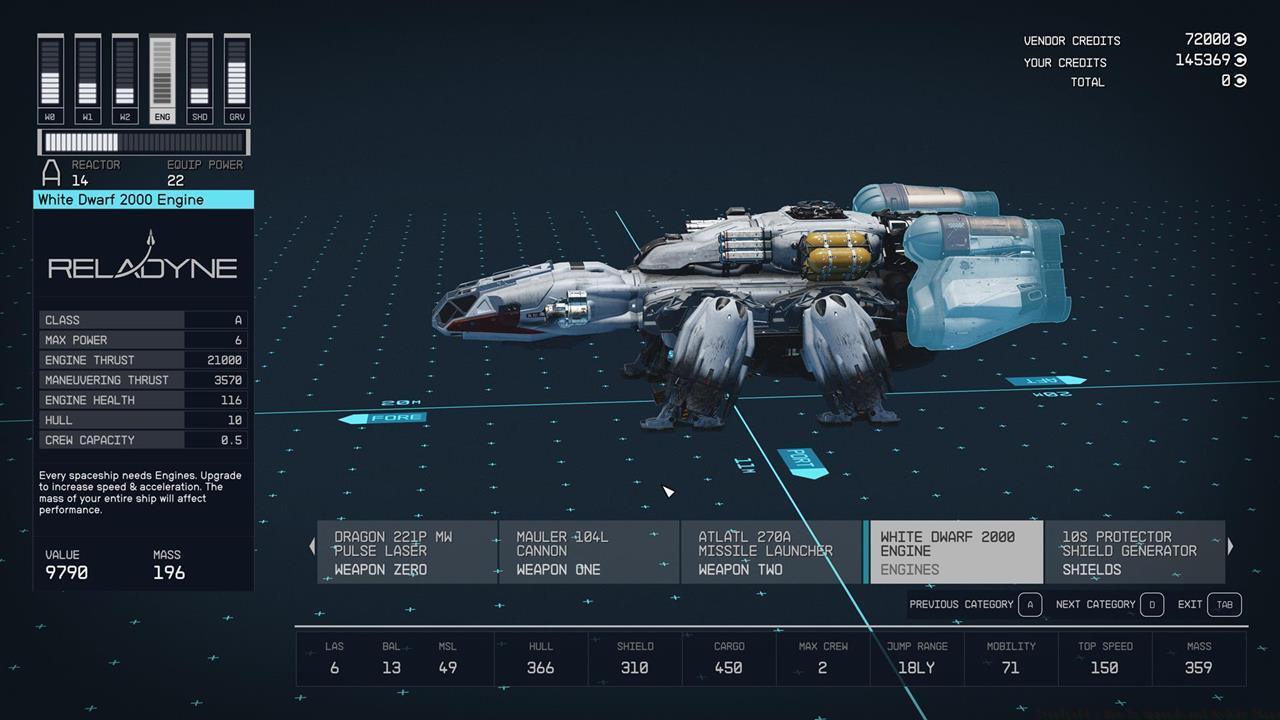
The ship upgrade function is fairly limited, but you can get everything sorted out quickly.
Strategic insight: Use the upgrade system for quick performance boosts between major missions, but reserve the Ship Builder for comprehensive overhauls when you have sufficient time and resources.
Manufacturer specialization becomes significant in late-game customization. Some manufacturers excel in specific systems—certain brands produce superior shield generators while others specialize in advanced propulsion technology.
The Ship Builder represents Starfield’s most powerful customization tool, enabling complete structural redesign and component integration. Access this advanced interface by pressing X after selecting your target vessel from the ship services menu.
This freeform system allows mixing modules from different manufacturers, creating truly unique spacecraft designs. The attachment system uses circular connection points that snap components together when properly aligned.
Beyond the core systems available in basic upgrades, Ship Builder provides access to these critical structural elements:
- Cockpit Configuration – Limited to one unit per ship, with different models offering varying crew capacities and control interfaces.
- Habitation Modules – These living quarters significantly impact crew capacity; specialized variants add passenger accommodation for transport contracts.
- Landing Bays – A single bay is mandatory, positioned at the vessel’s bottom rear section.
- Landing Gear – Minimum two units required, exclusively mounted on the ship’s underside.
- Docking Systems – One docker unit is essential, installed at the highest point of your spacecraft with adequate clearance.
- Fuel Storage – Additional tanks extend jump range to distant star systems, essential for exploration-focused builds.
- Structural Components – Beyond cosmetic purposes, these elements provide mounting points for additional systems like weapon hardpoints.
Left: Habs increase crew capacity and passenger slots; Right: You can choose different kinds of weapons.
Advanced building technique: Create specialized vessels for different purposes—dedicated combat ships, long-range explorers, or high-capacity freighters—rather than attempting a single jack-of-all-trades design that compromises performance across multiple roles.
When finalizing ship modifications by pressing the start button, various validation errors may prevent completion. Understanding these issues beforehand saves significant frustration and resource expenditure.
Structural validation errors include:
- Unattached Components – All modules must connect directly or indirectly to the main structure through attachment points.
- Excessive Length – Vessels exceeding 28 meters cannot perform planetary landings, restricting them to space station operations only.
- Reactor Class Mismatch – Components designed for Class-B or Class-C reactors won’t function with Class-A power plants.
- Landing System Misalignment – Gears and bays must occupy the lowest position on your ship’s frame.
- Insufficient Landing Gear – Larger vessels require additional landing support units based on mass distribution.
- Docker Placement Issues – The docking mechanism requires top placement with sufficient clearance from surrounding structures.
- Weapon Model Limit – The three-model restriction applies across all weapon categories combined.
- Power Overload – Multiple high-consumption engines can drain reactor capacity, especially with lower-class power systems.
- Grav Drive Insufficiency – Excessive mass requires either upgraded grav drives or strategic component removal.
- Maneuverability Degradation – Excessive cargo modules significantly impact turning rate and acceleration, creating combat disadvantages.
Proactive troubleshooting: Test your modified ship in safe systems before undertaking dangerous missions. Performance issues like poor maneuverability might not trigger validation errors but can prove fatal in combat situations.
Starfield offers virtually limitless customization possibilities for your spacecraft. Whether you prefer quick upgrades or complete rebuilds, mastering these systems enhances both practical functionality and personal satisfaction with your unique vessel design.
For comprehensive gameplay guidance beyond ship customization, explore our Battlefield 6 Complete Guide for additional strategies and techniques.
Action Checklist
- Locate ship services technician at major spaceports
- Analyze current ship statistics and identify improvement priorities
- Use quick upgrades (A button) for manufacturer-specific component improvements
- Experiment with Ship Builder (X button) for cross-manufacturer customization
- Validate structural integrity and system compatibility before finalizing changes
- Test modified ship performance in safe systems before dangerous missions
No reproduction without permission:SeeYouSoon Game Club » Starfield – How To Upgrade And Modify Ships Master ship customization in Starfield with expert upgrade strategies and advanced Ship Builder techniques