
TL;DR
- Press ~ to access console, but beware achievement disabling and marked save files
- Use ‘help [term] 4’ to find item IDs, NPC references, and perk codes efficiently
- Tgm enables god mode, player.additem adds resources, and player.modav adjusts experience values
- Manage companion relationships with getav/setav com_affinity commands for unique dialogue
- Add or remove perks instantly using player.addperk/removeperk with specific skill IDs
Unlocking Starfield’s full potential requires mastering the developer console, a powerful tool that transforms your gameplay experience. This comprehensive guide covers everything from basic access to advanced customization techniques.
Accessing the Console
Activate the console by pressing the tilde key (~) on your keyboard while playing on PC. This interface allows direct input of commands that can modify character attributes, spawn items, adjust relationships, and much more. However, exercise caution as most console usage comes with significant consequences for your gaming experience.
When you employ console commands, your save files receive a distinctive “[M]” marker, indicating modified game data. This flag permanently identifies your progress as altered, even if you later revert to earlier saves. For achievement hunters, this presents a major obstacle since most commands will disable your ability to earn in-game accomplishments.
Achievement Considerations
PC gamers should navigate to: C:UsersDocumentsMy GamesStarfield to locate the StarfieldConsoleHistory.log file. This comprehensive log tracks every console command executed, creating a permanent record of your modifications. To circumvent achievement restrictions, consider installing achievement enabler modifications. The Achievement Enabler created by Nexus Mods user Brunph provides a reliable solution for maintaining achievement eligibility while using console features.
Command History Tracking
The logging system maintains detailed records regardless of whether you load unmodified saves, ensuring complete transparency about your command history. This thorough tracking helps developers identify modified game states and maintain gameplay integrity across the community.
The most indispensable Starfield console function is undoubtedly the help command: help 4. This powerful search tool enables you to locate specific item identifiers, character references, and perk codes with precision.
For example, searching for companion information requires typing “help Sarah 4” while perk investigations utilize “help Piloting 4” to generate comprehensive lists of related identification codes. Once you’ve obtained these references, you can implement various functions that manipulate associated values and attributes.
Search Syntax
The numerical parameter “4” following your search term specifies the detail level of results. This ensures you receive complete information rather than abbreviated results that might omit critical data points.
Practical Applications
When searching for weapons, armor, or specialized equipment, use generic terms that describe the item category. The system will return all matching entries, allowing you to select the precise item variant you need for your specific situation.
Advanced Search Techniques
Advanced users can combine multiple search terms and utilize wildcard characters to broaden their investigations. This approach proves particularly valuable when dealing with obscure items or recently added content that might not yet be documented in community resources.
Transform your character’s capabilities through these essential player effect commands that adjust everything from survivability to resource management.
- God mode: Tgm – Activates complete invulnerability to all damage sources while maintaining oxygen consumption mechanics; includes unlimited ammunition and perpetual jetpack boosting functionality.
- Experience points: Player.modav experience – The specified numerical value represents the exact amount of additional XP applied to your current total. For instance, beginning with 100 experience and executing player.modav experience 1000 yields 1,100 total XP, triggering all associated level advancements and skill point allocations normally earned through gameplay.
- Adding items: Player.additem – Employ the help command previously discussed to identify specific item identification codes. This method works for weapons, protective gear, ammunition types, and numerous other inventory elements.
- Digipicks: Player.additem 0000000A – The numerical parameter determines how many lockpicking tools are added to your inventory management system.
- Money: Player.additem 0000000F – This value dictates the quantity of credits deposited into your financial resources.
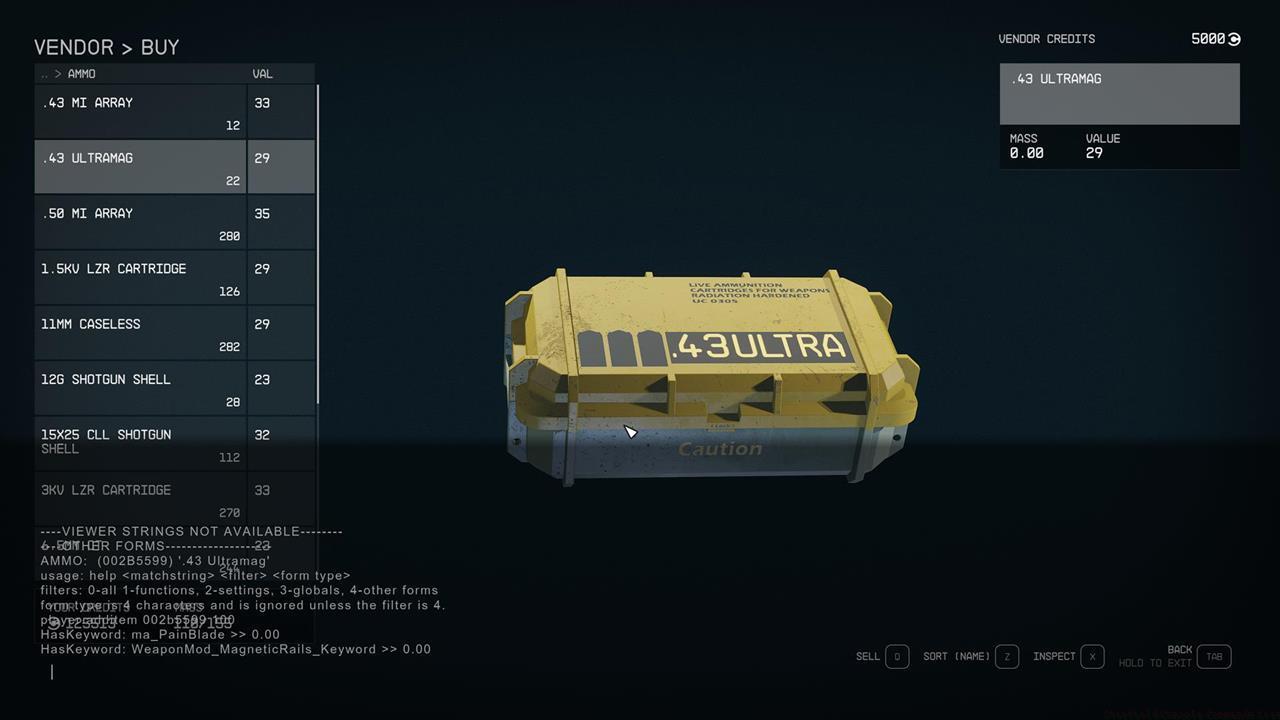
Strategic use of the help function enables precise item identification before implementing addition commands for targeted inventory management.
God Mode and Invincibility
While Tgm provides comprehensive damage immunity, certain environmental hazards and story-based incapacitations may still affect your character. This command primarily negates combat-related damage while preserving other gameplay mechanics for balanced experience modification.
Several Starfield console commands specifically influence recruitable companions, with the most practically valuable focusing on affinity management systems. Typically, companions unlock distinctive conversational content at specific affinity milestones (specifically 100, 200, 300, and subsequent hundred-point intervals). Implement these procedures systematically:
- Position yourself facing the companion directly before activating the console using the tilde key (~).
- Select the companion by clicking on their character model to display their unique reference identification code.
- Evaluate current status: With the companion’s reference ID visible, enter getav com_affinity to assess the present affinity valuation.
- Adjust values: Input setav com_affinity to modify the companion’s affinity level according to your narrative preferences.
- Strategic threshold management involves setting values precisely one unit below the next conversational trigger point. For example, initial unique dialogues activate at 100 affinity, meaning you should utilize: setav com_affinity 99.
- Subsequently, perform actions that align with the companion’s preferences, or continue exploration activities until subsequent conversational sequences initiate naturally.
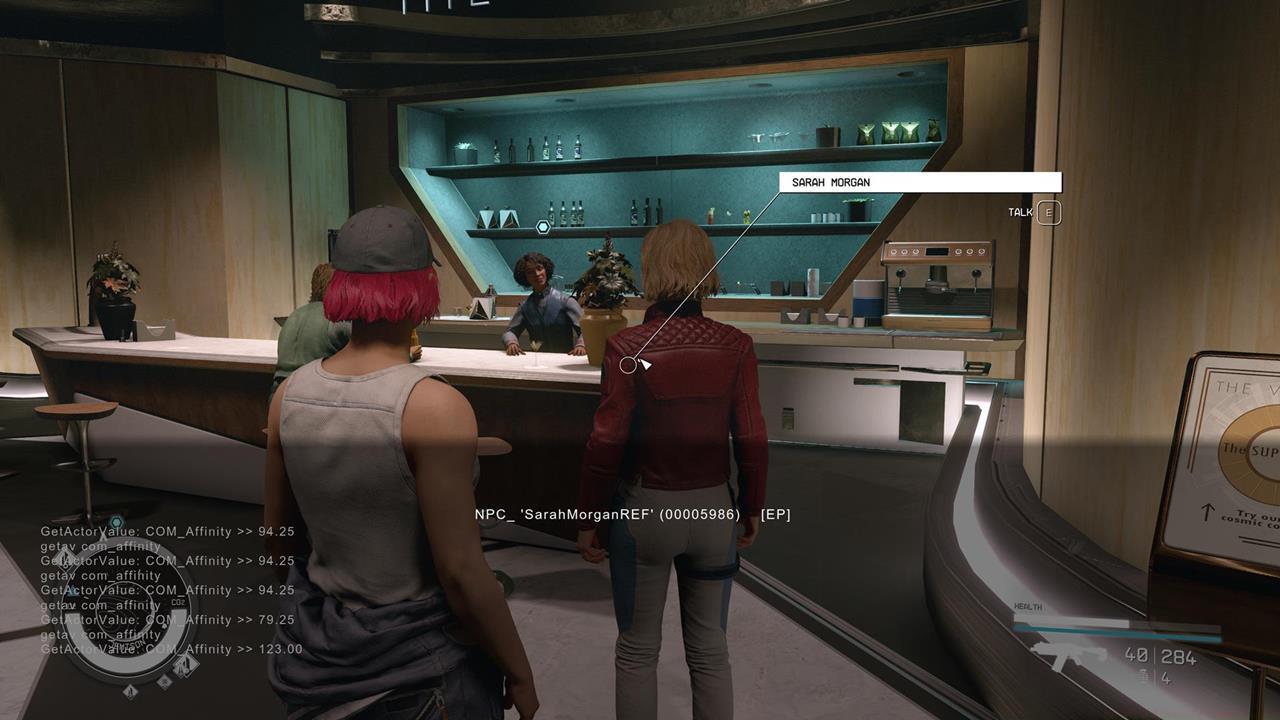
Carefully document companion affinity metrics before implementing adjustments to maintain narrative coherence and relationship development pacing.
Affinity Mechanics
Companion affinity operates on a cumulative system where positive interactions gradually build relationship levels. Setting values manually bypasses this gradual development but preserves the organic triggering of companion-specific content when managed strategically.
Our compilation concludes with Starfield console commands associated with premier skills. Here’s the essential information:
- Implement a perk: player.addperk – This applies a single rank advancement to the designated perk; numerical parameters prove unnecessary since the command consistently elevates your proficiency by one complete tier.
- Eliminate a perk: player.removeperk – This completely erases the perk from your character’s skill configuration.
Below are illustrative examples of skill identification codes:
- Persuasion: 0022EC82
- Stealth: 002CFCB2
- Leadership: 002C890D
- Ship Command: 002C53B3
- Piloting: 002CFCAC
- Boost Pack Training: 00146C2C
- Targeting Control System: 002C5559
- Starship Design: 002C59DC
- Spacesuit Design: 0027CBC3
- Weapon Engineering: 002C890C
Starfield represents an expansive gaming universe with countless planetary systems awaiting discovery. For additional strategic guidance and tactical approaches, explore our comprehensive guides hub for specialized content covering various gameplay aspects.
Perk Addition/Removal
When adding perks, the system automatically recognizes your current rank and advances it appropriately. Removal commands completely erase the perk from your build, requiring careful consideration before implementation to avoid unintended character configuration changes.
Action Checklist
- Press ~ to access console interface and verify achievement disabling consequences
- Use ‘help [term] 4’ to identify specific item, character, or perk IDs before implementing modification commands
- Implement Tgm for invincibility testing or player.additem for resource management
- Manage companion relationships using getav/setav com_affinity with strategic threshold positioning
- Customize skill builds using player.addperk/removeperk with verified skill IDs
No reproduction without permission:SeeYouSoon Game Club » Starfield Console Commands List Master Starfield console commands to unlock hidden features, customize gameplay, and troubleshoot issues efficiently