
TL;DR
- Enable crossplay via Settings > Accessibility tab to connect across all platforms
- Cross-save functionality allows seamless progression between different gaming systems
- Ubisoft designed Skull and Bones as multiplayer-first with robust social integration
- Server populations automatically mix players from all enabled platforms
- Friend invitations work identically regardless of platform combinations
Embark on your pirate adventures across multiple gaming platforms with Skull and Bones’ comprehensive cross-platform integration. This feature eliminates traditional barriers between console and PC ecosystems, creating a unified multiplayer environment where crews can form regardless of hardware preferences.
The maritime combat experience reaches its peak potential when shared with allies, and Ubisoft’s implementation ensures no captain sails alone. While the game accommodates solitary privateers, its core mechanics emphasize cooperative naval warfare and fleet coordination. The development team specifically engineered this pirate epic as a social-first experience, prioritizing seamless interaction between all supported platforms.
Beyond cross-platform matchmaking, Skull and Bones incorporates full cross-progression capabilities. This means your captain’s journey, ship upgrades, and accumulated treasures remain accessible whether you’re playing on console, PC, or switching between systems. This dual functionality represents a significant quality-of-life enhancement for modern gaming.
Before assembling your cross-platform armada, you must first activate the crossplay functionality within the game’s settings menu. This straightforward process ensures you can connect with crew members across all supported systems.
The activation sequence requires precise navigation: Begin by launching Skull and Bones and accessing the main Settings interface. Proceed directly to the Accessibility section, which houses the cross-platform connectivity options. Scroll downward through the menu until you locate the dedicated Cross-play configuration panel. Finally, toggle the setting to “Enabled” status by selecting the appropriate checkbox, then confirm your changes by exiting the settings menu.
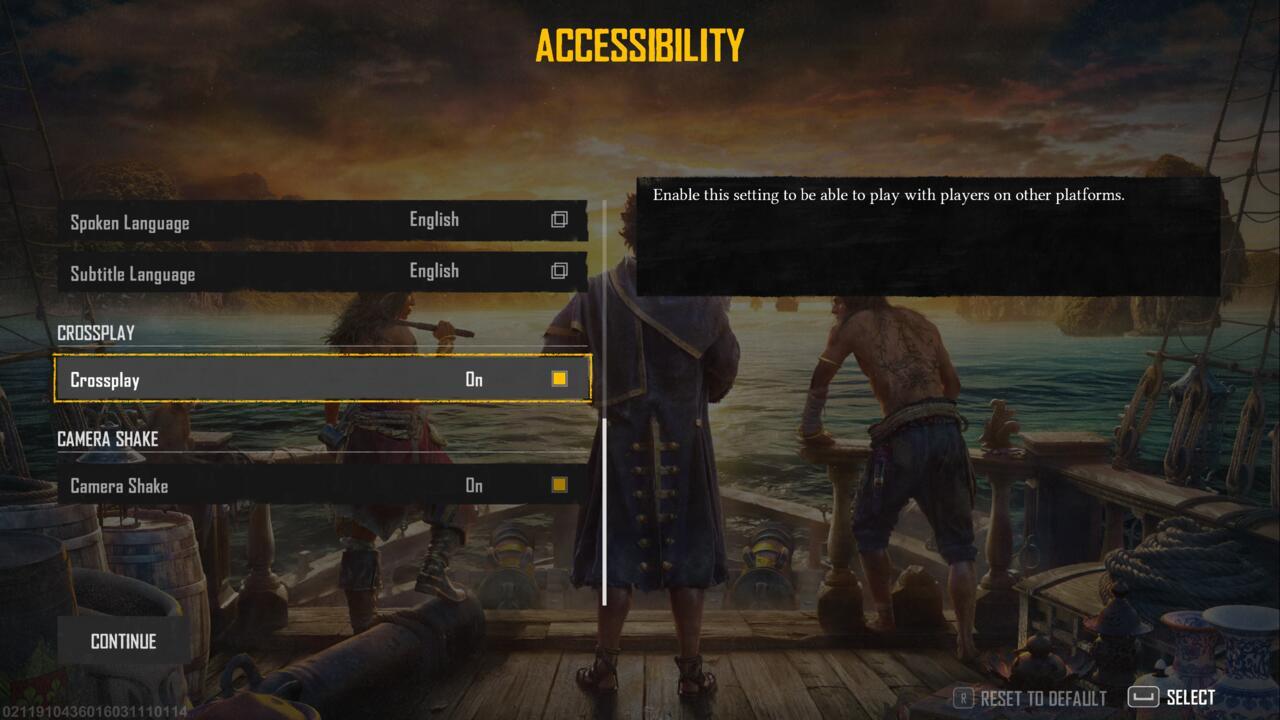
Locate the crossplay toggle in the Accessibility settings menu to enable platform connectivity
Many players overlook this crucial step and wonder why they cannot connect with friends on different platforms. Always verify crossplay is active before attempting cross-platform invitations.
Once crossplay functionality is operational, the entire social ecosystem of Skull and Bones becomes available across platform boundaries. The invitation system functions identically whether connecting with players on the same platform or different ecosystems, maintaining consistency in user experience.
The lobby management interface provides sophisticated tools for coordinating multi-platform fleets. You can seamlessly invite companions from any supported system to join your naval operations, with the game automatically handling the technical complexities of cross-platform connectivity.
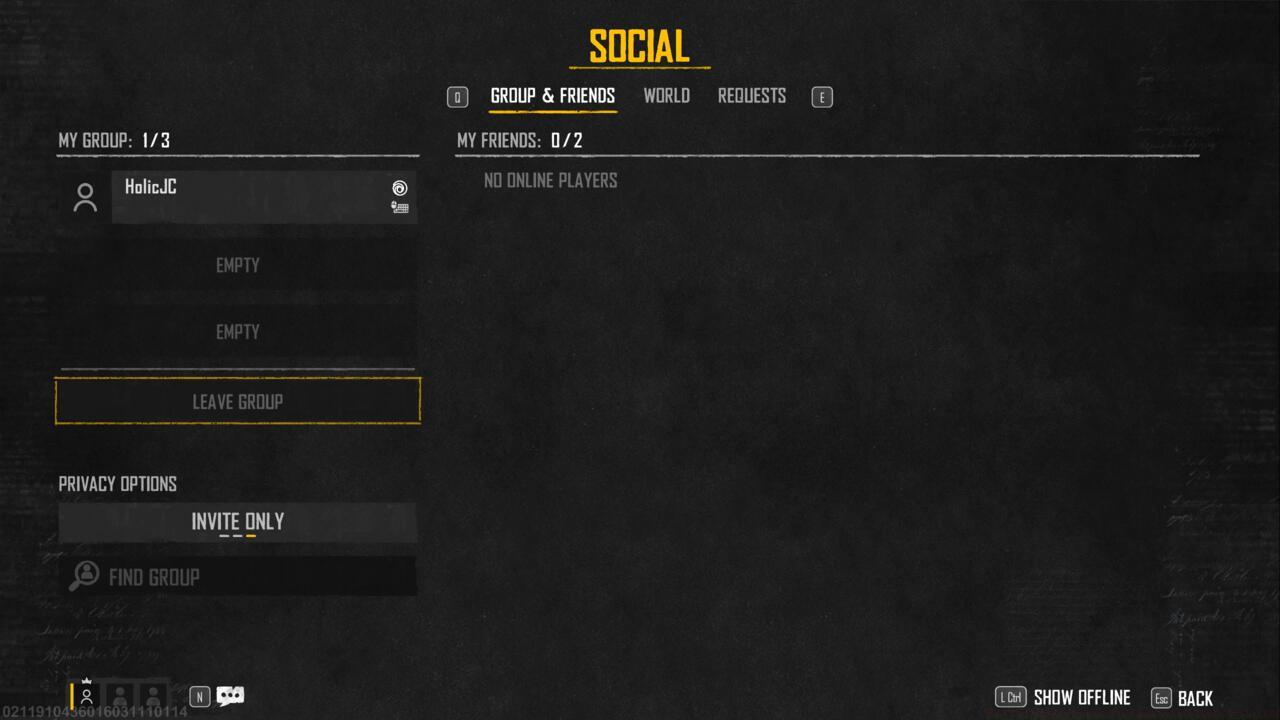
The social menu provides unified friend management across all connected platforms
Server populations dynamically incorporate players from every enabled platform, creating richly diverse maritime environments. This integration ensures matchmaking pools remain healthy and competitive, regardless of when you choose to sail. For those interested in broader military strategy games, our Complete Guide offers complementary insights into modern multiplayer mechanics.
Advanced players should note that cross-platform sessions may introduce varying skill levels and playstyles. Adapt your tactics accordingly and consider reviewing our Weapons Unlock strategies for optimizing your combat effectiveness in diverse multiplayer environments.
Action Checklist
- Navigate to Settings > Accessibility and enable crossplay toggle
- Verify crossplay activation by checking server population diversity
- Use social menu to send cross-platform invitations to friends
- Coordinate fleet compositions considering platform-specific control schemes
No reproduction without permission:SeeYouSoon Game Club » Skull And Bones Cross-Play And Multiplayer Explained Master cross-platform multiplayer in Skull and Bones with comprehensive setup and social features guide