
TL;DR
- Pre-order bonuses include White Sailor Uniform, Omamori accessory, and Item Box with healing items
- Deluxe Edition provides exclusive Pink Rabbit Costume with unique visual appeal
- All bonus items automatically appear when starting new game with eligible purchase
- Change costumes anytime at Hokora shrines using the Change Costume option
- Bonuses tab becomes accessible after completing initial story progression
Securing your pre-order for Silent Hill f unlocks several valuable in-game advantages that can significantly enhance your survival experience. These exclusive items provide both cosmetic customization and practical gameplay benefits that may prove crucial during tense encounters with the game’s terrifying threats.
When you pre-order any edition of Silent Hill f, you’ll receive these three essential items:


The Deluxe Edition of Silent Hill f offers additional premium content beyond the standard pre-order bonuses, providing enhanced visual customization options for dedicated fans of the series.
Deluxe Edition purchasers gain access to this exclusive cosmetic item:
Your White Sailor School Uniform (pre-order bonus) and Pink Rabbit Costume (Deluxe Edition bonus) become available immediately when initiating a new game, provided you’ve completed the appropriate purchase through your platform’s store. The redemption process is designed to be seamless and immediate.
You’ll have the opportunity to select your preferred costume before the main gameplay begins. If you wish to switch between available outfits later, simply locate a Hokora (shrine) within the game world and select the “Change Costume” option from the interaction menu. This flexibility allows you to adapt your character’s appearance based on your current preferences or the specific atmosphere you want to create.
The Bonuses management interface becomes accessible after you’ve progressed through the initial stages of the storyline. This typically occurs within the first hour of gameplay, depending on your exploration pace and engagement with side content.
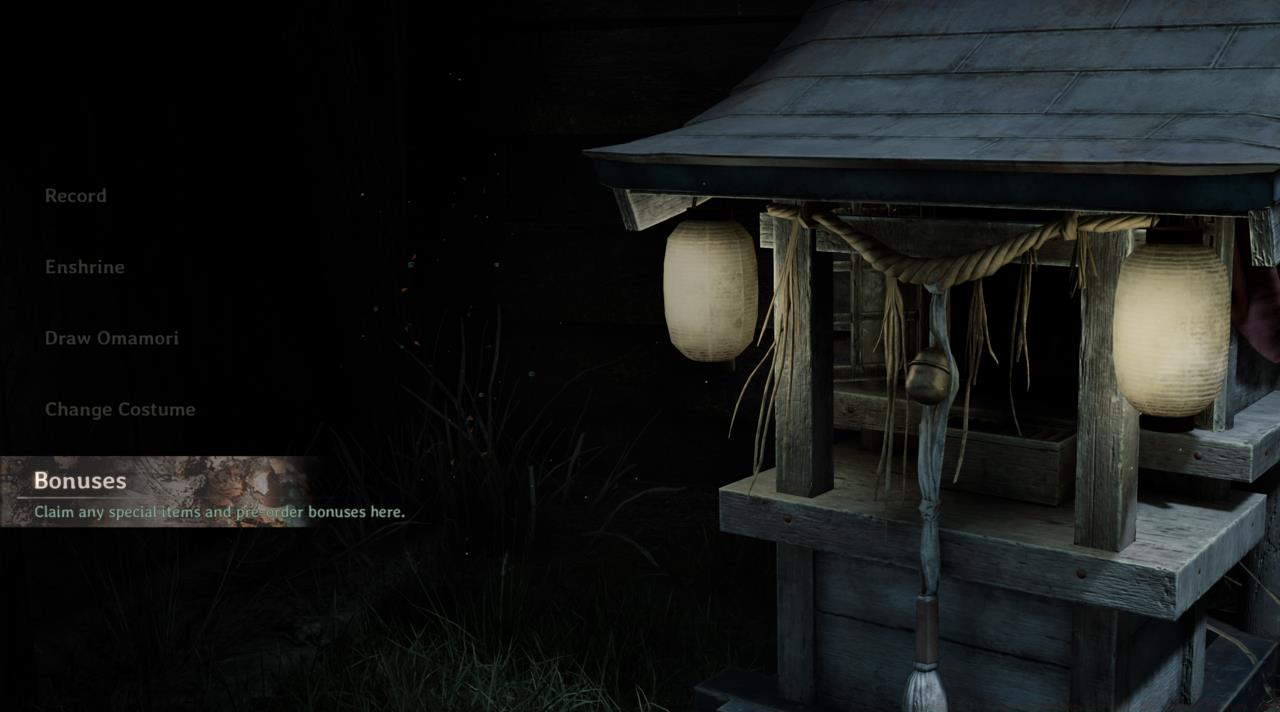
The Bonuses management section unlocks after reaching a specific story milestone, ensuring new players aren’t overwhelmed with menu options during critical introductory sequences.
For optimal use of your pre-order items, consider these strategic approaches: Equip the Omamori [Peony] during exploration segments where food items are plentiful to maximize its healing benefits. Save the Item Box contents for challenging encounters where additional resources could determine survival.
Common problems players encounter include not seeing bonus items immediately—this typically resolves by restarting the game or verifying your purchase status through your platform’s account management. If items remain missing after several hours, consult our Complete Guide for troubleshooting steps.
The Faith currency obtained from offering items can be strategically used for unlocking powerful equipment early in your playthrough. Planning your Weapons Unlock path becomes significantly easier with these additional resources. Understanding proper Class Guide fundamentals will help you maximize the value of your bonus items throughout the entire campaign.
 Gallery
 Action Checklist
- Verify your pre-order or Deluxe Edition purchase through your platform’s store
- Start new game and select preferred costume during initial setup
- Progress through initial story missions until Bonuses tab unlocks
- Visit Hokora shrine to change costumes anytime using Change Costume option
- Equip Omamori [Peony] during exploration to gain health from food items
No reproduction without permission:SeeYouSoon Game Club » Silent Hill f – How To Redeem Pre-Order And Deluxe Edition Items Complete guide to Silent Hill f pre-order bonuses and Deluxe Edition items with redemption strategies