
TL;DR
- RDR2 permission errors stem from inconsistent administrator privileges across multiple executable files
- Network connectivity issues often trigger offline mode activation even when servers are operational
- Proper file permission configuration requires specific settings for RDR2.exe and PlayRDR2 files
- Rockstar Launcher requires administrator rights for four critical service components
- Following the complete troubleshooting sequence prevents cascading error chains
Games and Esports Articles
RDR2 has been available on personal computers for several years, yet a specific permissions-related malfunction continues to frustrate players consistently. This technical glitch proves particularly vexing because it manifests through diverse error notifications while originating from the same underlying cause. The problem affects users across all distribution platforms including Steam, Epic Games Store, and direct Rockstar purchases.
This technical anomaly frequently emerges without apparent triggers, even following extended periods of successful gameplay. Players can diagnose this issue when the application initiates in offline mode unexpectedly or asserts that RDR2 has never been executed on their system previously. Our comprehensive resolution methodology provides effective remediation.
Common Error Messages and Their Root Causes
- RDR2 is not in your Social Club library
- Your account doesn’t own Red Dead Online
- Unable to launch RDR2.EXE
- Rockstar Launcher tries to access servers in the offline mode but crushes or reports various errors.
- Unable to launch due to a lack of privileges
- Unable to launch Social Club because your account didn’t previously log in on this machine.
- “Activation needed” due to offline mode
These diverse error messages typically share a common origin in permission escalation failures. The system’s inability to properly authenticate user credentials and verify game ownership permissions triggers these misleading notifications. Understanding that these represent symptoms rather than distinct problems simplifies the troubleshooting approach significantly.
Network Connectivity and Server Status Solutions
Begin by verifying Rockstar gaming servers are currently operational here. Should servers demonstrate instability, connectivity problems triggering offline mode activation can frequently be resolved through basic network hardware reset procedures (applicable to both traditional routers and mobile hotspot configurations). When router resets prove insufficient, employing a Virtual Private Network often circumvents regional connectivity restrictions. This particular technical glitch exhibits high recurrence rates even after successful temporary fixes and commonly generates subsequent file permission complications.
Network-related errors often stem from DNS caching issues or ISP routing problems. Consider flushing your DNS cache (ipconfig /flushdns in Command Prompt) and trying alternative DNS servers like Google DNS or Cloudflare DNS for improved connectivity reliability.
Advanced Administrator Permission Configuration
Many technical guides recommend executing your gaming application and its associated launcher with administrator privileges, yet this approach frequently fails due to overlooked supplementary configuration requirements. Here’s the complete procedural methodology:
- Don’t skip any of these steps, as it will cause a chain of new errors.
- Press Ctrl+Alt+Del and check if RDR or Rockstar Launcher are active in the taskbar. Close them if they are.
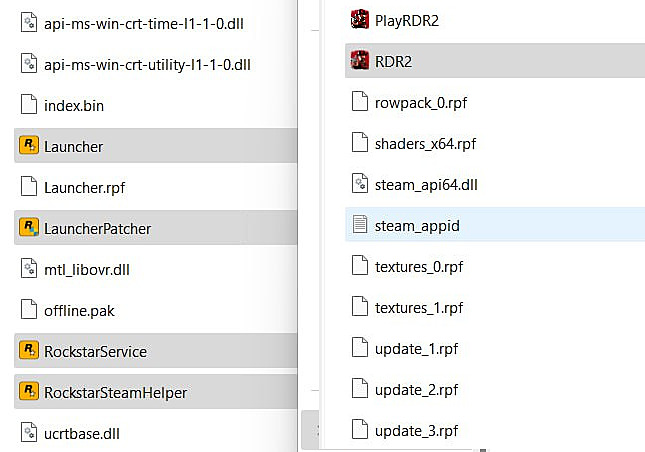
- Open game core folder: Steam/steamapps/common/Red Dead Redemption 2.
- Right-click on RDR2, choose properties, compatibility tab, and choose “Run as administrator.”
- Now Right click on PlayRDR2 and remove the same check if it is there (Don’t run this file as administrator).
- Open the Rockstar Launcher core folder: Program files/Rockstar games/Launcher.
- Locate the following .exe files: Launcher, LauncherPatcher, RockstarService, and SteamWebHelper.
- Right-click on each and choose “Run as administrator.”
- Launch the game from Steam or another platform
Critical implementation detail: The PlayRDR2 executable must NOT run with administrator privileges, as this creates conflicting permission levels that prevent proper game initialization. This specific configuration nuance represents the most commonly overlooked step in permission error resolution.
Action Checklist
- Verify Rockstar server status and reset network hardware
- Terminate all RDR2 and Rockstar processes via Task Manager
- Configure RDR2.exe with administrator privileges
- Ensure PlayRDR2.exe runs WITHOUT administrator rights
- Set administrator permissions for all four Rockstar Launcher components
No reproduction without permission:SeeYouSoon Game Club » RDR2 offline mode and Rockstar Launcher errors working fix (Win 10/11, Steam, 2023): “Unable to launch RDR2.EXE”, “Account doesn’t own Red Dead Online”, “You didn’t previously log-in on this machine” Comprehensive troubleshooting guide for RDR2 offline mode and Rockstar Launcher permission errors on Windows platforms