
TL;DR
- Connect Pokemon Go to your Nintendo Account through Settings to enable transfers
- Use Go Transporter energy strategically – legendaries cost more and recharge takes 7 days
- Many special forms revert to standard versions when transferred between games
- Transfers are permanent one-way moves – plan carefully before sending Pokemon
- Claim free Gigantamax Melmetal as a bonus for your first successful transfer
The integration between Pokemon Go and Pokemon Home has revolutionized how trainers manage their collections across platforms. This connectivity allows you to bring your hard-earned Pokemon from the mobile game into the broader Pokemon ecosystem, opening up new possibilities for battling and collecting in main series titles.
Before initiating any transfers, you must establish a secure link between your Pokemon Go account and your Nintendo Account credentials. Launch the Pokemon Go application and tap the prominent Poke Ball icon positioned at the screen’s bottom edge. Navigate to the Settings menu located in the upper right corner, then scroll downward until you locate the Pokemon Home option. Selecting this will trigger the authentication process where you’ll input your Nintendo Account login details.
Originally restricted to trainers who had achieved level 40 status, Niantic has democratized access to this feature. Now players at any experience level can utilize the transfer functionality, making it accessible to both veteran collectors and newcomers alike.
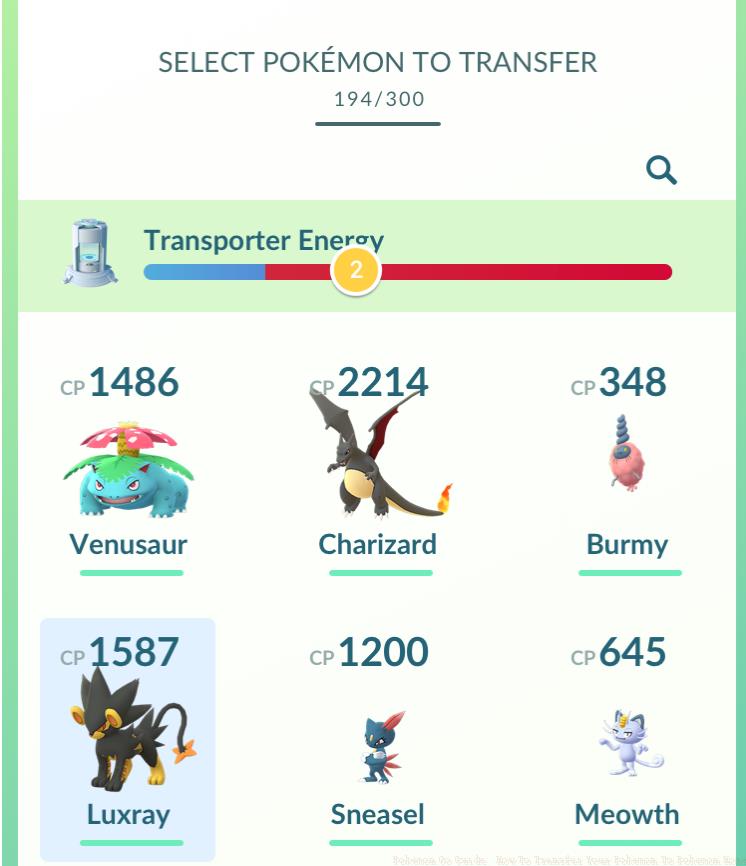
Pokemon Go transfer screen interface showing selection options
Once your accounts are successfully synchronized, the real magic begins. Navigate back to the Pokemon Home section within your Settings menu and select the Send Pokemon command. This action activates the Go Transporter interface, where you can choose which creatures to relocate to your Home storage system.
The transfer mechanism operates on an energy-based system that demands strategic planning. Different Pokemon categories consume varying energy amounts based on their rarity tier. Common species require minimal energy expenditure, while Shiny variants and Legendary Pokemon drain significantly more from your Transporter’s capacity. Your initial usage comes with a full energy reserve, but subsequent transfers will require patience as the system regenerates approximately over a seven-day cycle.
Several Pokemon categories face transfer restrictions that cannot be bypassed. Event-exclusive creatures like Armored Mewtwo and costumed Pokemon from special occasions remain bound to Pokemon Go. Additionally, Shadow Pokemon, purified variants, Lucky Pokemon, and any currently Mega-Evolved monsters are ineligible for transfer to the storage service.
Form alterations represent another critical consideration during transfers. Origin Forme Giratina will revert to its Altered Forme upon entering Pokemon Home, while weather-dependent Castform forms (Sunny, Rainy) return to their standard appearance. These transformations occur because alternate forms aren’t recognized as distinct species in core game titles, though they can regain their special forms under specific conditions in Pokemon Sword or Shield.
Mastering the Go Transporter’s energy economics separates casual trainers from strategic collectors. The system automatically replenishes its energy reserves over time, with a complete recharge cycle lasting roughly one week. For those facing time-sensitive transfer needs, a PokeCoin payment option exists, though at a steep premium – 1,000 coins for an instant full recharge.
Strategic transfer planning can maximize your energy efficiency. Consider transferring common Pokemon first to establish your Home collection foundation, then strategically use full energy charges for high-value Legendary or Shiny transfers. This approach ensures you don’t waste precious energy on low-priority transfers when you need it for rare captures.
A common mistake trainers make is transferring Pokemon haphazardly without considering their long-term collection goals. Since transfers are irreversible one-way transactions, carefully evaluate each Pokemon’s potential value in both games before committing to the move. This permanent decision-making process resembles the finality of weapon selection in tactical shooters, where each choice carries lasting consequences.
Advanced players should monitor event schedules, as some limited-time Pokemon may become transfer-eligible during special occasions. Keeping abreast of update announcements can help you plan which creatures to prioritize for transfer when new compatibility gets introduced.
Beyond basic transfers, the system offers special incentives for engaged trainers. Your first successful transfer unlocks the opportunity to claim a complimentary Gigantamax Melmetal in Pokemon Home. This powerful creature represents one of the most valuable rewards available through the connectivity feature.
The irreversible nature of Pokemon Go to Home transfers cannot be overstated. Once a Pokemon leaves the mobile game, it can never return, similar to permanent game progression decisions that reshape your available options. This permanence demands careful consideration of each Pokemon’s utility across different games.
For trainers deeply invested in building comprehensive Pokedex entries across multiple titles, this transfer system becomes an essential tool. The ability to move creatures between ecosystems enhances collection completeness and provides access to Pokemon that might be unavailable in certain games.
Understanding these mechanics thoroughly will help you make informed decisions about your collection strategy. Just as mastering class selection in competitive games requires understanding long-term implications, so too does mastering cross-game Pokemon transfers.
Action Checklist
- Link Pokemon Go to Nintendo Account via Settings menu
- Plan your transfer strategy based on current energy levels and Pokemon rarity
- Select and transfer common Pokemon first to establish Home collection
- Claim your free Gigantamax Melmetal reward after first transfer
- Monitor energy recharge (7 days) for subsequent Legendary/Shiny transfers
No reproduction without permission:SeeYouSoon Game Club » Pokemon Go Guide: How To Transfer Your Pokemon To Pokemon Home Complete guide to transferring Pokemon from Go to Home with energy management and form change strategies