
Complete guide to earning Overwatch 2 Season 18 Twitch Drops with expert strategies and optimization tips
Season 18 Twitch Drops Overview
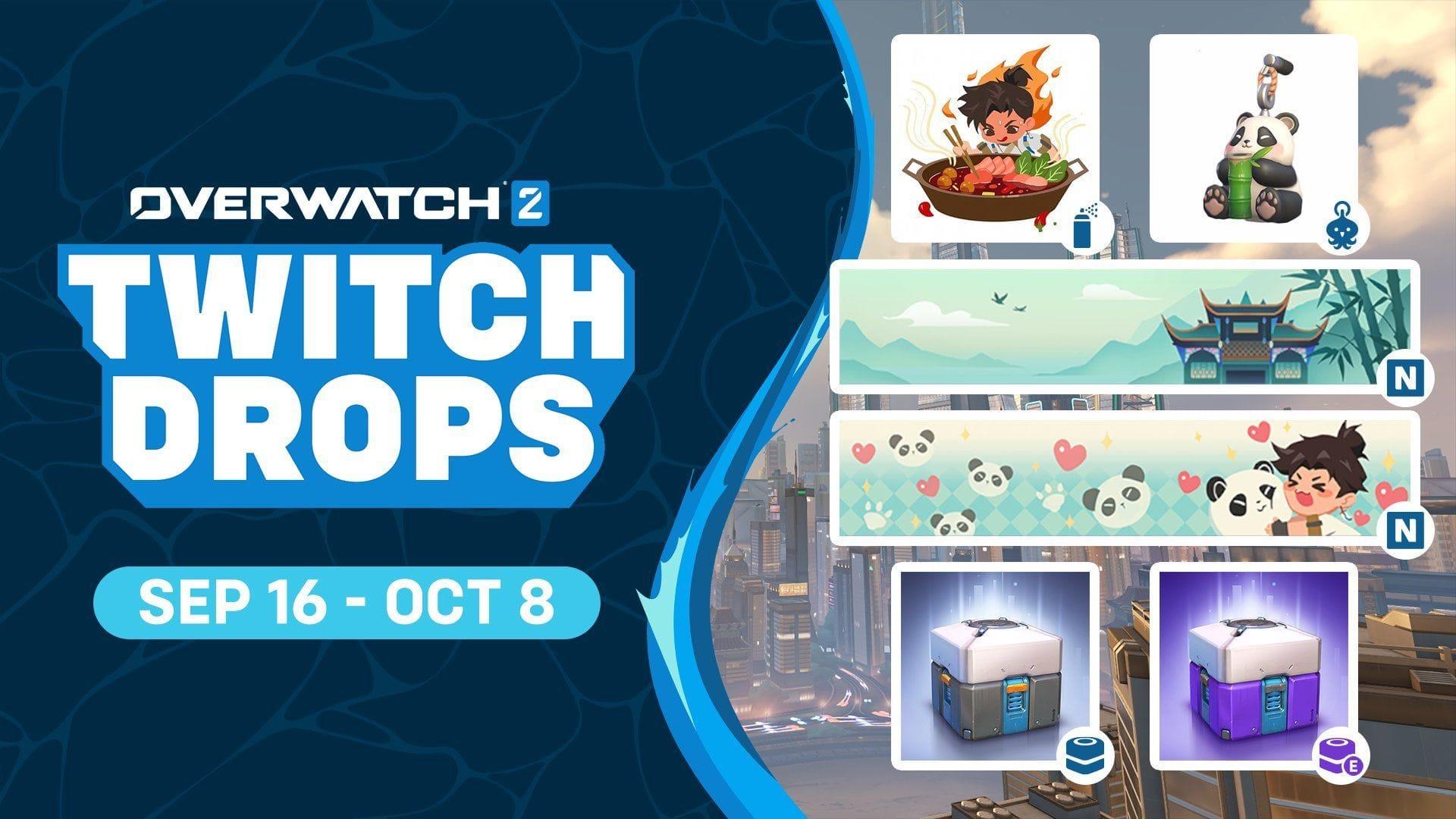
Overwatch 2’s latest collaboration introduces a culturally rich collection of Twitch Drops following the Season 18 mid-season refresh. This themed event showcases Chinese-inspired cosmetic items that perfectly complement Wuyang’s aesthetic in the game. What makes this wave particularly valuable is that every item can be obtained completely free through straightforward viewing requirements.
According to official communications from the Overwatch 2 team, this limited-time event remains accessible from September 16, 2025, through October 8, 2025. This generous three-week window provides ample opportunity for players to secure all available cosmetics, but careful planning is essential to maximize your collection efforts.
Read more: Overwatch 2 Season 18 hero perks revealed: Everything we know
Complete Reward Breakdown & Requirements
The acquisition method for these exclusive items follows the established Twitch Drops system, where community members simply need to watch designated Overwatch 2 streams with ‘Drops Enabled’ status during the specified timeframe. Each cosmetic has distinct viewing requirements, creating a progressive reward system that incentivizes extended engagement.
Here’s the complete catalog of available items with their respective watch time thresholds:
- Mala Mania Spray: Watch eligible Overwatch 2 Twitch streams for 1 hour
- Seeking Waters Way Name Card: Watch eligible Overwatch 2 Twitch streams for 3 hours
- Panda Hugger Name Card: Watch eligible Overwatch 2 Twitch streams for 5 hours
- Happy Panda Weapon Charm: Watch eligible Overwatch 2 Twitch streams for 8 hours
- Lootbox: Watch eligible Overwatch 2 Twitch streams for 10 hours
- Epic rarity Lootbox: Watch eligible Overwatch 2 Twitch streams for 13 hours
Important note: Your viewing progress accumulates across multiple streams and sessions, meaning you don’t need to complete requirements in single sittings. The system tracks cumulative watch time, making it easier to earn higher-tier rewards over the event duration.
Advanced Earning Strategies
Maximizing your Twitch Drops efficiency requires strategic approach beyond simply watching streams. First, ensure your Battle.net account is properly linked to your Twitch account through the connections page on Twitch’s website. Verification is crucial – many players miss rewards due to unlinked accounts.
Stream selection significantly impacts earning speed. Prioritize streams with stable uptime and consistent viewer counts, as these are less likely to experience interruptions. Look for the ‘Drops Enabled’ tag in stream titles or descriptions, and consider following multiple Overwatch 2 content creators to maintain consistent viewing options.
For optimal efficiency, use multiple devices where possible. You can run streams on muted browsers or mobile devices while gaming or working, though ensure volume is at least 1% to comply with Twitch’s terms. Track your progress through the Twitch inventory page, which provides real-time updates on each reward’s completion percentage.
Common Mistakes & Troubleshooting
Many players encounter preventable issues when pursuing Twitch Drops. The most common mistake involves failing to verify stream eligibility. Not every Overwatch 2 stream qualifies – only those specifically enabled for drops will contribute to your progress. Always check for the official ‘Drops Enabled’ indicator before committing viewing time.
Account synchronization problems frequently cause frustration. If rewards don’t appear in-game immediately after earning them, allow up to 24 hours for system synchronization. For delayed rewards, first check your Twitch drops inventory for confirmation, then verify your Battle.net account links. Sometimes simply relinking accounts resolves delivery issues.
Technical considerations include ensuring stream quality settings don’t interrupt view tracking. Avoid frequently switching between streams, as this can reset progress counters for current reward tiers. Also, remember that AFK viewing is permitted, but completely inactive streams (0 viewer count) may not properly track watch time.
That covers everything essential about the Overwatch 2 Twitch Drops available after the Season 18 mid-season update. For additional gaming insights, explore these related guides:
- Overwatch 2 Wuyang: Abilities, playtest, and what to expect
- What is Hero Skill Rating in Overwatch 2?
- New Sojourn Mythic skin in Overwatch 2 revealed: Everything we know
No reproduction without permission:SeeYouSoon Game Club » Overwatch 2 Twitch Drops (Season 18 mid-season update): All rewards and how to unlock Complete guide to earning Overwatch 2 Season 18 Twitch Drops with expert strategies and optimization tips