
Complete guide to unlocking Overwatch 2 Season 16 Twitch Drops with expert tips and redemption strategies
Introduction to Season 16 Twitch Drops
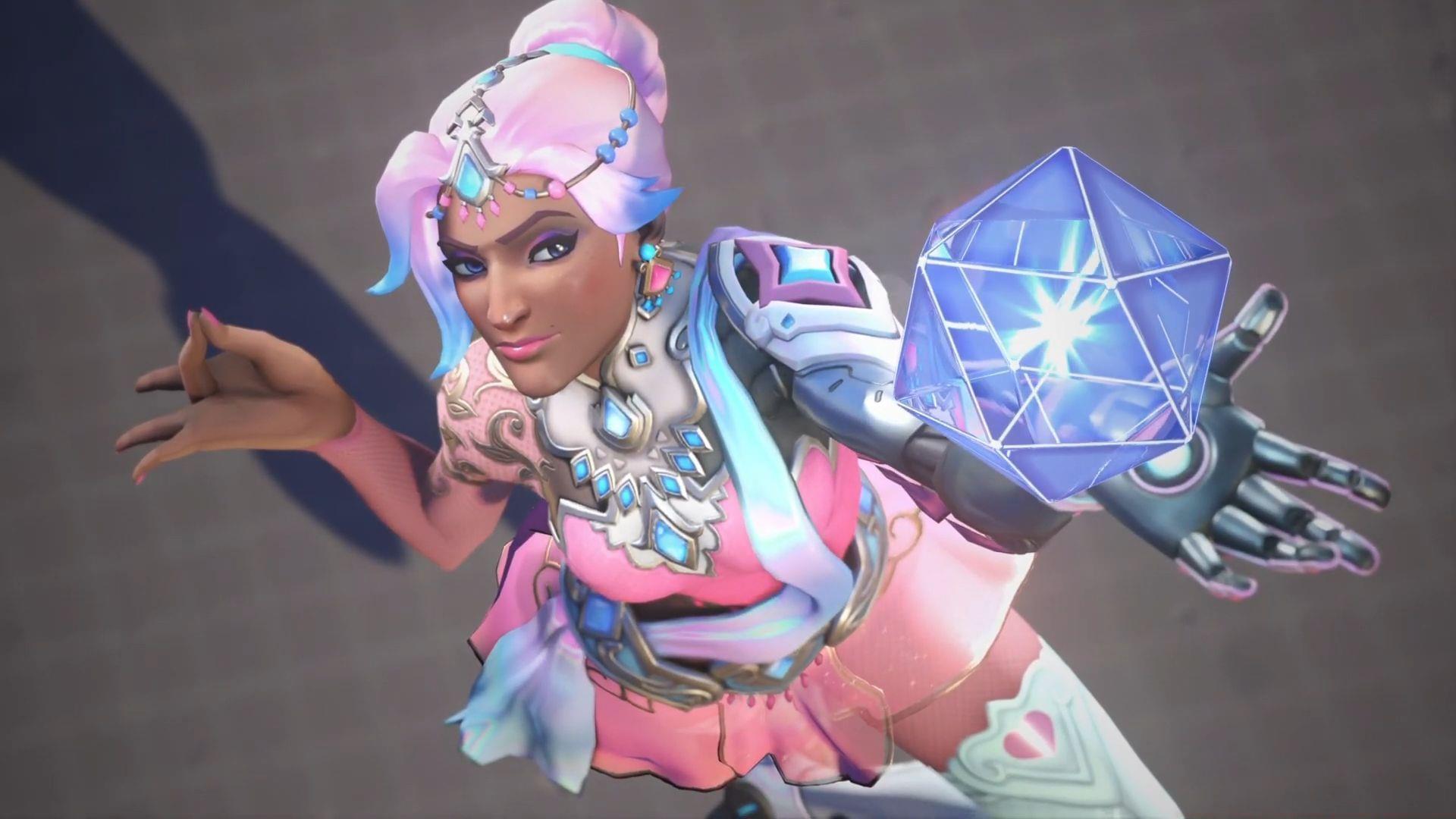
The Overwatch 2 Season 16 Twitch Drops campaign has officially commenced, presenting players with exclusive cosmetic rewards obtainable through strategic viewership. This promotional system enables dedicated fans to acquire premium in-game items without spending additional money, simply by engaging with content creators streaming Overwatch 2 on Twitch. The current event features a winter-themed collection centered around Symmetra’s Ice Princess aesthetic, offering both cosmetic enhancements and display items for player profiles.
- Ice Princess Jewel Spray
- Ice Princess Player Icon
- Ice Princess Symmetra Skin
These rewards represent varying levels of commitment, with the Legendary skin requiring the most substantial time investment. The system operates through Twitch’s integrated drops functionality, which automatically tracks viewing duration across eligible channels broadcasting Overwatch 2 content.
Read more: Overwatch 2 Season 16: 5 best damage heroes
Detailed Reward Requirements
To participate in the Overwatch 2 Season 16 Twitch Drops program, viewers must watch designated streams featuring drops-enabled Overwatch 2 gameplay. A crucial advantage of this system is its passive nature – you don’t need to actively watch the content. Simply maintaining an open tab with a qualifying stream running in the background while you work or engage in other activities will accumulate progress toward your rewards.
Each cosmetic item features distinct time requirements that must be fulfilled sequentially. The progression system operates cumulatively, meaning your viewing time counts toward all rewards simultaneously. Here’s the precise breakdown of time commitments needed for each item:
- Ice Princess Jewel Spray: Watch ‘drops-enabled’ OW2 streams for two hours – perfect for casual viewers
- Ice Princess Player Icon: Watch ‘drops-enabled’ OW2 streams for five hours – intermediate commitment level
- Ice Princess Symmetra Skin: Watch ‘drops-enabled’ OW2 streams for nine hours – dedicated fan reward
Also read: Overwatch 2 Gundam Wing collab: Release date and what to expect
Advanced Claiming Strategies
Maximize your efficiency with these professional tips for acquiring Season 16 Twitch Drops. First, ensure your Battle.net and Twitch accounts are properly linked well before starting your viewing session – this is the most common point of failure. Look for streams with “Drops Enabled” clearly marked in their title or description, as not all Overwatch 2 streams participate in the program.
Avoid these common mistakes: forgetting to claim rewards before they expire (typically 24-48 hours after completion), using multiple Twitch accounts which violates terms of service, and not verifying your progress through the Twitch Drops inventory page. For optimal efficiency, schedule your viewing during peak streaming hours when more drops-enabled channels are available, reducing the risk of streams going offline mid-progress.
Advanced strategy: Use the Twitch mobile app to maintain viewing progress while away from your computer. The system tracks watch time across devices as long as you’re logged into the same account. Monitor your progress periodically through the Drops & Rewards section to ensure everything is tracking correctly.
Redemption Walkthrough
After completing the watch time requirements for all rewards, you must manually claim them through Twitch’s interface to activate them in your game account. Follow this precise redemption process:
- Access Twitch.tv and confirm you’re signed into the exact account that accumulated the viewing progress across all drops.
- Select your profile icon positioned in the top-right corner of the screen interface.
- From the resulting dropdown navigation, choose the ‘Drops & Rewards’ option to access your available items.
- The interface will display all three unlocked rewards with individual ‘Claim’ buttons beneath each cosmetic.
- Click each claim button systematically to transfer the items to your connected Overwatch 2 account.
Following these procedures will successfully deliver the latest Overwatch 2 Season 16 Twitch Drops to your in-game inventory. Note that items may take up to 24 hours to appear in your Overwatch 2 cosmetics collection after claiming. If rewards don’t appear, first verify your Battle.net account connection in Twitch settings and restart your game client.
Check out: Overwatch 2 Stadium: All hero powers explored
For more related news, stay tuned to Sportskeeda’s esports section.
No reproduction without permission:SeeYouSoon Game Club » Overwatch 2 Season 16 Twitch Drops: All rewards and how to unlock Complete guide to unlocking Overwatch 2 Season 16 Twitch Drops with expert tips and redemption strategies