
TL;DR
- Preferred Item Slots automatically organize your inventory based on preset weapon preferences
- The system prioritizes higher rarity items and maintains order until all five slots are filled
- Proper configuration can save 2-3 seconds during critical combat situations
- Early game implementation provides significant advantage in hot drop scenarios
- Customization requires experimentation but dramatically improves muscle memory efficiency
This inventory optimization tool fundamentally transforms how you manage gear during intense firefights.
In Fortnite’s competitive battle royale environment, efficient inventory navigation often determines victory or defeat. When you’re struggling to locate crucial weapons mid-combat—potentially wasting precious seconds scrolling through misplaced items—Preferred Item Slots offers a systematic solution. This automation feature, introduced in 2021, enables preset organization of your equipment, eliminating manual sorting during high-pressure moments. Understanding this system provides a measurable edge over opponents who rely on traditional inventory management.
The feature operates on a simple principle: assign specific inventory positions to weapon categories, ensuring your assault rifle always occupies your preferred slot, followed by SMGs, snipers, and healing items in designated spaces. This consistency builds muscle memory, reducing reaction time when switching between weapons during critical engagements.
To configure Preferred Item Slots, navigate to Fortnite’s settings menu and select the Game tab, identifiable by its gear icon. Scroll downward until you locate the Preferred Item Slots option, then choose “Configure” to access the customization interface.
This configuration panel allows you to establish your ideal loadout sequence across the five available inventory slots. For instance, you might designate your leftmost position for primary assault rifles, followed by close-range SMGs, then sniper rifles, with the remaining two slots reserved for throwables and healing consumables. The system then automatically positions newly acquired items according to these preferences, creating consistent weapon placement across matches.
When experimenting with different arrangements, consider your playstyle preferences. Aggressive players typically prioritize shotgun placements in easily accessible slots, while strategic players might favor sniper rifle positioning. Don’t hesitate to test multiple configurations in creative mode before committing to your preferred setup.
The automation system maintains functionality until your inventory reaches maximum capacity with five items. Once all slots contain equipment, manual adjustments become necessary, though the system continues prioritizing higher rarity weapons within designated categories.
For example, if you’ve assigned shotguns to your second inventory position and discover an epic (orange) variant while carrying a rare (blue) version, Preferred Item Slots will automatically replace the inferior weapon with the superior one in your predetermined shotgun slot. This intelligent upgrading ensures your loadout consistently features your best available equipment without manual intervention.
The system’s limitation emerges during full inventory situations, where newly discovered items won’t automatically organize unless they represent upgrades to existing category assignments.
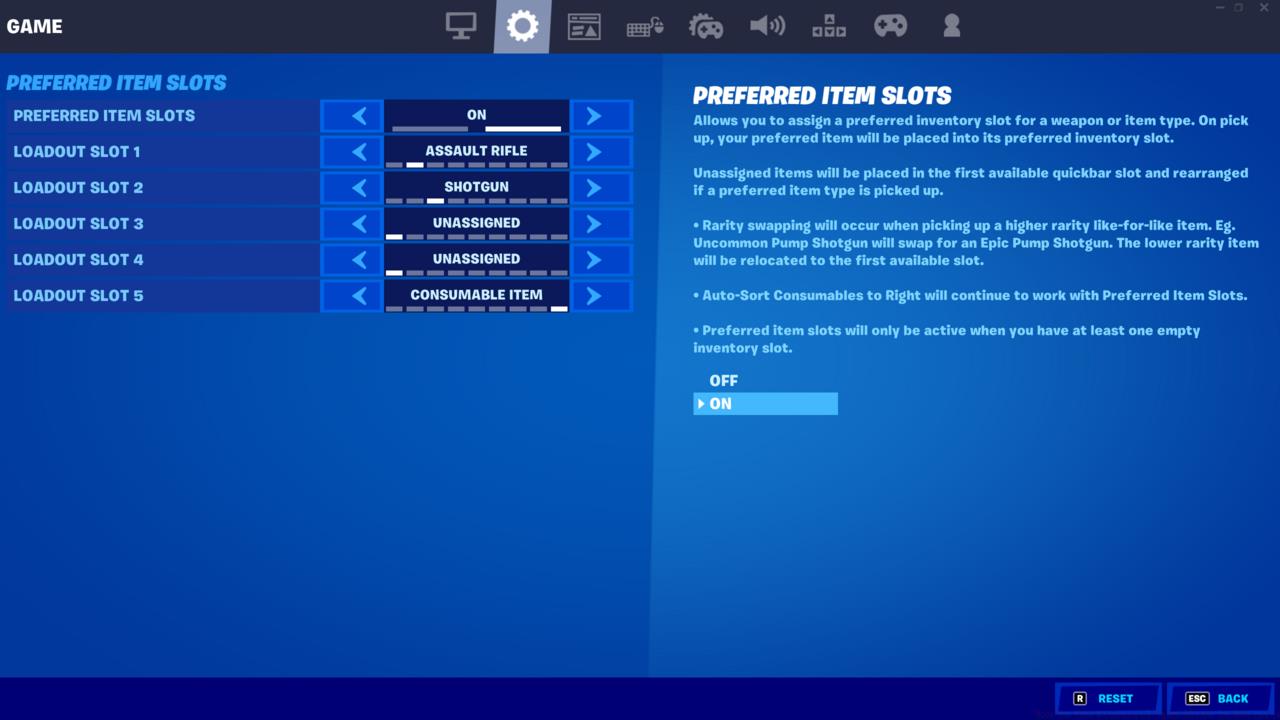
This inventory automation system represents such a significant quality-of-life improvement that returning to manual organization feels unnecessarily cumbersome.
This organizational system proves particularly valuable during early game scenarios when landing in contested areas. By eliminating the need to manually position newly acquired weapons, you gain precious seconds that could determine survival in initial skirmishes. This automated efficiency becomes especially critical during hot drops where immediate weapon access separates victors from eliminated players.
Common configuration mistakes include over-specializing slot assignments or creating impractical weapon sequences. Avoid dedicating specific positions to overly niche items that appear infrequently, as this wastes valuable organizational potential. Instead, focus on categories you consistently utilize across matches.
Advanced players should periodically reassess their Preferred Item Slots configuration as meta shifts occur. The introduction of new weapon types or balance changes might necessitate adjustments to your established preferences. Remember to select “Apply” after making changes to ensure your configurations save properly.
Since the feature’s implementation in summer 2021, all players have utilized Preferred Item Slots with default settings. If you haven’t customized these options, you’re missing optimization opportunities that could enhance your performance. Customizing this feature reduces time spent managing inventory—no more fumbling through virtual pockets like survival horror games—and increases time for strategic gameplay and celebrating victories.
Action Checklist
- Access Game settings tab and navigate to Preferred Item Slots configuration menu
- Experiment with different weapon category placements in creative mode
- Establish your primary loadout sequence based on playstyle preferences
- Test configuration in actual matches and adjust based on performance feedback
- Periodically review and update configurations as new weapons or meta changes occur
No reproduction without permission:SeeYouSoon Game Club » How To Use Preferred Item Slots In Fortnite Master Fortnite's inventory management with Preferred Item Slots to gain competitive advantage and faster loadout organization