
TL;DR
- Battlefield 6 and Redsec share weapon progression, allowing cross-mode loadout access
- Designate up to eight favorite weapon builds through the customization interface for Redsec availability
- Acquire custom weapons through timed public events or mission completion rewards
- Strategic loadout planning requires specialization for different combat scenarios and ranges
- Each custom weapon drop provides only one weapon selection, requiring careful planning
Battlefield Redsec revolutionizes the battle royale experience by integrating deeply with Battlefield 6’s progression ecosystem. Unlike standalone battle royales, this free-to-play shooter maintains weapon and attachment synchronization across both game modes, creating a unified progression pathway that rewards your investment in either experience.
The shared progression system means every weapon unlocked, attachment earned, and customization option acquired in Battlefield 6’s traditional multiplayer modes becomes immediately available within Redsec matches. This strategic design choice eliminates redundant grinding and allows players to focus on mastering their preferred weapon systems across the entire Battlefield universe. For comprehensive understanding of this ecosystem, consult our Battlefield 6 Complete Guide for detailed progression mechanics.
This cross-mode availability provides significant tactical advantages, as custom weapon builds typically outperform the randomized ground loot scattered throughout Redsec’s combat zones. However, accessing these personalized arsenals requires understanding specific acquisition mechanics that differ substantially from competitors like Warzone.
To utilize your Battlefield 6 weapon configurations within Redsec matches, you must first designate them as favorite loadouts through a specific interface process. This involves navigating to the weapon customization menu, selecting your preferred firearm, and activating the favorite status using the Triangle button on PlayStation or Y button on Xbox controllers.
The visual confirmation appears as a distinctive red star banner overlay on the weapon icon, clearly indicating successful designation. This marking system ensures quick identification of your prioritized weapons during high-pressure combat situations when rapid loadout decisions are critical.
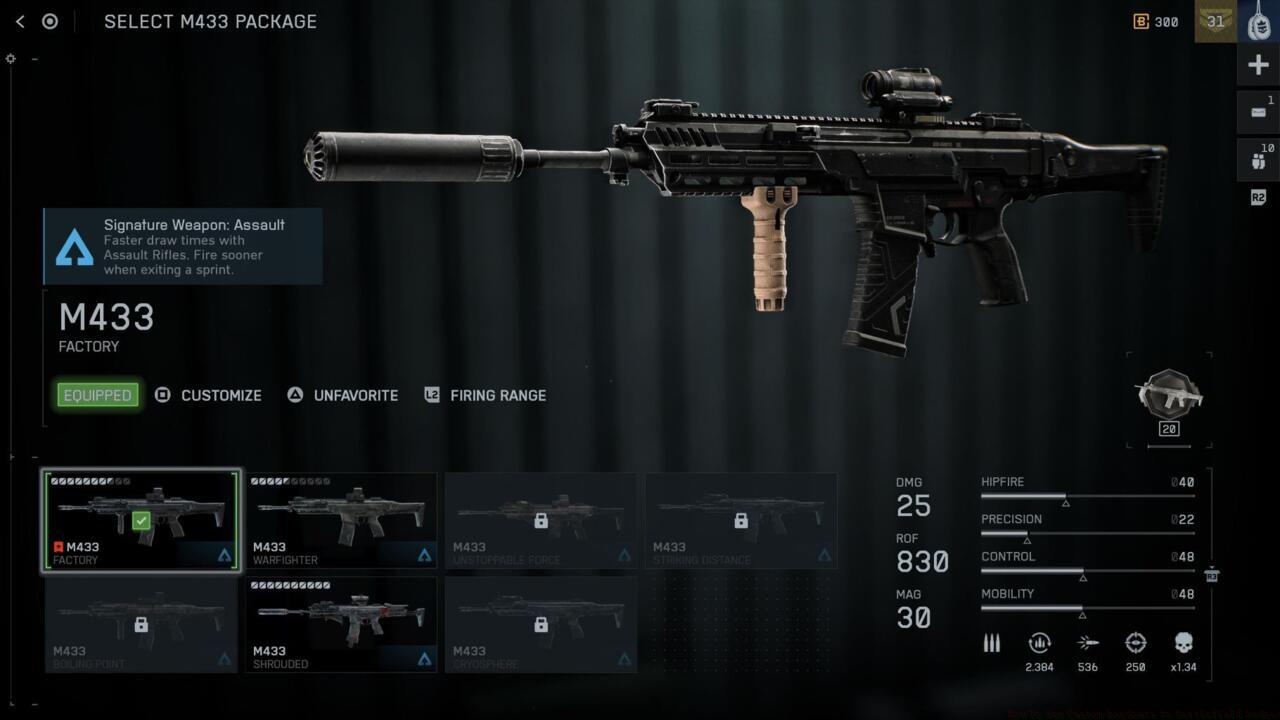
Battlefield 6 favorite weapon designation interface
Strategic loadout management demands preparation for diverse combat scenarios. Savvy players typically maintain multiple specialized builds addressing various engagement ranges and tactical situations. The system accommodates up to eight distinct favorite weapon configurations, allowing comprehensive coverage of potential combat requirements from close-quarters clearing to long-range precision engagements.
Common optimization mistakes include overlooking attachment combinations that perform differently in Redsec’s larger maps compared to traditional Battlefield 6 modes. Many players fail to optimize for the battle royale’s unique movement mechanics and engagement distances, resulting in underperforming custom builds. For weapon-specific optimization strategies, reference our BF6 Weapons Unlock Guide for detailed performance metrics.
Your designated favorite Battlefield 6 weapon builds become accessible through Redsec’s custom weapon drop system, which functions similarly to loadout acquisition mechanics in other battle royales but with crucial distinctions. Most significantly, each custom weapon drop permits selection of only one weapon from your favorites collection, demanding careful prioritization based on current match circumstances.
Two primary acquisition pathways exist for obtaining these valuable custom weapon drops:
- Public event participation: Randomly occurring map events provide opportunities to secure custom weapon drops, typically appearing during mid-game phases with clear audio and visual indicators
- Mission completion rewards: Numerous Redsec missions offer custom weapon drops as completion incentives, requiring strategic objective prioritization
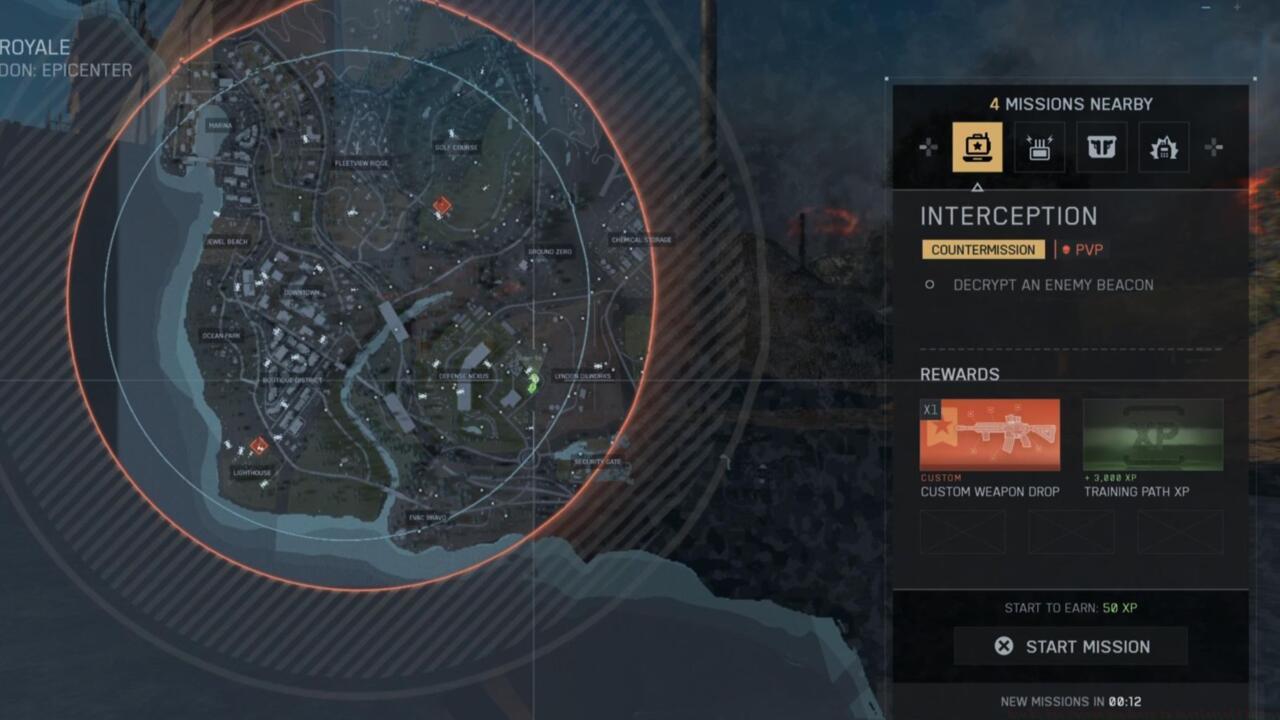
Redsec mission selection interface highlighting custom weapon drop rewards
Public events typically activate between the second and fourth circle closures, providing approximately 2-3 minute windows for participation. Mission rewards vary in difficulty and time investment, with simpler objectives taking 5-7 minutes and complex missions requiring 10-15 minutes for completion. Understanding these timeframes enables better resource allocation during matches.
Advanced acquisition strategy involves monitoring mission rotations and event timings to maximize custom weapon availability. Successful players coordinate with squadmates to secure multiple drops throughout a match, creating complementary loadout combinations that cover various tactical needs. For optimal class and weapon synergy, explore our BF6 Class Selection Guide for team composition strategies.
Beyond basic acquisition, mastering custom weapon usage requires sophisticated loadout planning tailored to Redsec’s unique combat dynamics. Weapon performance characteristics can shift significantly between Battlefield 6’s traditional modes and the battle royale’s expansive environments, necessitating specialized configurations.
Effective loadout diversification should address three primary combat ranges: close-quarters (0-30 meters), mid-range (30-75 meters), and long-distance engagements (75+ meters). Each range demands specific attachment combinations and weapon types to maximize effectiveness.
Common strategic errors include over-specialization in a single engagement range, leaving players vulnerable in varied combat scenarios. Another frequent mistake involves neglecting to create backup loadouts for when primary weapons become unavailable due to ammunition constraints or environmental factors.
Optimization for advanced players includes creating loadout pairs that share ammunition types, ensuring sustained combat effectiveness even when custom weapons are inaccessible. Additionally, considering your squad’s collective loadout coverage can create synergistic team compositions that handle any tactical situation.
Pro tips for loadout management: Always designate at least one versatile weapon capable of handling multiple engagement ranges, prioritize weapons with commonly available ammunition types, and create at least one loadout specifically for final circle scenarios where mobility and close-quarters effectiveness become paramount.
Action Checklist
- Access Battlefield 6 weapon customization and designate 3-5 primary favorites covering different engagement ranges
- Create specialized loadouts for close, mid, and long-range combat scenarios
- Monitor Redsec match for public event announcements or available missions
- Prioritize custom weapon drop acquisition based on current match situation and circle progression
- Coordinate with squadmates to secure complementary custom weapons covering multiple tactical needs
No reproduction without permission:SeeYouSoon Game Club » How To Use Custom Loadouts In Battlefield Redsec Master custom weapon builds in Battlefield Redsec with strategic loadout optimization and acquisition methods