
TL;DR
- GameShare enables Switch 2 owners to share games with friends and family members who don’t own the titles
- Setup requires accessing GameShare options within individual games, not from the home screen
- Both local and long-distance sharing options available through GameChat integration
- Limited game compatibility with specific titles supporting the feature
- Family groups can lend Virtual Game Card games with time restrictions
GameShare represents Nintendo’s innovative approach to digital game sharing, transforming how friends experience multiplayer gaming together. This feature addresses the common frustration when gaming groups want to play together but not everyone owns the same titles.
The system functions as a temporary game lending mechanism that enables Switch 2 owners to share their digital library with friends and family members. Unlike traditional game sharing methods, GameShare operates through a controlled environment that maintains game ownership rights while expanding accessibility. This eliminates the financial barrier that often prevents entire friend groups from enjoying the same gaming experiences simultaneously.
One crucial aspect many users overlook is that GameShare sessions maintain full multiplayer functionality, meaning shared games operate identically to owned copies during active sessions. This comprehensive sharing solution ensures no one gets excluded from gaming sessions due to purchase limitations.
Initiating a GameShare session follows a specific protocol that differs from conventional sharing methods. The game owner must navigate to the GameShare option located within the specific game’s menu system—this critical step often confuses users who expect to find sharing options on the system’s home screen interface.
Once the sharing process activates through the in-game menu, participants without game ownership can locate the distinctive GameShare icon positioned at the bottom section of their home screen. This icon only appears when an active sharing session is available for joining, preventing unnecessary clutter in the user interface.
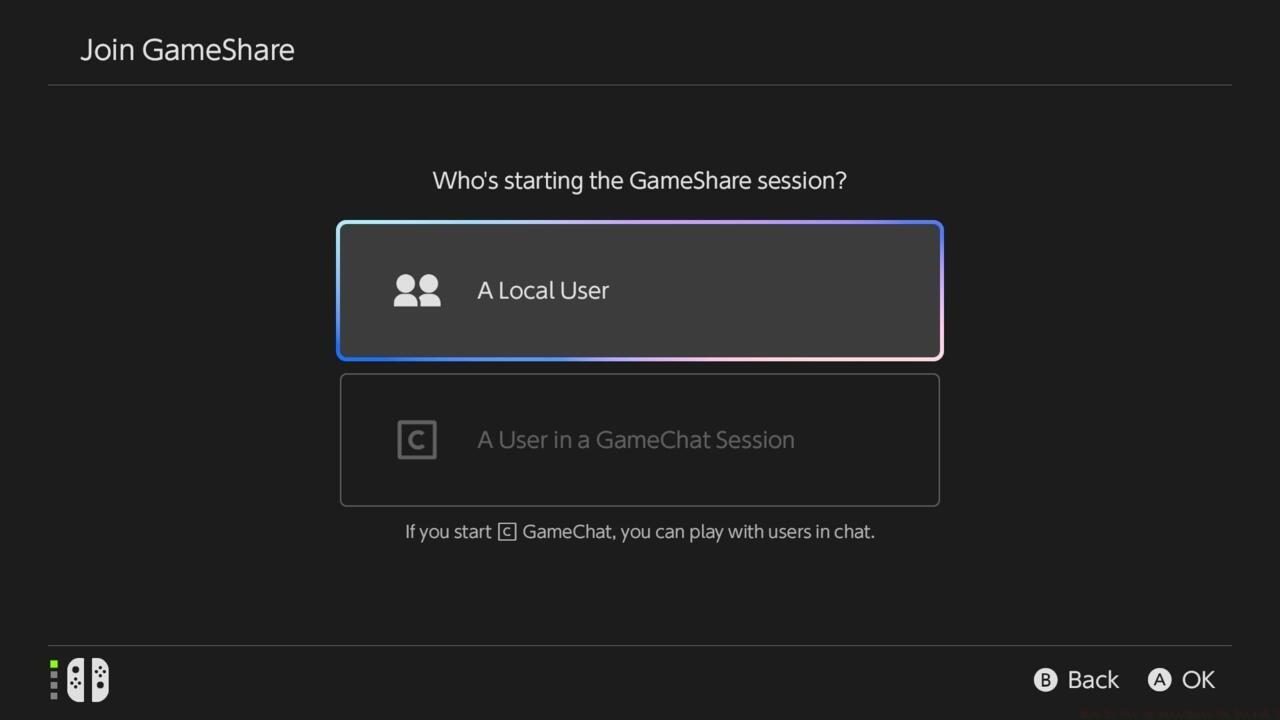
GameShare interface showing local and GameChat connection options for joining players.
Connection methodology varies significantly between local and long-distance sessions. Local GameShare participants can establish connections effortlessly by selecting the ‘A Local User’ option, which utilizes proximity-based connectivity. However, long-distance sharing necessitates GameChat integration, requiring all participants to configure GameChat beforehand for successful game sharing across distances.
A common setup mistake involves attempting long-distance sharing without proper GameChat configuration, resulting in connection failures. Ensure all potential participants complete GameChat setup before initiating cross-region sharing attempts to avoid disruption.
Long-distance GameShare sessions maintain connectivity for the entire duration of the active GameChat session, providing extended playtime for distributed friend groups. This temporal limitation ensures shared games eventually return to their original owners while maximizing accessibility during active sessions.
GameShare compatibility remains selective rather than universal across the Switch 2 library, with specific titles engineered to support this sharing functionality. Nintendo maintains an official registry of GameShare-enabled games, with current support focused on multiplayer-oriented experiences.
The compatibility list continues expanding as developers incorporate GameShare support into new releases. Current fully supported titles according to Nintendo’s official documentation include:
Industry analysts anticipate significant expansion of GameShare compatibility throughout 2024, with major publishers evaluating integration for upcoming multiplayer titles. This gradual rollout ensures stability and performance optimization across the gaming ecosystem.
A crucial limitation involves game save compatibility—shared games typically don’t permit save data creation or transfer, maintaining progression exclusivity for actual owners. This design choice protects investment value while enabling temporary access.
Family Group sharing extends GameShare functionality to designated family members with additional flexibility and extended time allowances. This specialized sharing mode requires establishing a formal Family Group through Nintendo’s account management system before game lending becomes available.
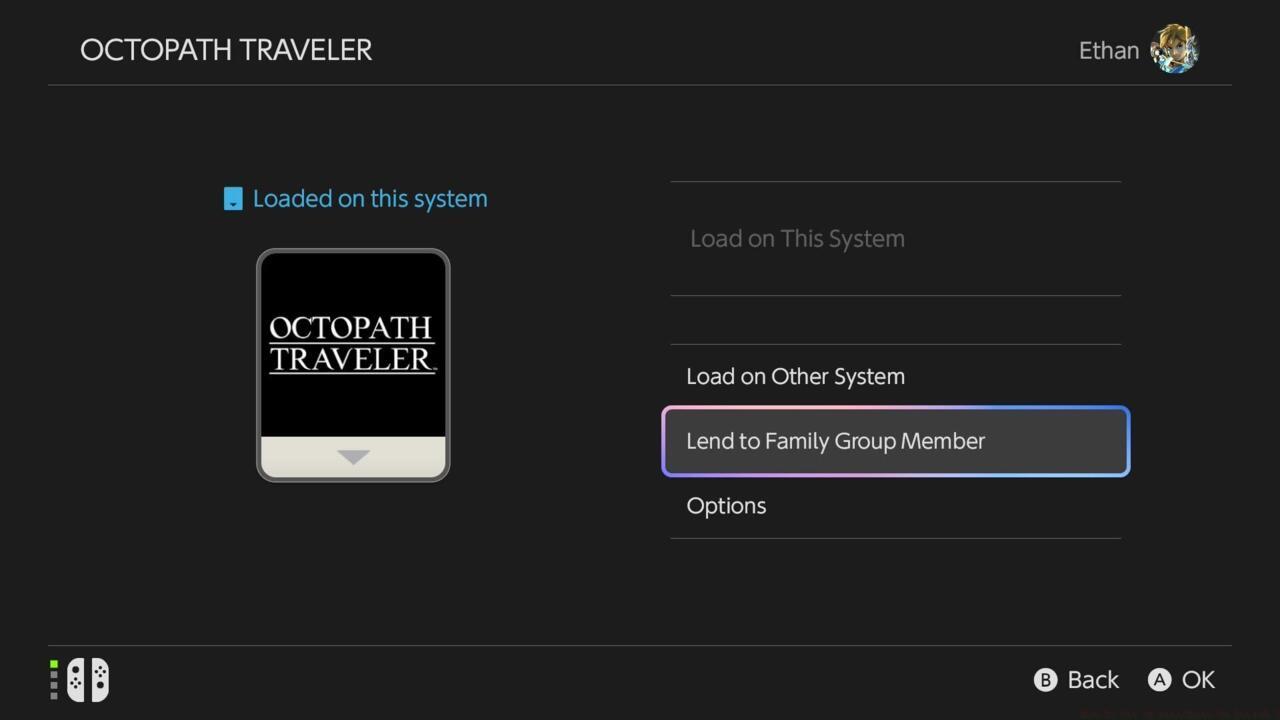
Family Group sharing interface showing Virtual Game Card lending options with time restrictions.
Virtual Game Card titles represent the primary content category eligible for family sharing, with specific lending duration limits applied to prevent permanent transfers. These temporal restrictions typically range from 24 hours to 7 days depending on publisher specifications and game type.
Family Group lending operates under distinct rules compared to standard GameShare—extended play periods, simultaneous access for multiple family members, and specialized parental controls for younger gamers.
Configuration involves accessing family management settings through the system’s account menu, then designating specific games as shareable within the family ecosystem. This process requires the family group organizer to initiate sharing permissions rather than individual family members requesting access.
A frequently encountered issue involves confusion between Family Group sharing and standard GameShare—the former offers extended accessibility within trusted circles while the latter focuses on temporary friend-based sharing.
Optimizing GameShare performance requires understanding the underlying technical constraints and connection methodologies. For local sessions, ensure all devices remain within approximately 30 feet for optimal connectivity, as distance significantly impacts performance stability.
Long-distance sharing through GameChat benefits from stable internet connections with minimum 5Mbps upload speeds for the host and 3Mbps download speeds for participants.
Common connectivity issues often stem from NAT type restrictions—achieving NAT Type A or B dramatically improves connection success rates compared to restrictive NAT Type C or D configurations.
Advanced users can maximize GameShare effectiveness by scheduling sessions during off-peak internet hours when bandwidth availability increases connection quality. Additionally, closing background applications on the Switch 2 frees system resources for smoother shared gaming experiences.
When experiencing persistent connection failures, reset both the hosting and joining consoles before reattempting GameShare initiation. This simple troubleshooting step resolves numerous transient connection issues.
For comprehensive gaming strategies beyond sharing, explore our Battlefield 6 Complete Guide for advanced tactics and gameplay optimization.
Action Checklist
- Configure GameChat for all potential long-distance sharing participants
- Verify game compatibility through Nintendo’s official GameShare list
- Initiate sharing from within compatible games, not home screen
- Establish Family Group for extended sharing with family members
- Optimize network settings for improved long-distance sharing performance
No reproduction without permission:SeeYouSoon Game Club » How To Set Up GameShare On Switch 2 Master Nintendo Switch 2 GameShare with setup guides, compatible games, and family sharing strategies