
TL;DR
- Use Polygonal Scanners in triangular formations to pinpoint deep deposits with minimal energy expenditure
- Deploy Mining Outposts strategically to serve as both resource extractors and fast travel waypoints
- Establish Pylon networks with clear line of sight and upgrade to Hub Pylons for extended range
- Connect multiple outposts to single Pylon networks to maximize resource collection efficiency
- Position Travel Pylons in remote areas to minimize backtracking and optimize exploration time
Building a sustainable resource pipeline is crucial for survival and progression in The Alters. While surface materials are abundant, the most valuable resources lie hidden in deep deposits that require specialized equipment and strategic planning to access efficiently.
Many players struggle with resource management early on, often wasting valuable materials on inefficient setups. This guide provides advanced techniques to optimize your scanning, mining, and power distribution systems, ensuring you maximize returns on your investment.
To establish effective resource operations, you’ll need three core components:
- Polygonal Scanner – Essential for detecting underground deposits; quantity can be increased through Probes Upgrade research
- Mining Outposts – Crafted at the Workshop for 30x metals each
- Pylon Components – Available as packages of three from the Workshop, costing 30x metals per package
When surveying new regions, you’ll notice areas indicating potential deep deposits containing metals, minerals, organics, rapidium, and enhanced resources. Your Polygonal Scanners, accessible through the item wheel, are your primary tools for precise resource localization.
Optimal Scanner Deployment: Place scanners in triangular formations rather than random patterns. This geometric approach creates more effective detection zones and reduces the number of scanners needed per deposit. The ideal distance between scanners is approximately 15-20 meters – close enough for connection but far enough to cover substantial area.
- Position Polygonal Scanners to form enclosed geometric shapes, with triangles being most efficient for initial scanning
- Monitor the enclosed area for proximity indicators that reveal deposit depth and concentration
- Activate Scan Wave by holding the prompt button; this consumes 1x Suit Energy but provides directional guidance toward deposit cores
Advanced Technique: Experienced players use sequential scanning – start with a large triangle, then deploy additional scanners to narrow the search area systematically.
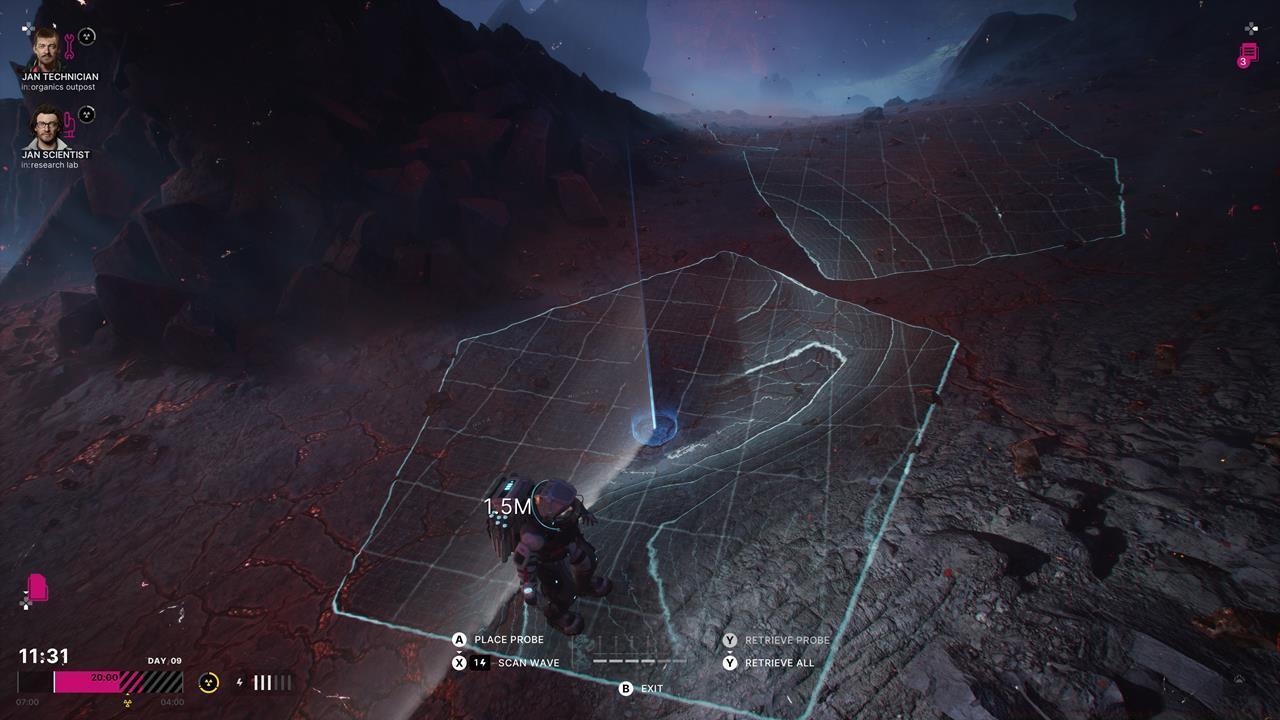
Strategic scanner placement in triangular formations significantly improves deposit detection efficiency.
Once you’ve precisely located a deep deposit core through scanning, the game prompts you to deploy a Mining Outpost via Building Mode. These structures serve as your primary resource extraction points and exploration aids.
Mining Outpost Capabilities:
- The central extraction terminal enables Jan or any alter to harvest substantial quantities of the identified resource type
- A navigation panel provides instant fast travel to your base, other Mining Outposts, or Travel Pylons
- The energy station allows complete recharging of your Suit Battery system
Critical Consideration: Many players mistakenly believe Mining Outposts become operational immediately after placement. In reality, they require power connectivity through Pylon networks before any functions become available.
Strategic Placement Tip: Position outposts near multiple potential deposit sites when possible. This allows single outposts to service several deposits as you discover them, reducing overall construction costs.
Effective resource mining in The Alters demands establishing reliable power connections from Mining Outposts back to your mobile base. This infrastructure determines your operational range and efficiency.
Network Establishment Protocol:
- Access the item wheel and select Pylon objects; deploy the initial pylon near the maximum operational distance from the Mining Outpost
- Continue placing additional pylons while maintaining return path to your base, ensuring uninterrupted line of sight between each structure
- Visual confirmation comes from the green power conduit that automatically forms between properly aligned pylons
- When a pylon connects within range of your base generator, the connected Mining Outpost activates fully
- Later game progression unlocks Hub Pylons through research, offering significantly extended connectivity range compared to standard models
Advanced Network Design: Instead of creating separate networks for each outpost, connect multiple Mining Outposts to existing pylon lines. This shared infrastructure approach conserves resources and simplifies expansion.
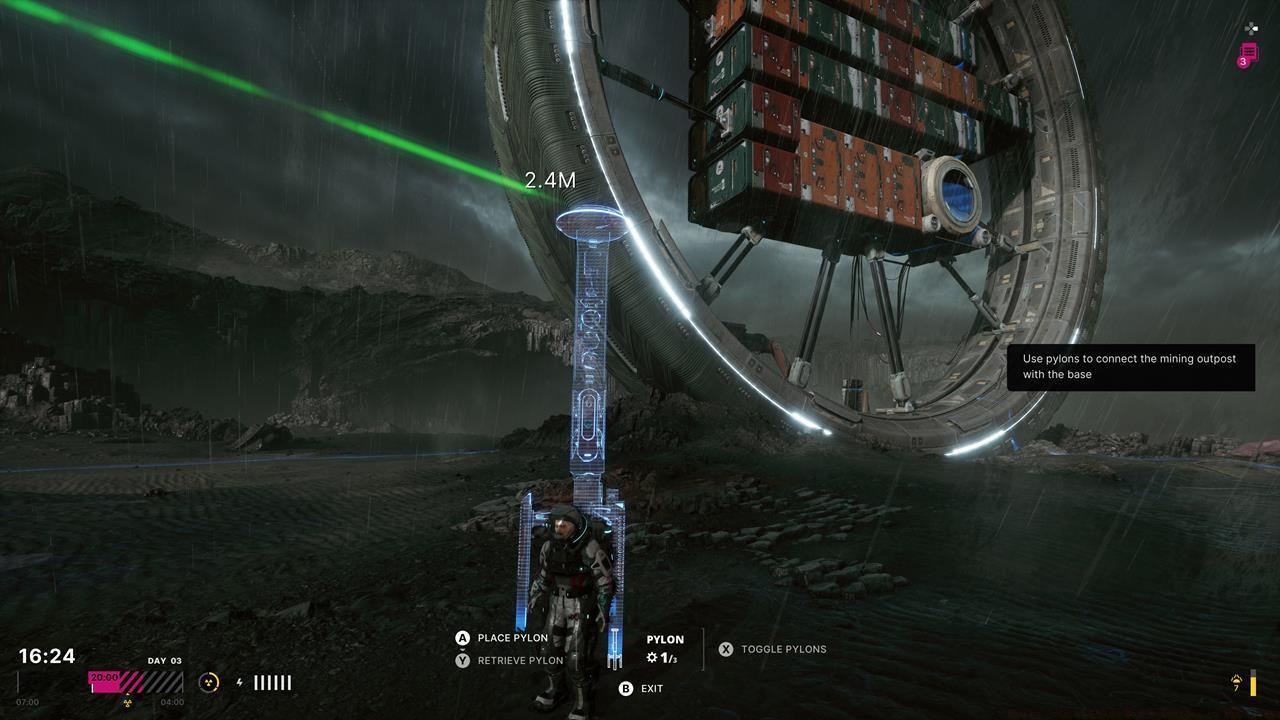
Well-planned pylon networks with clear line of sight ensure reliable power delivery to remote mining operations.
Common Mistake: Players often place pylons too close together, wasting materials and creating unnecessary network complexity. Optimal spacing maximizes coverage while maintaining connection integrity.
Travel Pylon Integration: As you progress, you’ll gain access to Travel Pylons, specialized structures that enhance mobility across explored regions. These function as additional fast travel points and provide suit energy recharging capabilities.
Strategic Placement: Position Travel Pylons in areas distant from existing Mining Outposts to create comprehensive travel networks. This strategic placement minimizes unnecessary backtracking and optimizes exploration efficiency.
Power Dependency: Remember that Travel Pylons, like Mining Outposts, require connection to active Pylon or Hub Pylon networks to remain operational.
Time Optimization: Efficient players establish pylon networks along exploration routes rather than direct paths. This forward-thinking approach ensures new discoveries can be quickly integrated into existing infrastructure.
Common Pitfalls to Avoid:
- Don’t exhaust all scanner energy on single deposits – conserve for multiple potential sites
- Avoid placing Mining Outposts on deposits with limited resources; assess potential yield first
- Never deploy pylons without verifying line of sight to adjacent structures
- Don’t ignore Hub Pylon research – the extended range dramatically improves network flexibility
- Avoid constructing Travel Pylons too close to existing fast travel points; maximize coverage area instead
Mastering these resource management systems will significantly enhance your survival capabilities. For comprehensive strategies on utilizing gathered resources, explore our Complete Guide to base development and resource allocation.
Need more specialized guidance? Our Weapons Unlock and Class Guide provide additional tactical insights for overcoming The Alters’ challenges.
Action Checklist
- Deploy Polygonal Scanners in triangular formations 15-20 meters apart for optimal deposit detection
- Use Scan Waves strategically to conserve suit energy while pinpointing deposit cores
- Place Mining Outposts only after confirming deposit value and potential for multiple resource servicing
- Establish Pylon networks with clear line of sight, optimizing spacing between structures
- Research and deploy Hub Pylons to extend network range and connectivity
No reproduction without permission:SeeYouSoon Game Club » How To Scan And Mine For Resources In The Alters Master resource scanning, mining outpost deployment, and pylon network optimization in The Alters