
TL;DR
- PS5 Audio Focus eliminates console audio disadvantage by amplifying critical sounds like footsteps
- Four presets (Boost High Pitch, Boost Quiet Sounds, Boost Voices, Boost Low Pitch) with adjustable strength levels
- Boost High Pitch provides maximum footstep detection but may cause audio discomfort on strong settings
- Audio Focus only works with headphones and requires latest PS5 system software update
- Start with weak/medium settings and gradually adjust based on your hearing sensitivity
The recent PlayStation 5 system enhancement introduces groundbreaking audio accessibility capabilities that transform competitive gameplay. Released on April 24, 2025, Audio Focus represents Sony’s commitment to leveling the playing field between console and PC gamers through advanced sound processing technology.
This innovative feature functions similarly to Loudness Equalization settings that PC Call of Duty enthusiasts have utilized for years. The technology balances audio dynamics by reducing excessively loud sounds while intensifying subtle audio cues, particularly enemy movement indicators that often determine match outcomes. For several gaming seasons, console participants faced significant auditory disadvantages compared to their computer-based counterparts.
The gap between platforms has now substantially narrowed for PlayStation 5 owners. Simply activating Audio Focus and configuring a few parameters can dramatically improve your situational awareness during intense multiplayer engagements.
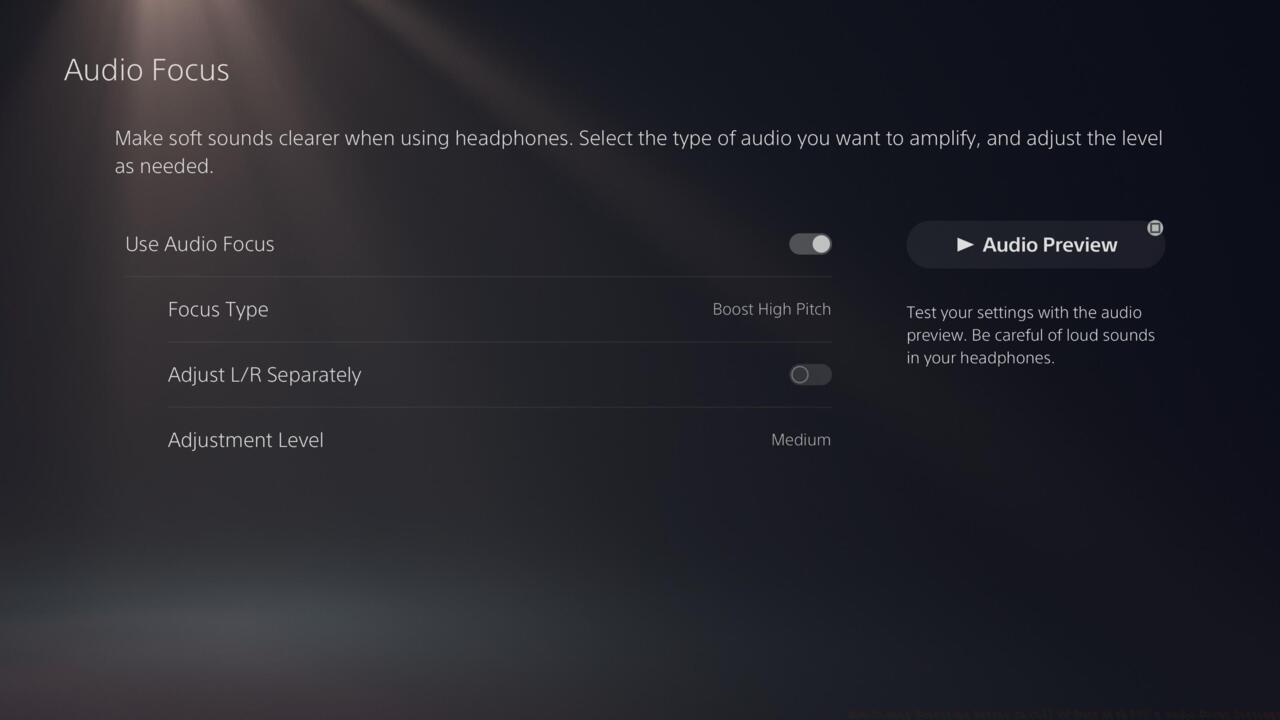
PS5’s Audio Focus setting
Begin by confirming your PlayStation 5 operates on the most current system software version available.
- Navigate to your console’s configuration menu
- Choose the Audio options category
- Proceed downward through the menu to locate Volume controls
- Activate Audio Focus functionality
You’ll discover four distinct audio enhancement profiles: Boost Low Pitch, Boost Voices, Boost High Pitch, and Boost Quiet Sounds. Every profile offers customizable intensity options including mild, moderate, and powerful settings, plus the ability to independently configure left and right audio channels for precision tuning.
Boost High Pitch
The Boost High Pitch configuration specifically targets footstep audio enhancement, as it focuses on intensifying “high-frequency auditory signals including footsteps and metallic impacts.”
Although accessible to all gamers seeking competitive benefits, remember that Audio Focus primarily serves as an accessibility tool designed for individuals with genuine hearing impairments. Many streamers and content producers will likely employ maximum settings to optimize their competitive performance, but players with normal auditory capabilities might discover they don’t require the highest intensity for effective sound improvement.
I suggest initiating with mild or moderate intensity for this particular setting. Having both acute hearing and quality headphones, I discovered that utilizing the powerful setting for Boost High Pitch created excessive audio amplification. While footsteps remained at tolerable volumes, certain metallic sounds within the enhancement spectrum frequently became uncomfortably sharp. Specific vehicle engine noises and the screeching metal from aircraft wreckage in Boneyard became nearly intolerable during my testing sessions.
I conducted extensive Warzone gameplay sessions utilizing Boost High Pitch across various intensity levels. The technology unquestionably enhanced footstep detection remarkably, to the extent that opponents might suspect unauthorized modifications. On multiple occasions, I detected enemy movements from considerable distances behind terrain obstacles, and successfully identified approaching adversaries from behind during active firefights—situations where normal audio settings would provide insufficient warning.
Boost Quiet Sounds
The Boost Quiet Sounds profile indicates it intensifies “low-volume auditory signals across broad frequency ranges.” Since footstep audio typically registers as subtle in Call of Duty titles, I evaluated this as a more gentle option compared to the Boost High Pitch configuration.
I tested Warzone gameplay employing this setting at moderate and powerful levels. I continued to perceive footsteps more distinctly than standard configurations provided, though the effect seemed less pronounced than Boost High Pitch delivered. The most noticeable audio enhancement occurred when opponents moved through Verdansk’s vegetated regions. I detected grass movement sounds with greater clarity, enabling more precise location identification of approaching enemies.
Consequently, this represents a more subdued alternative for players seeking audio amplification who find Boost High Pitch excessively intense. This setting additionally reveals environmental audio elements like wind effects and foliage rustling that typically remain inaudible, though such atmospheric details rarely provide tactical match advantages.
Audio Focus exclusively functions with headphones. If configuration adjustments remain unavailable, the system likely fails to detect audio peripherals, so verify headset connectivity. This functionality should operate across various PlayStation 5 gaming titles beyond Call of Duty franchises.
Common Configuration Errors: Many players immediately select maximum intensity settings, resulting in audio discomfort and reduced gameplay enjoyment. Another frequent mistake involves neglecting stereo channel calibration, which can create directional audio imbalances affecting spatial awareness.
Advanced Optimization Strategy: Combine Boost High Pitch at medium intensity with gaming headphones featuring enhanced treble response for optimal footstep detection without audio fatigue. Professional gamers recommend dedicating 15-20 minutes to audio calibration in training modes before competitive matches.
For comprehensive configuration guidance, we additionally provide detailed recommendations for optimal settings in Black Ops 6 and Warzone environments. This encompasses controller configurations, audio parameters, visual settings, and advanced gameplay adjustments that complement your Audio Focus configuration.
Action Checklist
- Verify PS5 system software version 8.00 or newer
- Connect compatible gaming headphones to controller audio port
- Navigate to Settings > Sound > Volume > Audio Focus
- Select Boost High Pitch preset and configure to medium strength
- Test audio calibration in training mode for 15 minutes
- Adjust stereo channel balance if directional audio seems imprecise
No reproduction without permission:SeeYouSoon Game Club » How To Hear Footsteps Better In Call Of Duty With PS5’s Audio Focus Settings Master PS5 Audio Focus to gain competitive edge in Call of Duty with enhanced footstep detection