
TL;DR
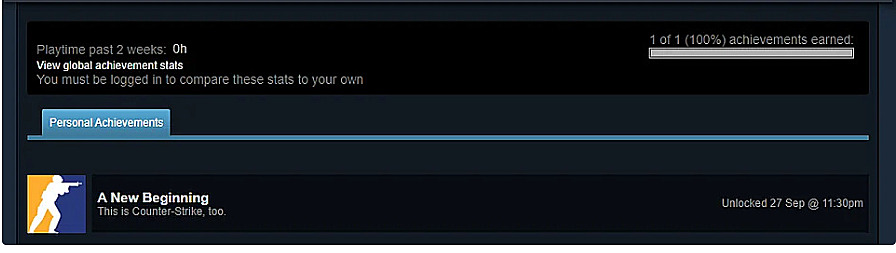
- CS2 replaced all CS:GO achievements with just one hidden achievement called ‘A New Beginning’
- Navigate to Steam Games → Counter-Strike 2 → Achievements to view your progress
- Achieve a multi-kill in any game mode including bot matches or Deathmatch
- The achievement may require match completion or multiple attempts due to occasional bugs
- Restarting practice sessions or verifying through Steam Community can help trigger recognition
Games and Esports Articles CS 2
Valve’s September 27th release of Counter-Strike 2 marked a significant transition in the franchise, completely replacing CS:GO and making its official servers inaccessible. This overhaul extended to the achievement system, where all previously earned CS:GO accomplishments were removed from Steam profiles, creating a clean slate for the new gaming experience.
To access the current achievement listing, navigate through your Steam client interface: select your profile → Games library → Counter-Strike 2 → then locate the Achievements tab positioned on the right-side panel. This streamlined approach simplifies tracking your gaming milestones compared to the previous system.
Counter-Strike 2 currently features just a single unlockable accomplishment, deliberately hidden from view until successfully obtained. Titled “A New Beginning,” this achievement symbolizes the fresh start for both the game and its player base. While accessible to all skill levels, understanding its specific activation criteria requires careful attention to in-game actions.
CS2 official minimal system requirements on Steam. Can my PC run CS2?
While Valve hasn’t provided official documentation for obtaining the “A New Beginning” achievement, community testing has revealed consistent activation patterns. Players report that initiating any match type within CS2 and securing a multi-kill during a single round triggers the accomplishment. This includes less intensive modes like training sessions against AI opponents or casual Deathmatch scenarios, making it accessible regardless of competitive play preference.
The term “multi-kill” typically refers to eliminating multiple opponents within a short timeframe, usually 2-4 kills depending on the game mode. For optimal results, focus on achieving rapid successive eliminations rather than spaced-out kills across different rounds. The achievement’s hidden nature means you won’t receive progress indicators, requiring you to complete the action then check your Steam profile for confirmation.
Success rates appear highest in official matchmaking games, though bot matches provide a reliable alternative for players preferring solo practice. The flexibility in completion methods ensures that both new and experienced Counter-Strike enthusiasts can earn this milestone through their preferred playstyle. If you’re working on weapon mastery, our Weapons Unlock guide offers transferable aiming techniques that can improve your multi-kill efficiency.
The achievement system occasionally experiences recognition delays, where successful multi-kills don’t immediately register. Some players found that completing the entire match session or restarting practice modes multiple times eventually triggered the unlock. This suggests potential server-side validation timing or specific round completion requirements that aren’t immediately apparent.
If your achievement doesn’t pop after meeting the requirements, try these verified workarounds: first, ensure you’ve played through to match conclusion rather than exiting early; second, attempt the multi-kill in different game modes to account for mode-specific bugs; third, verify your Steam connection stability during gameplay sessions.
Community reports indicate that achievement tracking may require consistent play rather than isolated attempts. Playing several rounds consecutively with multiple multi-kill performances increases the likelihood of successful registration. The community-driven Complete Guide to FPS mechanics provides additional troubleshooting approaches that apply to CS2’s system.
For persistent issues, check the Steam Community forums for current bug reports and solutions. Valve typically addresses achievement recognition problems in subsequent patches, so checking for game updates before extensive retrying can save time and frustration. Understanding class roles through our Class Guide can also help optimize your loadout for multi-kill scenarios.
Valve changes weekly skin/case drops in CS2. How to get Care Package rewards in CS2
We have a choice now.
Seasoned players recommend specific strategies for consistent achievement unlocking: utilize high-capacity weapons like rifles or SMGs in close-quarters maps, focus on objective points where enemy concentration is higher, and practice burst firing techniques to maximize elimination efficiency within tight time windows.
The gaming community continues to discover nuanced activation criteria, with some evidence suggesting that multi-kills spread across different opponents rather than repeated kills on the same player yield better results. The hidden nature suggests Valve may add more achievements later, making “A New Beginning” potentially the first of many.
Document your attempts by noting the game mode, number of kills, time between eliminations, and whether you completed the match. This data can help identify patterns if the achievement doesn’t trigger initially. Many successful players reported achievements popping during subsequent gaming sessions rather than immediately, indicating possible delayed server synchronization.
Remember that achievement systems in newly launched games often undergo adjustments during initial months. If you’ve met the requirements without success, periodically check your Steam profile as retroactive recognition sometimes occurs after system updates.
Action Checklist
- Launch CS2 and select any game mode (Competitive, Casual, Deathmatch, or Practice with Bots)
- Achieve a multi-kill (2-4 rapid eliminations) in one round
- Complete the entire match session without early exit
- Check Steam profile → Games → CS2 → Achievements for verification
- If not unlocked, repeat in different game modes or restart practice sessions
- Verify game is updated to latest version and check community forums if issues persist
No reproduction without permission:SeeYouSoon Game Club » How to get A New Beginning achievement in CS2. What are achievements of CS2? Complete guide to unlocking CS2's only achievement with troubleshooting tips and Steam navigation