
TL;DR
- Clear DirectX shader cache through Windows Disk Cleanup to resolve immediate freezing
- Increase GPU shader cache size in NVIDIA Control Panel for long-term performance gains
- Update graphics drivers and verify system meets Stalker 2’s demanding requirements
- Monitor system temperatures and performance during extended compilation sessions
- Implement regular maintenance to prevent recurrence of shader compilation issues
Games and Esports Articles
S.T.A.L.K.E.R. 2 encounters significant performance bottlenecks during the initial shader compilation phase, which can completely halt game progression for many players. This preprocessing stage translates game shaders into formats optimized for your specific hardware configuration, but corrupted cache files or insufficient allocation often trigger extended freezes lasting 5-10 minutes or becoming permanent.
The compilation process is particularly demanding because Stalker 2 utilizes advanced rendering techniques and dynamic lighting systems that require extensive shader preparation. Systems with older graphics cards or limited VRAM experience the most severe symptoms, though even high-end configurations can encounter issues if system caches become corrupted over time.
Shader compilation represents a critical performance optimization step where game assets are prepared for your specific GPU architecture. When this process fails, players face either extended waiting periods or complete game lockups, making understanding and resolving these issues essential for enjoying the game properly.
The most effective initial approach involves purging accumulated shader cache data that may have become corrupted or outdated. This straightforward Windows procedure eliminates problematic cached files that often cause compilation hangs.
- Ensure the game is completely closed, including any background processes running in your system tray.
- Activate the search function by pressing the Windows key or selecting the search interface.
- Input “Disk Cleanup” and initiate the system utility application.
- Examine the presented selection list and locate the DirectX Shader Cache option specifically.
- Place a checkmark in the corresponding box and confirm your selection by clicking “OK.”
- When prompted with “Are you sure you want to permanently delete these files?” respond affirmatively.
- Restart Stalker 2 to trigger fresh shader compilation with clean cache foundations.

This cache clearance typically reduces subsequent compilation times by 30-60% while resolving most freezing scenarios. The improvement occurs because the game rebuilds shaders from scratch rather than attempting to utilize potentially damaged cached versions. For optimal results, consider performing this maintenance monthly or after significant graphics driver updates.
When cache clearing provides only temporary relief or fails entirely, adjusting your graphics card’s shader cache allocation delivers more permanent solutions. This configuration change accommodates Stalker 2’s substantial shader requirements.
- Access the NVIDIA Control Panel through your Windows taskbar notification area.
- Navigate to the Manage 3D Settings section within the control interface.
- Scroll through the available options until you locate Shader Cache Size settings.
- Choose an allocation size appropriate for your storage capacity; 10GB represents the recommended minimum for stable performance.
- Finalize your configuration changes by selecting the Apply button.
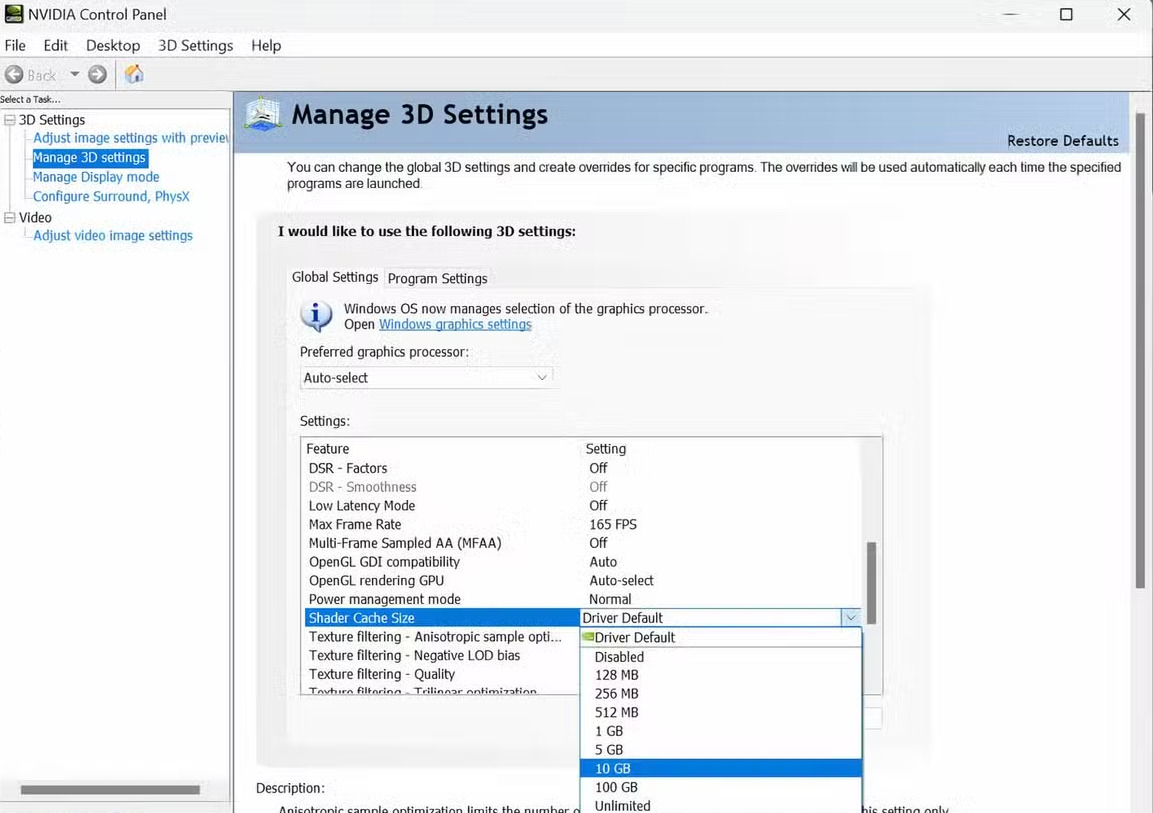
AMD users can achieve similar results through Radeon Software by accessing Graphics settings, then Advanced options, and modifying Shader Cache allocations similarly. The increased cache prevents frequent recompilation of commonly used shaders, significantly accelerating loading times after the initial compilation completes. Systems with solid-state drives benefit most from larger cache sizes due to faster read/write capabilities.
Monitor your system’s performance after implementing these changes. If compilation times remain excessive, investigate potential hardware limitations or driver compatibility issues that might require additional troubleshooting measures.
For persistent shader compilation problems, several advanced techniques can identify underlying system issues. Begin by verifying your graphics drivers are current, as outdated drivers frequently cause compilation conflicts with modern game engines.
System temperature monitoring represents another critical consideration. Overheating components during extended compilation can trigger performance throttling that mimics freezing behavior. Ensure adequate cooling and ventilation during initial game launches.
Regular maintenance prevents recurrence of these issues. Schedule monthly cache clearing sessions, particularly following major Windows updates or driver installations. Consider implementing a system optimization routine similar to those used for other demanding titles.
Console command for maximum/unlimited weight in S.T.A.L.K.E.R 2. How to remove inventory limit in Stalker 2?
Carrying more items in Stalker 2.
If these methods prove insufficient, your system might struggle with Stalker 2’s demanding technical requirements. Consult performance optimization guides for graphically intensive games to identify potential hardware upgrades that could resolve performance limitations. In rare cases, fresh game installations become necessary when core game files become corrupted.
Action Checklist
- Clear DirectX shader cache using Windows Disk Cleanup utility
- Configure GPU shader cache size to 10GB minimum in graphics control panel
- Update graphics drivers to latest stable versions from manufacturer website
- Monitor system temperatures during compilation to prevent thermal throttling
- Establish monthly maintenance routine for cache clearing and system optimization
No reproduction without permission:SeeYouSoon Game Club » How to fix stuck/freeze at compiling shaders issue at loading screen in Stalker 2. How to decrease loading time in S.T.A.L.K.E.R. 2 Expert solutions to fix Stalker 2 shader compilation freezing and dramatically reduce loading times