
TL;DR
- Auras activate via skill gems using right-click on skill icons above gem slots
- Spirit resource limits simultaneous aura usage through reservation mechanics
- Support gems increase spirit costs but enhance aura effectiveness significantly
- Auras persist through death but require careful resource management planning
- Advanced builds require balancing multiple auras with available Spirit capacity
Games and Esports Articles
Path of Exile 2 revolutionizes skill activation through an intricate gem-based system where abilities are tied to specific gems that offer extensive customization options. Unlike active skills that demand player input for each use, auras operate as persistent effects that continuously influence your character and nearby allies. These passive enhancements utilize a dedicated resource called Spirit, which represents one of the most significant innovations in PoE 2’s gameplay mechanics.
The skill gem system distinguishes between two primary categories: active skills requiring manual triggering and auras providing automatic, ongoing benefits. Understanding this distinction is crucial for effective character building, as mismanaging your skill types can lead to inefficient resource allocation and suboptimal performance in combat situations.
PoE 2 provides comprehensive ability management through an intuitive skill book interface accessible by pressing the G key. Alternatively, you can right-click directly on any skill gem within your inventory to initiate the activation sequence. The process follows these critical steps:
- Navigate through your skill book to locate the specific aura gem you wish to activate
- Assign the gem to an available gem slot in your equipment setup
- Right-click the square skill icon positioned above the gem stone to trigger the activation animation
- Confirm successful activation through visual indicators and persistent effect application
Once activated, auras maintain their effects indefinitely, surviving even character death without requiring reactivation. This persistence makes them invaluable for consistent character enhancement throughout your gameplay experience.
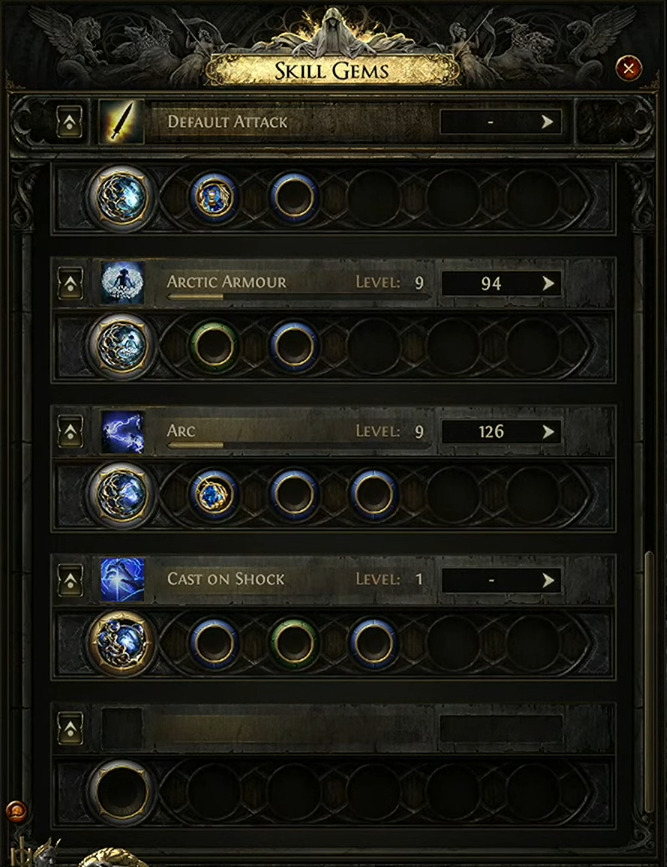
Spirit represents a groundbreaking resource system exclusive to Path of Exile 2, specifically designed to balance aura usage and prevent overpowered combinations. Each aura reserves a portion of your total Spirit capacity, creating natural limitations on how many passive skills you can run simultaneously. The Spirit indicator appears as a distinctive arc surrounding your mana pool in the lower left interface, providing real-time feedback on your current resource allocation.
When you enhance auras with supporting gems, the Spirit reservation cost increases proportionally. This cost-benefit relationship allows for deep customization of your abilities but demands strategic planning in resource distribution. Effective Spirit management often determines the success of advanced character builds, requiring players to make calculated decisions about which auras provide the most value for their investment.
Advanced players should monitor their Spirit arc carefully, as reaching maximum capacity prevents activation of additional auras and may require deactivating existing ones to make room for new enhancements. This dynamic resource system encourages thoughtful build planning rather than simply stacking every available aura.
Seasoned PoE 2 players recommend several optimization strategies for maximizing aura effectiveness. First, prioritize auras that synergize with your primary damage type and playstyle. Second, calculate your total Spirit reservation before committing to multiple auras to avoid unexpected capacity issues. Third, consider using reduced reservation passives or items to expand your available Spirit for additional auras.
Common mistakes include activating too many minor auras that drain Spirit without providing significant benefits, ignoring aura radius considerations for party play, and failing to plan for Spirit costs when upgrading support gems. New players often overlook that supporting an aura with multiple gems can exponentially increase its Spirit reservation, potentially locking them out of other valuable skills.
For comprehensive build planning, consider consulting our Class Guide to understand how different classes interact with aura mechanics and Spirit resource management.
Action Checklist
- Press G to open skill book and locate desired aura gem
- Place aura gem in available equipment slot and right-click skill icon
- Monitor Spirit arc indicator to ensure sufficient capacity remains
- Calculate total Spirit reservation before adding support gems
No reproduction without permission:SeeYouSoon Game Club » How to activate and use Auras in PoE 2. Enabling passive skills in Path of Exile 2 Master PoE 2 aura mechanics with step-by-step activation, Spirit management, and advanced optimization strategies