
TL;DR
- Transmog lets you customize gear appearance while keeping original stats and bonuses
- Access the system through the Gear tab by hovering over equipped items
- All previously obtained gear designs become permanently available for transmog
- Sell unwanted gear without losing cosmetic options for future use
- Platform-specific controls require different button inputs for activation
Transform your wizard’s visual presentation through Hogwarts Legacy’s transmogrification feature while preserving your equipment’s functional attributes.
The transmog system (short for transmogrification) provides comprehensive character customization options that separate aesthetics from statistics. You can freely modify how your attire appears without compromising the defensive or offensive benefits of your current gear loadout. This guide explores the complete process for altering your gear’s visual design while maintaining its gameplay advantages.
Transmog mechanics originated in massively multiplayer online role-playing games, with World of Warcraft pioneering the concept of appearance customization based on previously acquired items. This system allows players to maintain character progression while expressing personal style preferences.
Hogwarts Legacy implements this feature seamlessly – every gear design you encounter becomes permanently added to your transmog collection. Cosmetic items from special editions, like the Dark Arts Pack for Deluxe Edition preorders, integrate directly into this system. The technology enables complete visual overhaul of equipped items while their statistical enhancements remain fully intact.
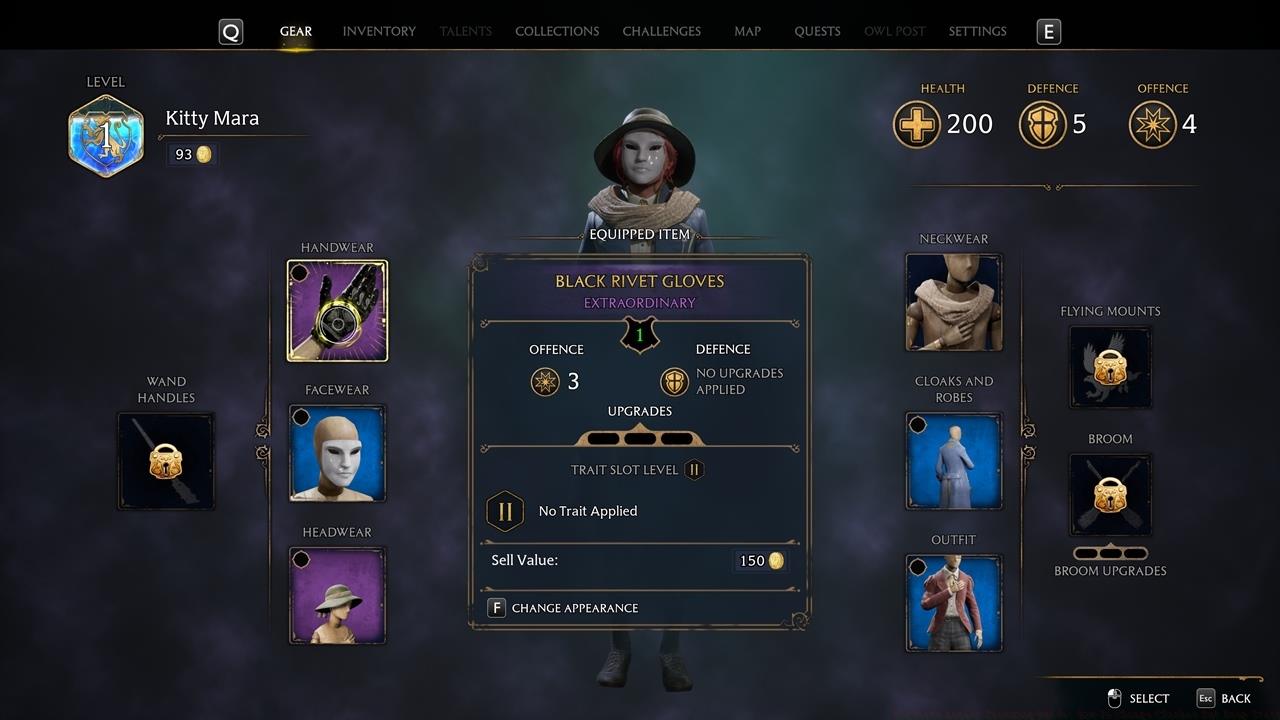
Navigate to any equipped gear piece and activate the appearance modification interface.
To utilize transmog functionality in Hogwarts Legacy, access your character’s Gear inventory screen. Position your selection cursor over any currently equipped item, then input the appropriate command to initiate appearance alteration. Control schemes vary by platform: PC users press F, Xbox controllers utilize X, while PlayStation systems require the square button.
The alteration interface presents two primary categorization systems:
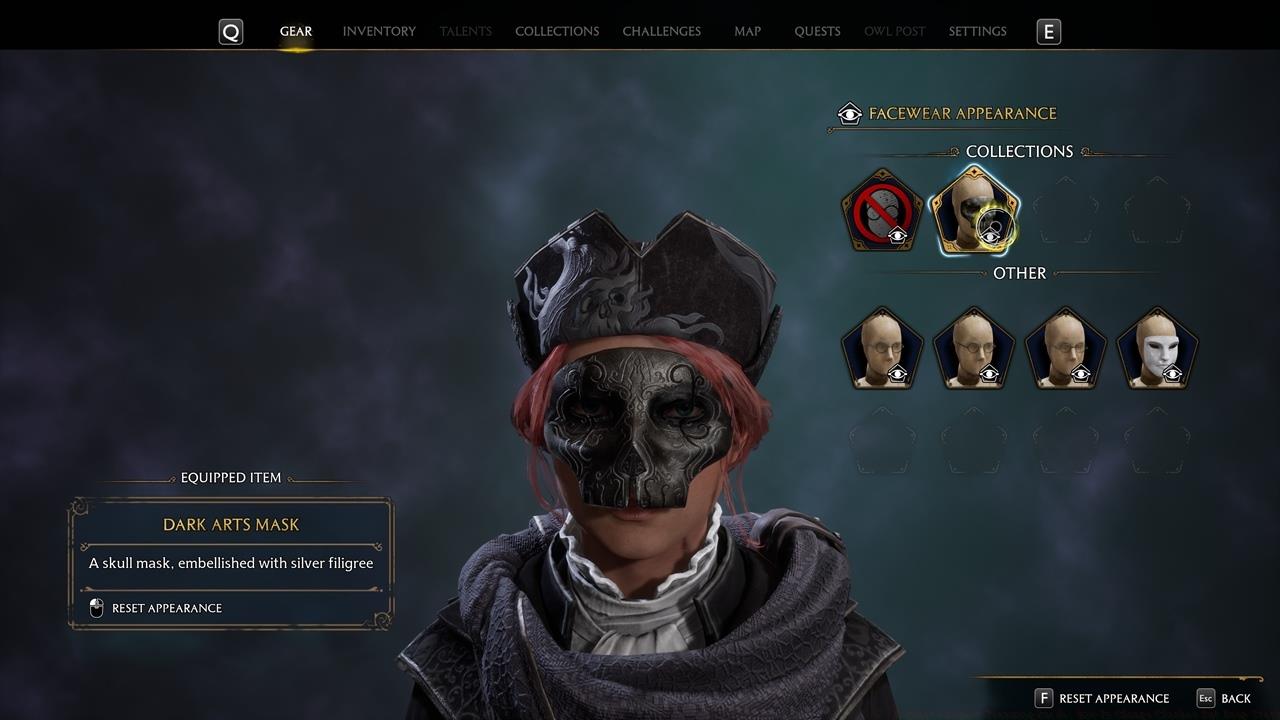
Browse through your unlocked visual options to create your ideal character presentation.
Select your preferred aesthetic combinations to craft a distinctive magical appearance. The system’s design philosophy encourages selling obsolete or unwanted gear regardless of visual appeal, since all discovered designs remain permanently accessible for application to superior equipment.
Mastering transmog requires understanding several optimization techniques. First, regularly sell unwanted gear to free up inventory space – the system automatically preserves all visual designs for future application. Second, experiment with mixing and matching pieces from different sets to create unique combinations that reflect your personal wizarding style.
Avoid these common mistakes: hoarding low-level gear for cosmetic reasons (unnecessary), ignoring the Collections tab (contains exclusive designs), and forgetting to update appearances when acquiring new powerful gear. Many players overlook that transmog works on all equipment slots simultaneously, allowing complete outfit coordination.
For advanced customization, consider creating thematic outfits for different activities – dark arts combat gear, Hogwarts classroom attire, Hogsmeade social wear. The system remembers your selections even when switching between complete outfit sets. Additionally, some rare gear designs only appear during specific story missions or through completing challenging side quests, so thorough exploration pays cosmetic dividends.
Time investment varies – basic transmog changes take seconds, while creating complex coordinated outfits might require 5-10 minutes of experimentation. The interface provides preview functionality before confirming changes, eliminating the risk of undesirable combinations.
Action Checklist
- Access Gear menu and hover over equipped items
- Press platform-specific button (F/X/Square) to open appearance options
- Browse Collections for premium cosmetics and Other for standard designs
- Apply selected visual designs while maintaining original gear stats
- Sell unwanted gear while keeping designs permanently available
No reproduction without permission:SeeYouSoon Game Club » Hogwarts Legacy Transmog Guide: How To Change Clothes But Keep Stats Master Hogwarts Legacy's transmog system to customize your wizard's appearance while maintaining gear stats