
TL;DR
- CS2 demo viewer creates 25GB+ screenshots per 10 minutes of replay
- Bug causes severe replay lag and storage depletion on your system
- Fix involves denying file creation permissions in movie folder
- Monitor storage usage and expect official patch in future updates
- Alternative solutions include manual cleanup and drive space monitoring
Games and Esports Articles CS 2
Counter-Strike 2 players have encountered a disruptive technical issue where the demo viewer functionality malfunctions during replay analysis. Community reports from Reddit users confirm this software anomaly captures individual frames as screenshots continuously while watching match recordings. The system automatically stores all generated images within the designated movie directory, creating substantial storage consumption that escalates rapidly during extended viewing sessions.
This technical glitch exhibits intermittent behavior rather than occurring consistently during every replay session. However, when activated, the bug significantly degrades performance by introducing noticeable stuttering and frame rate drops throughout the playback experience. The combination of storage depletion and performance degradation makes this issue particularly problematic for competitive players who rely on demo analysis for improvement.
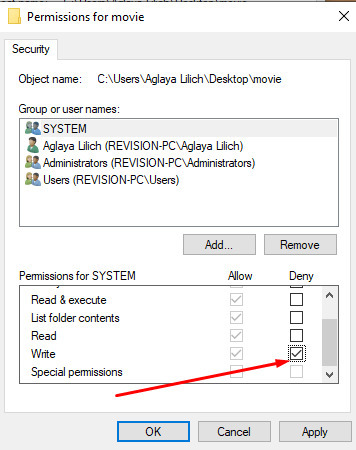
Valve will likely address this software defect through official patches in upcoming game updates. Meanwhile, players can implement a reliable workaround solution by configuring system permissions to block file generation within the problematic directory. This preventive approach stops the screenshot creation process without affecting other game functionality.
To execute this fix, navigate to your CS2 installation directory and identify the movie subfolder. The standard installation path typically follows this structure:
C:Program Files (x86)SteamsteamappscommonCounter-Strike Global Offensivegamecsgomovie
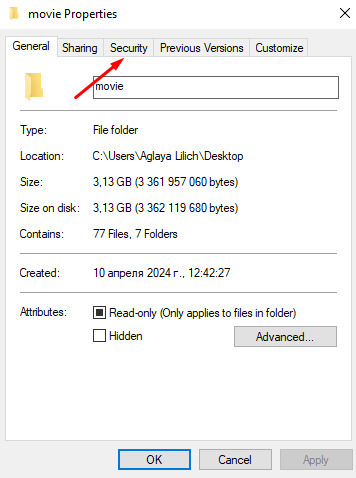
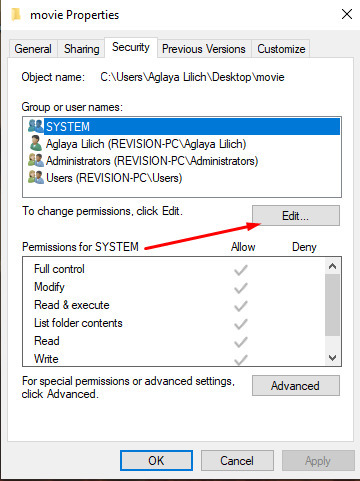
Right-click the movie folder and access Properties from the context menu. Proceed to the Security tab where you’ll find user permission settings. Modify the access controls to explicitly deny file creation privileges for all user accounts and applications interacting with this location.
For players seeking comprehensive storage management, regularly monitor your system’s available space and consider implementing automated cleanup scripts. Understanding game mechanics like this screenshot bug helps optimize your overall gaming experience, similar to mastering weapon systems in our BF6 Weapons Unlock Guide where systematic approaches yield better results.
The storage impact becomes particularly severe during extended demo analysis sessions, with just ten minutes of match footage generating approximately 25 gigabytes of screenshot data. This rapid accumulation can quickly fill solid-state drives, potentially affecting system performance beyond just the game environment. Competitive players should incorporate these troubleshooting steps into their regular system maintenance routine.
When implementing this fix, ensure you maintain proper game file structure awareness, much like understanding class roles in our BF6 Class Selection Guide where proper configuration enhances overall performance. Always create system restore points before modifying folder permissions to enable quick recovery if unexpected issues arise.
Insider: “Cloud9 are ready to pay the full buyout price for m0NESY, their CEO is working on it”
Action Checklist
- Navigate to CS2 movie folder in installation directory
- Access folder Properties and Security tab permissions
- Configure deny permissions for file creation by all users
- Monitor system storage and test demo playback functionality
- Create system restore point before modifications as precaution
No reproduction without permission:SeeYouSoon Game Club » CS2 demo view bug creates tens of GBs of screenshots. Here’s how to fix the issue Fix CS2 demo viewer screenshot bug that creates massive storage issues and causes replay lag