
TL;DR
- Zone Hitting Interface is mandatory for PCI customization and provides superior batting control
- PCI Anchor settings should be disabled initially for maximum manual control during learning phases
- Visual PCI customization significantly impacts tracking ability and swing timing accuracy
- Advanced players benefit from specific pitcher-hitter matchup configurations once fundamentals are mastered
- Consistent practice with optimized settings reduces strikeouts and increases extra-base hits
Navigating the complex PCI configuration options in MLB The Show 25 can dramatically transform your batting performance when properly understood and implemented.
Batting represents both the most challenging and satisfying aspect of gameplay throughout MLB The Show 25. You might experience moments of brilliance with multiple home runs, followed by frustrating stretches where making solid contact seems impossible. While performance slumps naturally occur, mirroring real baseball patterns, your hitting difficulties often stem from improperly configured PCI settings rather than skill deficiencies.
Within MLB The Show 25, the Zone Hitting Interface stands as the premier batting method for serious players. This system provides unparalleled precision in aligning your bat with incoming pitches. Crucially, Zone hitting remains the exclusive interface that enables Plate Control Indicator functionality, which fundamentally changes how you approach at-bats.
To maximize your offensive production in MLB The Show 25, this comprehensive guide details the most effective PCI configurations used by top-ranked players.
You can modify your PCI configuration in MLB The Show 25 by accessing the settings menu, choosing “Gameplay,” then navigating to the “Hitting” subsection. As noted previously, PCI customization requires Zone Hitting Interface activation. Both Timing and Directional hitting modes completely disable all PCI adjustment options, limiting your batting precision.
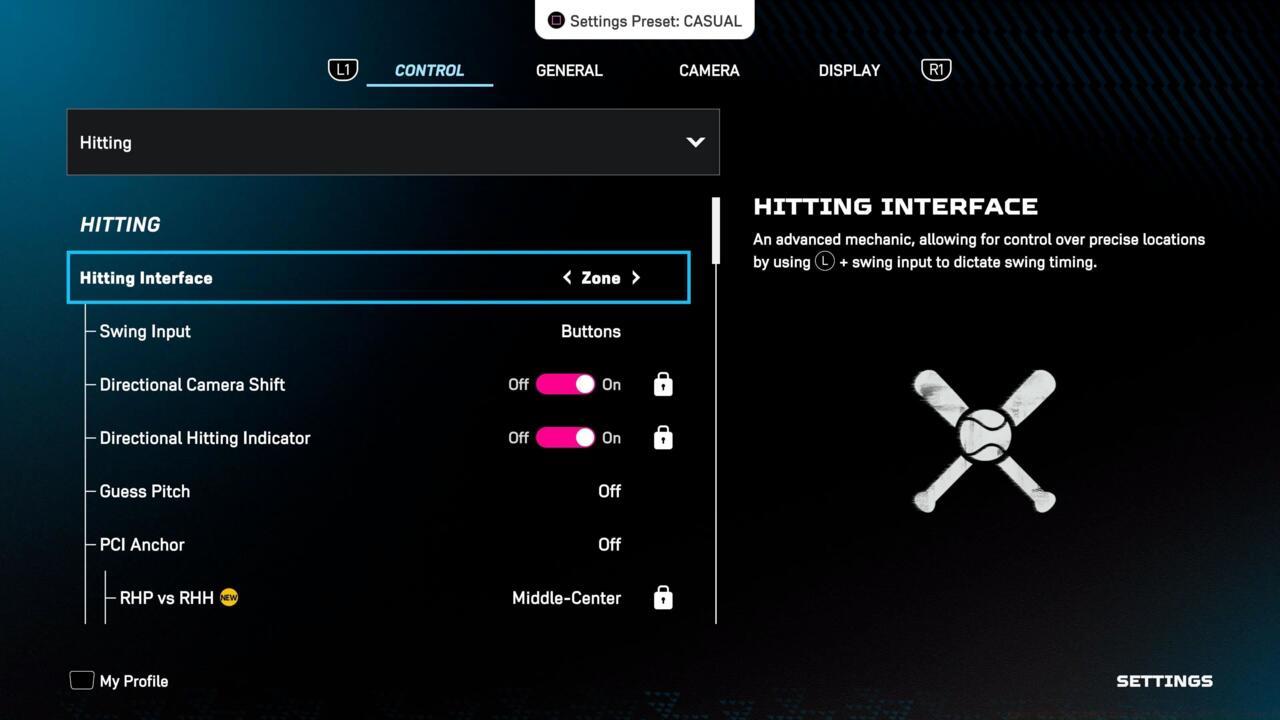
The hitting menu in MLB The Show 25
The PCI configuration ecosystem encompasses multiple interrelated components. These include PCI behavior variations based on pitcher handedness, visual presentation customization at the plate, and visibility toggles for the indicator itself. With more than twelve distinct PCI-specific options available in the batting menu, the game provides limited explanation of each setting’s functional impact.
Thankfully, the detailed breakdown below explains every PCI configuration option alongside professional recommendations for optimal performance:
- PCI Anchor: This setting determines whether your PCI automatically positions itself in specific locations depending on pitcher type. Most experienced players disable this feature to maintain complete manual control, though beginners may find it helpful during initial learning phases.
- RHP vs RHH, RHP vs. LHH, LHP vs. RHH, LHP vs. LHH: These pitcher-batter matchup configurations only become adjustable when PCI Anchor functionality is activated. With anchor enabled, you can preset PCI starting positions for each possible handedness combination scenario.
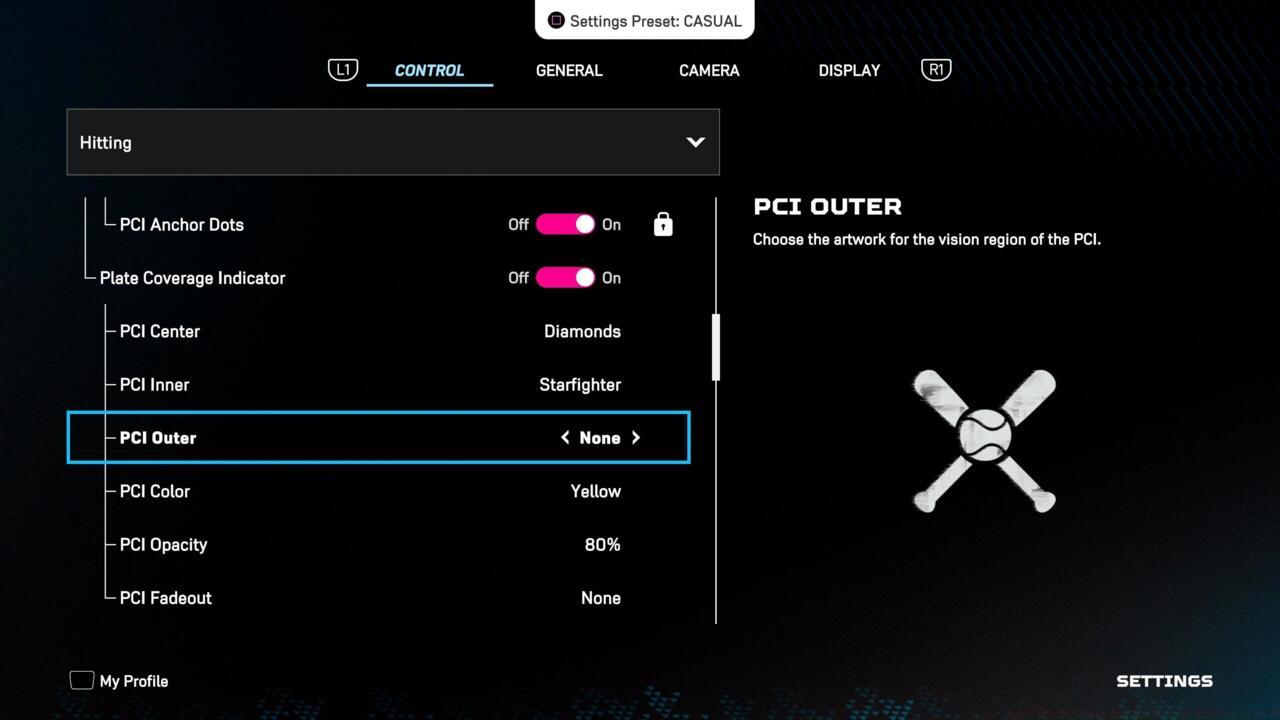
The preferred PCI settings
PCI Visibility: Controls whether the Plate Control Indicator appears during pitch delivery. Most competitive players use “Always On” for consistent visual reference, though some prefer minimal visual clutter with “Off” settings once muscle memory develops.
PCI Center Diamonds: Adjusts the central reticle design. The “Fade” option typically works best as it reduces visual distraction while maintaining alignment reference points.
PCI Outer Rings: Modifies the outer boundary appearance. “Dynamic” settings provide the most useful feedback, changing opacity based on swing timing accuracy.
Advanced PCI Placement Techniques: Instead of aggressively chasing pitches, professional players recommend subtle PCI movements and focusing on pitch tracking. Position your PCI in the general zone where you anticipate the pitch, making minor adjustments rather than dramatic swings across the strike zone.
Timing Practice Drills: Spend 15-20 minutes daily in practice mode focusing exclusively on timing fastballs down the middle before progressing to breaking pitches. This builds the muscle memory necessary for consistent contact.
Common Configuration Errors: Many players make the mistake of using overly bright PCI colors or excessive visual effects that distract from pitch tracking. Opt for subtle color schemes that contrast with the stadium background without overwhelming your visual focus.
Pitcher Analysis Integration: Pay attention to pitcher tendencies throughout games. Most pitchers have preferred pitch sequences and locations they favor in different count situations.
Performance Tracking: Monitor your batting statistics after implementing new PCI settings. Give configurations at least 10-15 games before making additional adjustments, as immediate results may not reflect long-term performance improvements.
For comprehensive gameplay strategies beyond hitting, consult our Complete Guide to master all aspects of your gaming experience.
Action Checklist
- Switch to Zone Hitting Interface in Gameplay settings
- Disable PCI Anchor initially to develop manual control skills
- Configure PCI visibility to ‘Always On’ and center diamonds to ‘Fade’
- Practice 15 minutes daily in batting practice mode focusing on pitch tracking
- Analyze batting performance data after 10-15 games before further adjustments
No reproduction without permission:SeeYouSoon Game Club » Best PCI Settings For Hitting In MLB The Show 25 Master MLB The Show 25 hitting with optimized PCI settings and advanced batting strategies