
TL;DR
- Battlefield 6 servers are experiencing intermittent issues due to external AWS outages affecting connectivity
- Queue times range from 2-15 minutes depending on position, with 400,000+ queues taking 13-15 minutes to clear
- Official status pages show normal operations but player experiences vary significantly by region
- Common problems include missing Play buttons, DLC purchase errors, and wrong region connections
- Proactive monitoring and platform-specific troubleshooting can significantly improve connection success
Navigating Battlefield 6 server connectivity requires understanding the current technical landscape. As one of the most anticipated FPS releases this year, the game’s infrastructure faces immense pressure from millions of concurrent players attempting to access Conquest matches and other game modes.
The server ecosystem presents a mixed picture currently. While Electronic Arts’ official status dashboard indicates all systems operational, real-world player reports tell a different story. Google search analytics reveal “servers” and “down” as trending keywords, indicating widespread access challenges. This situation coincides with a major AWS infrastructure outage affecting multiple online services globally.
Battlefield Studios has officially acknowledged investigating multiple connectivity problems. Their technical teams are examining disconnection patterns, latency spikes, and incorrect regional server assignments. These issues appear connected to external service disruptions beyond their direct infrastructure control.
DownDetector’s monitoring platform recorded an unprecedented surge in Battlefield outage reports, with patterns suggesting infrastructure-level rather than game-specific problems.
“We’re actively analyzing reports of disconnects, latency irregularities, and regional misrouting,” stated Battlefield Studios representatives. “Current evidence points toward broader internet service disruptions impacting our operational environment. Our engineering teams are exploring mitigation strategies to restore consistent server performance across all regions.”
Server instability patterns: disconnections, latency anomalies, regional assignment errors, October 20, 2025.
Our investigation focuses on disconnection events, latency fluctuations, and incorrect regional server assignments. These symptoms appear related to wider internet infrastructure disruptions affecting services beyond our immediate control. We are…
Battlefield 6 implements a sophisticated queue management system during peak demand periods, building upon the foundation established during BF6 beta testing. Understanding queue dynamics helps manage expectations and plan gaming sessions effectively.
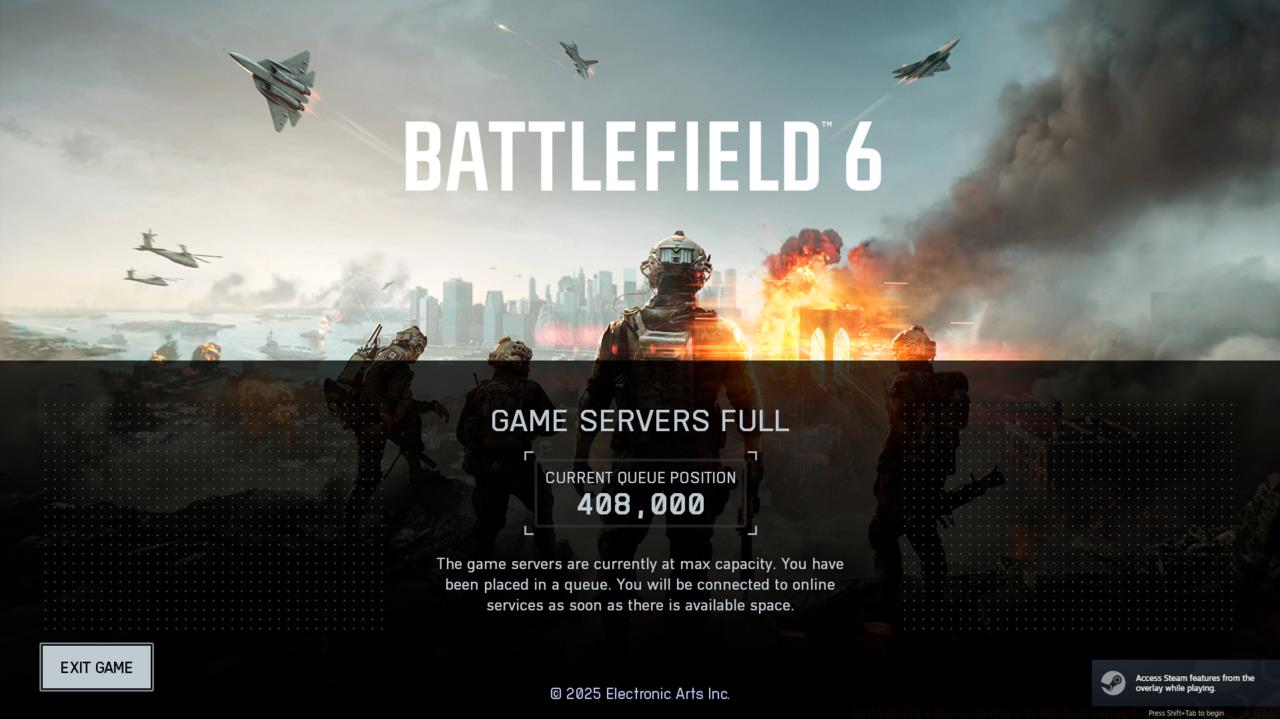
Battlefield 6 servers full queue position.
Queue position interpretation requires contextual understanding. Positions exceeding 400,000 players typically resolve within 13-15 minutes under current system capacity. However, positions around 200,000 clear considerably faster, typically within 2-4 minutes based on beta performance metrics.
The development team’s communication strategy emphasizes maximizing player access while maintaining server stability. Battlefield Comms social channels indicate efforts toward “relatively short” queue durations, though actual wait times depend on regional player density and time of day.
Steam platform users encountering missing “Play” buttons should implement a simple client restart procedure. This platform-specific issue resolves completely with a fresh Steam client initialization, unrelated to broader server problems.
Advanced queue strategy involves monitoring regional player populations and selecting less congested game modes. During Pax Armata events or special Assignments periods, queue times may increase significantly due to concentrated player activity.
Effective troubleshooting begins with accurate problem identification. Many connectivity issues stem from external factors rather than game server problems, requiring different resolution approaches.
The erroneous DLC purchase prompt represents a confirmed bug currently under investigation. Players receiving this message should avoid making additional purchases, as the issue relates to authentication system errors rather than actual content requirements.
PC players must ensure Secure Boot functionality meets Battlefield 6’s security requirements. This system-level security feature represents a mandatory prerequisite for game operation on Windows platforms.
Network configuration optimization can significantly improve connection stability. Implementing port forwarding for Battlefield 6 specific ports, disabling bandwidth-intensive background applications, and selecting optimal DNS servers all contribute to improved performance.
Regional server selection mistakes represent another common pitfall. The game’s automatic region assignment sometimes directs players to geographically distant servers, increasing latency and connection instability. Manual region selection through the game’s server browser provides more reliable results.
For comprehensive gameplay strategies beyond server connectivity, our Complete Guide covers advanced tactics and system mastery.
Experienced Battlefield 6 players employ sophisticated server management techniques to minimize connectivity disruptions and maximize gameplay time.
Peak hour avoidance represents the most effective strategy for bypassing queue systems entirely. Early morning and late evening sessions typically experience significantly reduced wait times across all regions.
Server performance monitoring tools provide real-time insights into connection quality. Third-party applications can track latency patterns, packet loss rates, and server response times, enabling data-driven server selection.
NATO faction servers often experience different load patterns compared to other factions, presenting opportunities for strategic server switching.
Weapon loadout optimization represents another connectivity-adjacent strategy. While our Weapons Unlock guide details optimal configurations, understanding that certain weapon combinations perform better on specific server types due to hit registration variations.
Class selection also impacts server performance perception. The Class Guide explains how different specializations interact with server performance characteristics.
Infrastructure-level understanding helps differentiate between temporary outages and persistent problems. Major cloud service disruptions typically resolve within hours, while game-specific server issues may require patch deployments for resolution.
Action Checklist
- Check official EA status page and DownDetector for outage confirmation
- Restart Steam client if Play button missing – resolves platform-specific issue
- Monitor queue position and estimate wait time based on current metrics
- Select manual server region to avoid incorrect automatic assignments
- Implement network optimization: port forwarding, DNS changes, bandwidth management
- Schedule gaming sessions during off-peak hours to avoid queues entirely
No reproduction without permission:SeeYouSoon Game Club » Battlefield 6 Server Status – Is BF6 Down During Big October 20 AWS Outage? Complete guide to Battlefield 6 server status, queue times, and troubleshooting connectivity issues