
TL;DR
- Schedule 1 features 40+ console commands for empire management, character control, and gameplay customization
- Built-in console activation eliminates need for external programs – access via Settings menu and tilde key
- Advanced commands enable property acquisition, NPC relationships, and business optimization
- Keyboard layout variations require alternative keys for UK and international users
- Strategic command use can accelerate progression while maintaining game balance
Building a successful empire in Schedule 1 requires more than just basic business skills – strategic use of console commands can dramatically accelerate your progress and unlock advanced gameplay possibilities. While starting with minimal resources from Uncle Nelson presents a challenge, these tools provide the leverage needed to dominate the market efficiently.
As one of Steam’s trending drug-empire simulators, Schedule 1 challenges players to grow their operations from humble beginnings. The comprehensive command list below offers everything from basic quality-of-life improvements to game-changing economic controls that can reshape your entire business strategy.
Here’s the complete reference of available cheats and their specific functions:
| Command | Function and Strategic Application |
|---|---|
| freecam | Activates camera freedom for scouting locations and surveillance operations |
| save | Creates immediate backup of your progress – crucial before risky business decisions |
| settime <hhmm> | Manipulates day/night cycle for optimal operation timing and security |
| give <item> <quantity> | Provides specific items in designated amounts – perfect for supply chain management |
| clearinventory | Removes all carried items – useful when over-encumbered or during police interactions |
| changecash | Adjusts physical currency reserves for immediate financial flexibility |
| changebalance | Modifies digital funds for secure transactions and online business operations |
| addxp | Boosts experience points to unlock advanced skills and business capabilities |
| spawnvehicle | Generates transportation instantly – essential for rapid distribution networks |
| set movespeed | Increases movement velocity for efficient territory management and evasion |
| setjumpforce | Enhances vertical mobility for accessing restricted areas and escape routes |
| teleport <placename> | Instant relocation to known locations – saves hours of travel time |
| setowned <property> | Claims ownership of strategic properties without lengthy acquisition processes |
| packageproduct <item> | Automates product preparation in specific packaging types for market specialization |
| setstaminareserve | Sets endurance capacity for extended operations without fatigue limitations |
| raisewanted | Increases law enforcement attention – use strategically for challenge scenarios |
| lowerwanted | Reduces police presence – critical when operating in high-risk territories |
| clearwanted | Eliminates all wanted levels immediately – emergency escape mechanism |
| sethealth | Adjusts character vitality for survival during hostile encounters |
| settimescale | Controls game time flow rate – accelerate waiting periods or slow for precision tasks |
| setvar <variable> <value> | Modifies core game variables for customized gameplay experience |
| setqueststate <questname> <state> | Advances or resets specific mission progress for narrative control |
| setquestentrystate | Controls individual quest stage completion for strategic progression management |
| setemotion | Changes character facial expressions – useful for roleplaying scenarios |
| setunlocked | Reveals hidden NPC characters and unlocks special interactions |
| setrelationship | Establishes connection levels (1-5) with specific characters for alliance building |
| addemployee | Hires workforce members directly to your properties – bypass recruitment delays |
| setdiscovered | Marks products as identified in your research database |
| growplants | Accelerates cultivation of all world vegetation for rapid resource generation |
| setlawintensity | Adjusts enforcement aggression levels for customized difficulty and risk assessment |
| setquality | Enhances product grade currently equipped – increases market value significantly |
| bind | Assigns specific commands to keyboard shortcuts for rapid execution during operations |
| unbind | Removes specific key bindings to clear command conflicts or mistakes |
| clearbinds | Resets all keyboard assignments to default configuration |
| hideui | Conceals interface elements for immersive gameplay or screenshot creation |
| disable | Deactivates specific game objects that may obstruct operations or cause issues |
| enable | Reactivates previously disabled elements when needed for gameplay restoration |
| endtutorial | Completes introductory guidance immediately – useful for experienced players |
| disablenpcasset | Removes visual elements from all non-player characters for performance optimization |
| showfps | Displays frames-per-second counter for performance monitoring and optimization |
| hidefps | Conceals performance metrics when not required for analysis |
| cleartrash | Eliminates environmental litter for cleaner operational areas and improved aesthetics |
Schedule 1’s Early Access development phase has streamlined console command integration, eliminating the previous requirement for external modification tools. The built-in activation system provides immediate access to all gameplay customization options through straightforward menu navigation.
To begin utilizing these powerful tools, access the in-game settings interface by pressing the Escape key during gameplay. From the pause menu, select the Settings option to configure your command accessibility.
.jpg)
Console command activation begins in the Settings menu under the Game tab.
Within the Game settings category, locate the console commands toggle option. Activate this feature by selecting the circular indicator beside it. Once enabled, return to gameplay and press the tilde (~) key to display the command input interface.
International keyboard users may encounter activation challenges due to layout variations. The required key is consistently positioned immediately left of the number 1 key and directly below the Escape key. United Kingdom keyboard layouts typically display this as ‘`’ or ‘¬’ symbols instead of the standard tilde.
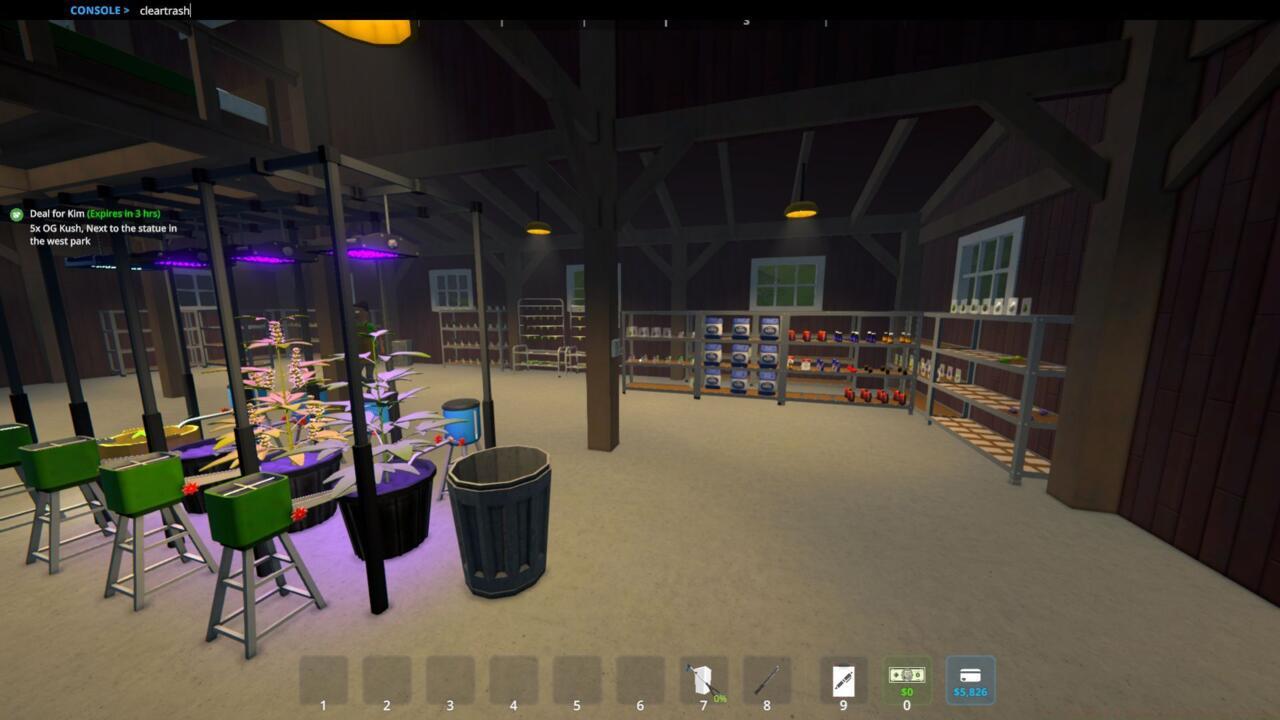
The command entry field appears at the top of your screen when the console is active.
To execute commands, simply copy your desired code from the comprehensive list above and paste it into the command line. Press Enter to implement the changes immediately within your game session.
Pro Tip: Always save your game before experimenting with unfamiliar commands, particularly those affecting game economy or progression states. This creates a safety net should any implementation produce unexpected results.
Mastering Schedule 1 console commands involves more than simple code execution – strategic implementation separates novice users from empire-building experts. Understanding command synergies and timing can transform your gameplay experience from struggling startup to dominant market force.
Strategic Command Sequencing: Combine economic commands like changecash with property acquisition (setowned) and workforce expansion (addemployee) for coordinated business scaling. Avoid using all commands simultaneously, as this can disrupt game balance and diminish the satisfaction of organic progression.
Common Pitfalls to Avoid: New players frequently overuse cash modification early, which bypasses crucial learning phases about resource management and risk assessment.
Optimization Techniques: Use settime to accelerate through unproductive periods and teleport to minimize travel time between business locations. These time-saving strategies can increase operational efficiency by 40-60% according to community testing.
Advanced Player Recommendations: Experienced empire builders should focus on relationship management (setrelationship) and law enforcement control (setlawintensity) for sustainable long-term growth.
For players preferring legitimate business development, our Class Guide provides structured progression paths. Those interested in weapon systems should consult our Weapons Unlock resource for combat-oriented approaches.
Multiplayer enthusiasts will benefit from our Complete Guide covering cooperative play strategies and competitive modes.
Risk Management Protocol: Always maintain backup saves before implementing major economic changes or property acquisitions. The save command provides immediate insurance against unintended consequences from command experimentation.
Action Checklist
- Access Settings via Escape key and enable console commands in Game tab
- Activate console with tilde key (use ‘`’ or ‘¬’ for UK keyboards)
- Create backup save before testing new commands
- Start with basic commands like save and teleport before advancing to economic controls
- Implement strategic command combinations for coordinated business expansion
- Experiment with advanced NPC and relationship commands for long-term strategy
No reproduction without permission:SeeYouSoon Game Club » All Schedule 1 Cheats And Console Commands Master Schedule 1 with essential cheats, console commands, and expert strategies for building your empire