
Comprehensive guide to God of War Ragnarok’s 60+ accessibility features with optimization strategies and practical tips
Introduction: Setting New Standards in Gaming Accessibility
Sony Santa Monica Studios has unveiled a groundbreaking suite of accessibility enhancements for God of War Ragnarok, marking a significant milestone in inclusive gaming design during Global Accessibility Awareness Day celebrations.
The development team’s comprehensive approach to accessibility represents one of the most extensive feature sets in modern gaming, demonstrating their commitment to making the epic Norse adventure accessible to all players regardless of ability.
Lead UX Designer Mila Pavlin spearheaded the accessibility initiative, detailing how the team collaborated with accessibility consultants to create over 60 customizable options. This represents a significant evolution from previous titles and sets a new benchmark for AAA game development. The extensive feature set addresses visual, auditory, motor, and cognitive accessibility needs through systematic implementation.
PC Features Migration: Enhanced Console Experience
The development team has successfully integrated popular PC accessibility features into the console version of God of War Ragnarok, bringing enhanced control customization to a wider audience. This strategic migration includes Auto Sprint functionality that reduces repetitive button inputs, Always on Reticle for consistent aiming reference, and customizable Aim Style and Block Style options that adapt combat mechanics to individual player preferences.
These previously PC-exclusive features have been optimized for console controllers, providing seamless integration with the existing control scheme. The Auto Sprint feature particularly benefits players with mobility challenges by eliminating the need for constant thumbstick pressure during extended exploration sequences. For optimal experience, enable Auto Sprint during exploration-heavy sections but consider disabling it during precise platforming sequences where controlled movement is crucial.
Visual Accessibility: Comprehensive Display Customization
Visual accessibility receives comprehensive enhancement through multiple customization layers. The subtitle system now offers extra-large text scaling with dedicated display areas that meet broadcast television standards, addressing one of the most common complaints from God of War 2018 players. Players can independently adjust speaker name colors, subtitle body colors, and caption colors from seven distinct color options, with background blur and darkening effects to ensure readability in visually complex environments like snow-covered landscapes.
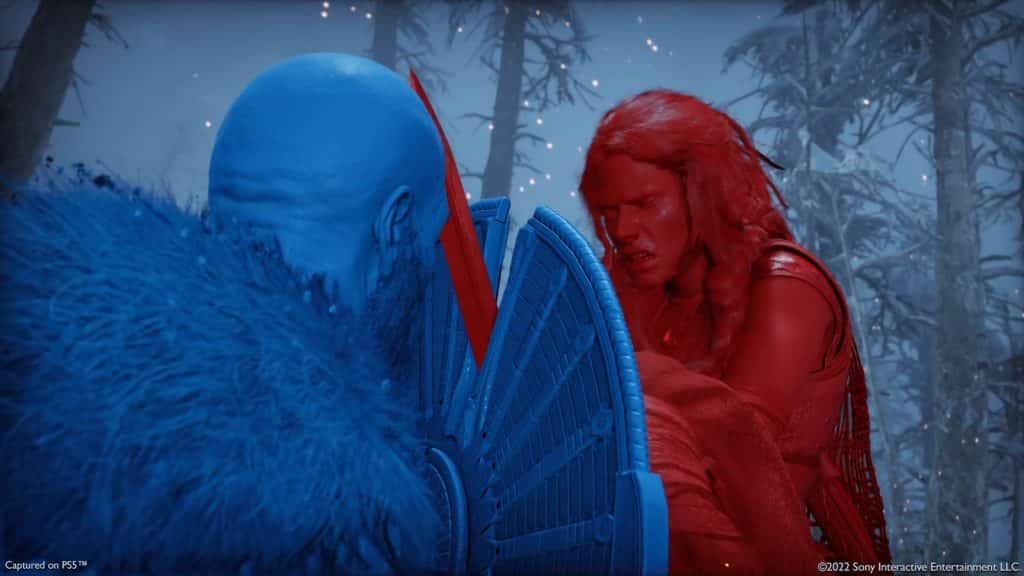
High Contrast Mode represents a significant advancement for players with color vision deficiencies or visual impairments. This feature applies vibrant color layers to character models, enemies, and interactive elements, making them stand out clearly against environmental backgrounds. The system allows individual color customization for different entity types and includes separate background contrast controls. For optimal visibility, combine high contrast colors with subtitle background darkening when playing in bright environments or areas with complex visual textures.
 Sony Santa Monica Studios
The High Contrast feature applies customizable color layers to NPCs and enemies to ensure clear visibility against complex environmental backgrounds, with separate customization options for characters, items, and background elements.
Audio Accessibility: Enhanced Sound Experience
Audio accessibility features provide comprehensive support for players with hearing impairments or those playing in sound-sensitive environments. The enhanced caption system now includes directional sound indicators that visually represent the source location of critical gameplay audio cues, particularly useful for puzzle sequences that rely on audio triggers. Expanded sound effect captions cover both cinematic sequences and gameplay moments, creating a rich understanding of the game’s audio landscape.
Audio Cues linked to on-screen interaction prompts provide auditory feedback when interactable objects are nearby and when button prompts become active. This feature is particularly valuable for players with visual impairments who rely on audio feedback for environmental navigation. For optimal puzzle assistance, enable both directional sound indicators and critical gameplay captions simultaneously to receive comprehensive environmental awareness information through multiple sensory channels.
Controller Customization: Advanced Input Options
Controller remapping has been completely rebuilt from the ground up, offering unprecedented customization for button configurations. Players can choose from numerous preset layouts optimized for different playstyles or create fully custom configurations by remapping individual buttons. The system accommodates complex actions with alternate configuration presets, ensuring that multi-button combinations can be adapted to individual physical capabilities.
Navigation Assist provides camera orientation toward compass objectives when not in combat, significantly reducing disorientation during exploration. This feature is particularly beneficial for players with spatial navigation challenges or cognitive disabilities that affect wayfinding. When customizing controls, prioritize mapping frequently used combat actions to easily accessible buttons and consider creating separate presets for exploration versus combat scenarios to optimize performance in different gameplay contexts.
Mobility Assistance: Simplified Gameplay Mechanics
Mobility assistance features automate various traversal mechanics based on directional input, significantly reducing the physical demands of gameplay. Gap jumping, vaulting, and mantling can now be automated, while Assistance+ extends this automation to interaction-based movements like climbing, crawling, and squeeze-through sequences. These features collectively reduce the need for precise timing and repeated button inputs during platforming sections.
For players with limited mobility or conditions causing fatigue, these automation features can make extended gameplay sessions more comfortable and sustainable. The traversal assistance is particularly valuable during the game’s more complex environmental navigation sequences. When using these features, maintain awareness that automated traversal may occasionally behave differently than manual input in tightly timed sequences, so practice in safe environments before relying on them during critical story moments.
Optimization Guide: Advanced Configuration Strategies
Maximizing the benefits of God of War Ragnarok’s accessibility features requires strategic configuration based on individual needs and gameplay scenarios. For visual clarity, combine High Contrast Mode with enlarged text and icons, using the background darkening feature in bright environments. Avoid the common mistake of over-customizing controls without testing – instead, make incremental changes and playtest each adjustment thoroughly.
Advanced players should create multiple controller presets for different gameplay situations: one for exploration with navigation assists enabled, another for combat with optimized button layouts, and a third for puzzle sequences with audio and visual cues maximized. Remember that High Contrast Mode automatically disables in menus, so don’t panic if colors appear different when accessing inventory or skill trees. For optimal performance, periodically review your settings as you progress through different game environments, as lighting conditions and gameplay requirements evolve throughout the adventure.
The development team’s commitment to ongoing accessibility improvement ensures that these features will continue to evolve based on player feedback. Their collaboration with accessibility consultants represents industry best practices that other developers should emulate, setting a new standard for inclusive game design in AAA titles.
No reproduction without permission:SeeYouSoon Game Club » 60 new God of War Ragnarok features revealed for Global Accessibility Awareness Day Comprehensive guide to God of War Ragnarok's 60+ accessibility features with optimization strategies and practical tips