
Master the housing system in Where Winds Meet with our comprehensive building guide and expert tips
Unlocking the Building System
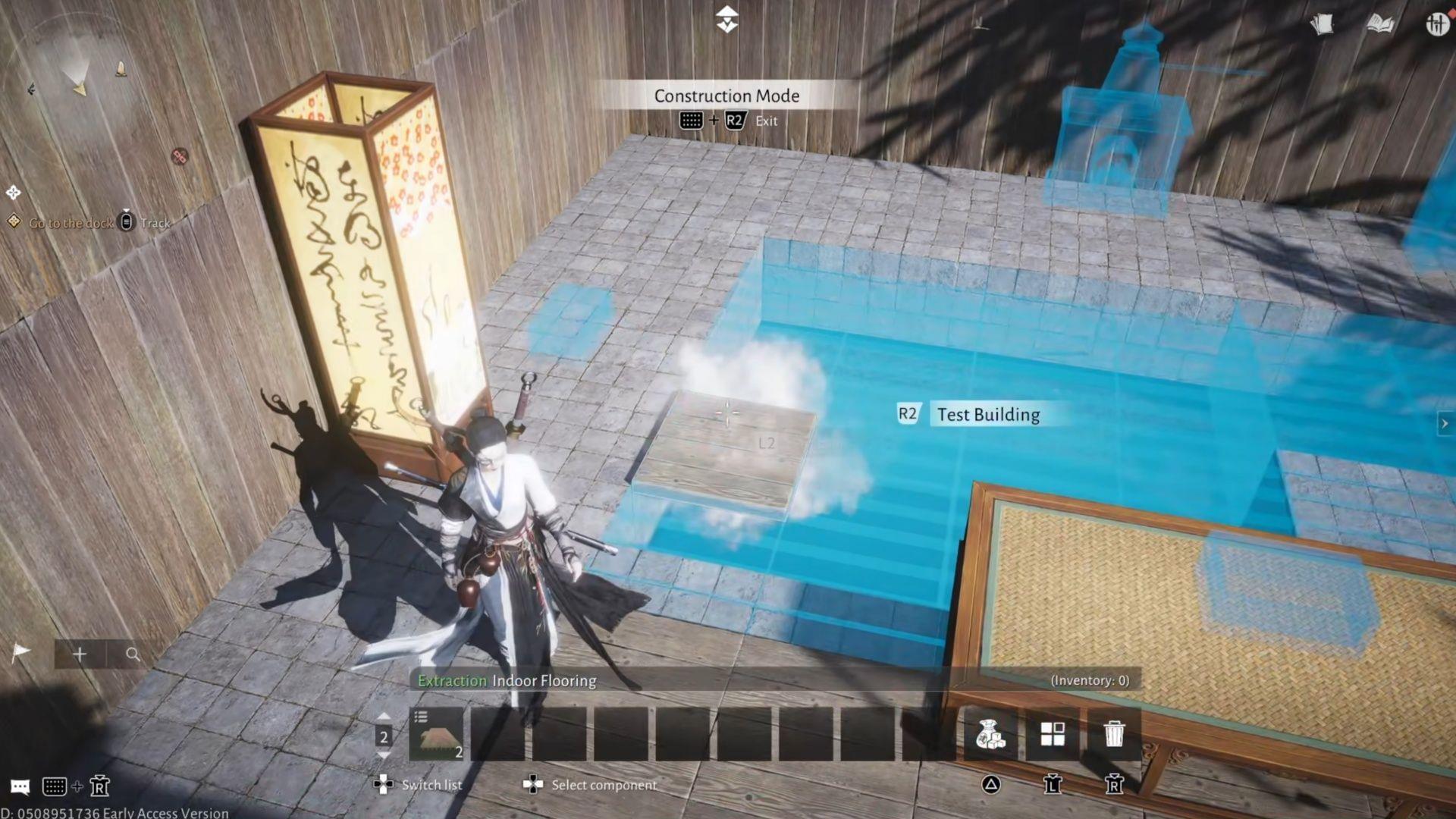
In Where Winds Meet, constructing your dream Wuxia residence represents a significant undertaking that begins with unlocking the housing system. You’ll need to complete a specific side quest before gaining access to the building mechanics. The resource requirements can be substantial, requiring extensive gathering of bamboo, lumber, stone, ore, and various other materials before you can create anything impressive.
To initiate the building tutorial, navigate to the Exploration Section within your Quest Menu. Activate and track the quest titled Building: One Last Job, then journey to Halo Peak. While multiple fast travel points exist nearby, Blissful Retreat typically provides the most convenient access. Follow the mountain path upward until you locate the quest giver positioned high on the peak.
During your ascent, you’ll encounter a Wayfarer who provides a detailed area map – an invaluable navigation tool. A few bandits patrol the route, though they present minimal threat to experienced martial artists. Once you reach Halo Peak’s summit, activate the teleport location for future visits and converse with Yang Yuan. Inform him of your reconstruction intentions; while he cannot offer monetary compensation, he will teach you fundamental building techniques. Collect three Pebbles from nearby rock formations and return them to Yang Yuan.
The actual building instruction commences here. Access your inventory, locate the Pebble item, select it, then choose the More option. Pick Craft to open the crafting interface and create the Stone Pagoda Piece – Top. After crafting, speak with Yang Yuan again and follow the prompt to enter Build Mode.
I strongly recommend enabling Free Camera functionality by pressing ~ on keyboard or L3 on controller and selecting Free Camera. This camera mode dramatically simplifies object placement compared to the standard player perspective.
Free Camera makes constructing in Where Winds Meet significantly more manageable when positioning multiple objects. Complete the tutorial by placing Stone Pagoda Piece – II atop the foundation, followed by Stone Pagoda Piece – III, and finally the Stone Pagoda Piece – Top. Your conversation with Yang Yuan concludes this quest and grants permanent building access.
Choosing Your Building Location
Where Winds Meet permits construction across most of its landscape, with certain limitations. Currently, building within or adjacent to settlements appears restricted, though this may change in future updates. I recommend selecting locations that are easily accessible or memorable, as constructed buildings don’t display on your map. For this reason, establishing homes near teleport stones proves particularly practical.
Pro Tip: Before committing to a location, test the area during different in-game times to ensure lighting conditions meet your preferences. Some players overlook how sunrise and sunset angles affect their building’s ambiance.
Additionally, consider proximity to resource nodes when choosing your building site. Locations near bamboo groves, stone quarries, or mining areas can significantly reduce travel time during resource gathering phases. However, balance this against potential monster spawn areas that might interrupt your construction sessions.
Blueprint Creation and Planning
Begin your construction project by accumulating ample resources through mining stone and harvesting lumber/bamboo. Once you’ve identified an ideal building site, press L3/~ and choose Cradle Blueprint to initiate the planning phase.
This action designates a 30×30 area for blueprint creation. If you have existing blueprints, you can select them here as well. The interface provides customization options: extend boundaries by clicking and dragging the four directional arrows in the UI, or reposition the entire blueprint area by clicking and dragging the blue zone.
When satisfied with placement, press Space Bar/Square to establish the blueprint space. The interface then displays three icons in the top-right corner: Details, Leave, and Clear. The Details option reveals area dimensions, personal notes, and all components utilized in your design.
Blueprint mode allows placement of any structure regardless of material availability, enabling comprehensive project planning. Use this feature to visualize your ideal home and identify exactly which materials require farming.
Common Mistake: Many players forget to check their blueprint details before exiting, leading to confusion about material requirements later. Always review the component list and take screenshots for reference.
For complex structures, consider creating multiple smaller blueprints for different sections of your build. This modular approach makes revisions more manageable and allows you to focus resources on completing one area at a time.
Construction and Placement Techniques
To commence actual construction, press Triangle/B on the Keyboard to access the building catalog containing Foundations, Walls, Roofs, and interior decorations. Browse the menu to find desired components. Selecting any item displays its forging cost and your current inventory of that material.
You can position items without possessing the necessary materials, though the blueprint cannot be finalized until requirements are met. The system helpfully tracks exactly which resources you need to gather in Where Winds Meet. When constructing walls, floors, or large structures, I recommend employing free camera mode for easier component alignment within the building system.
For efficiency, place multiple wall, floor, or other tiles simultaneously by dragging your mouse or holding R2. Once satisfied with your layout, select the Details icon in the top left. This menu allows naming your design, capturing screenshot previews, and saving the blueprint.
Select the Leave icon to exit this mode. The interface clears all placed items except those constructed manually beforehand. This represents one reason I prefer creating blueprints before manual construction in Where Winds Meet. Note that saved blueprints remain editable later.
When ready to materialize your Where Winds Meet blueprint, travel to your chosen location and enter Building Mode. Press ~/L3 and choose Cradle Blueprint. Select your desired blueprint and pick Place.
Aiming your camera at the blueprint reveals its name alongside the F/R2 prompt. Choose Auto Completion to instantly construct your design. Ensure Prefer to use existing components to fill remains selected if you possess the materials; deselect it otherwise.
The interface displays raw material requirements for automatic blueprint completion. Once fulfilled, your structure materializes completely! While my demonstration design remains basic, the principles apply to elaborate constructions.
Advanced Building Strategies
One final consideration: accessing the buildable items list (Triangle/B on the Keyboard) and navigating fully right with E/R1 reveals pre-designed structures:
These templates benefit players less confident in their architectural skills or those wanting quality foundations to customize. This approach definitely suits my planned usage when servers become fully operational.
Resource Optimization Tip: Focus on gathering bamboo first as it’s typically the most versatile resource for early-game structures. Stone becomes crucial for foundations, while specialized ores are needed for decorative elements.
Avoid This Mistake: Don’t immediately use rare materials for experimental builds. Create basic structures first to refine your design, then upgrade materials once you’re satisfied with the layout.
For advanced builders, consider creating resource outposts near gathering areas before constructing your main residence. These smaller structures can serve as storage and resting points during extended resource collection sessions.
Check out our other Where Winds Meet guides and features:
No reproduction without permission:SeeYouSoon Game Club » Where Winds Meet building guide: How to unlock and build structures Master the housing system in Where Winds Meet with our comprehensive building guide and expert tips