
Master Gran Turismo 7’s essential settings to optimize performance, improve driving skills, and enhance your racing experience
Essential General Settings Configuration
Gran Turismo 7 presents an extensive array of configuration options that can dramatically transform your racing performance and visual experience. Mastering these settings is crucial for both newcomers and seasoned veterans seeking optimal gameplay.
As the definitive ‘real driving simulator,’ Gran Turismo 7 offers an unprecedented level of customization to craft your ideal racing environment. From graphical enhancements that showcase the PS5’s capabilities to gameplay adjustments that affect your competitive edge, understanding these options is fundamental to success.Unlike casual racing titles, the Gran Turismo franchise emphasizes authenticity and precision driving mechanics.Consequently, you’ll encounter numerous configuration parameters before even starting your engine. These range from visual presentation choices to fundamental gameplay adjustments that shape your entire racing approach.For newcomers, this depth can initially seem intimidating. This comprehensive guide breaks down the most impactful settings and provides strategic recommendations for various skill levels.
- Display and Graphics
- Difficulty Selection
- Audio Configuration
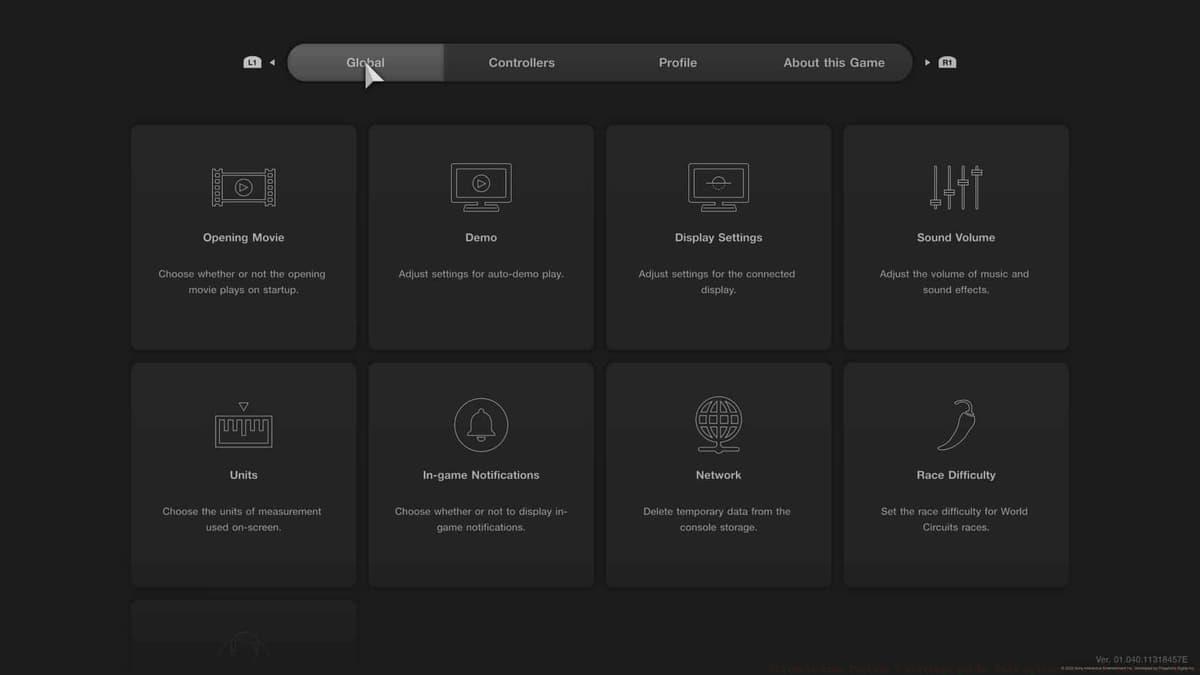
Begin your configuration journey by exploring the general Gran Turismo options accessible from the main menu’s upper-left corner.First, examine the Display Settings. This crucial option lets you choose between Performance Mode for maximum frame rate smoothness or Ray Tracing Mode for enhanced visual fidelity with realistic lighting and reflections.Given Gran Turismo 7’s exceptional optimization, we strongly recommend selecting Ray Tracing Mode. The visual enhancement significantly improves immersion while maintaining excellent performance, allowing you to fully appreciate the PS5’s graphical capabilities during races and replays.
 Polyphony Digital
Access Gran Turismo 7’s comprehensive visual configuration through the general options menu. Next, configure the Race Difficulty parameter. While this setting appears during initial setup, you can revisit it anytime through the general options menu for adjustment. Three distinct difficulty tiers are available, each significantly altering AI driver behavior and competitiveness. The easiest setting provides accessible competition for learning, while the hardest setting challenges even experienced sim racing enthusiasts with aggressive, precise AI opponents.
For your first Gran Turismo experience, select the Easy difficulty setting to build confidence and learn fundamental mechanics. Normal difficulty suits intermediate players with previous racing game experience, while Hard difficulty should only be chosen by veterans comfortable with competitive sim racing challenges.Importantly, prize money remains unaffected by difficulty selection, allowing you to choose appropriate challenge levels without financial penalty while developing your skills.
Advanced Assist Settings Breakdown
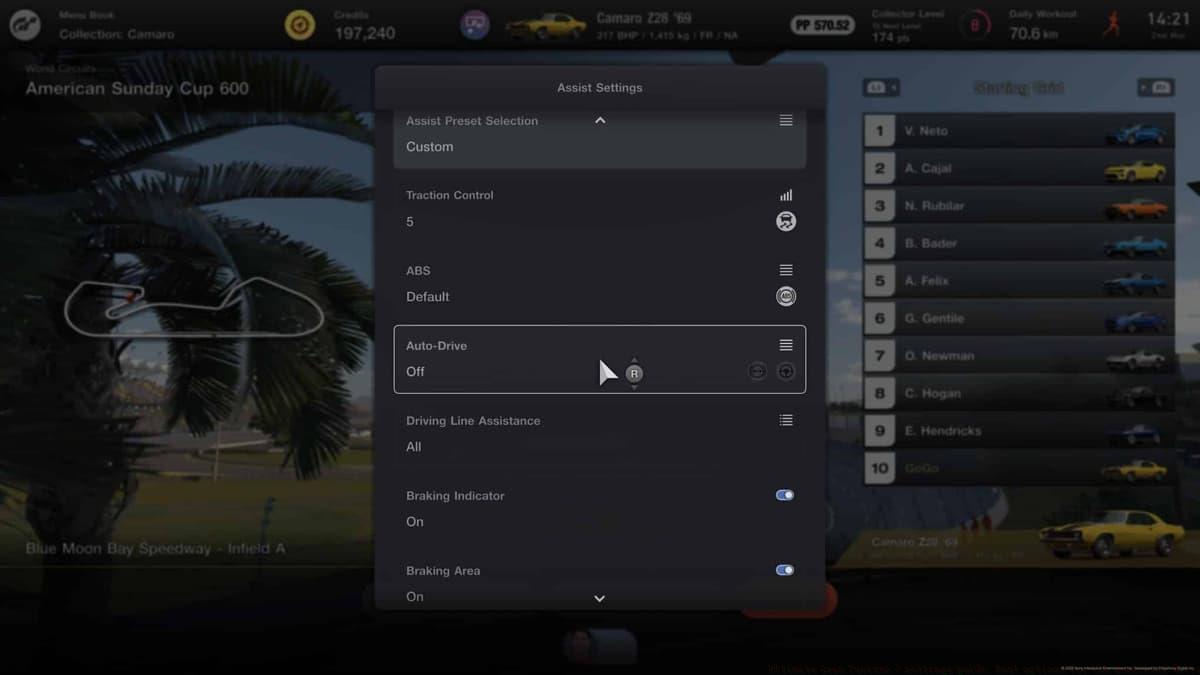
With general configuration complete, focus next on the comprehensive Assist settings available before each racing event. These can be adjusted per activity, allowing customization for specific tracks and conditions.Begin by modifying your Assist Preset Selection. Switch this to Custom mode to unlock granular control over individual assistance systems for precise tuning.Your primary adjustment should target the Auto Drive setting. By default, Gran Turismo intervenes automatically during certain driving situations—applying brakes for corners or correcting steering when drifting off-course.For genuine skill development, disable Auto Drive immediately. This grants complete vehicle control and represents the most authentic path to mastering advanced driving techniques.
 Polyphony Digital
Deactivating Auto-Drive early prevents dependency on automated systems and accelerates proper technique development. Next, configure Driving Line Assistance. This familiar racing sim feature displays an optimal path guide along the track surface using colored indicators. The driving line provides crucial cornering timing references, drift approach guidance, and optimal racing line visualization. It’s particularly valuable during initial track familiarization sessions. We recommend enabling this with the ‘All’ option during learning phases. Once you’ve mastered a circuit’s layout and can anticipate each turn instinctively, disable this feature to reduce visual clutter and develop independent racing line judgment. With eleven distinct assist parameters available, substantial customization potential exists as your expertise grows. Below presents our optimized Assist configuration recommendations for balanced performance and skill development in Gran Turismo 7:
- Assist Preset Selection
- Auto Drive
- Driving Line Assistance
 Polyphony Digital
Properly tuned assistance settings create a balanced environment for skill development and competitive performance. These configurations provide an ideal foundation for Gran Turismo 7 mastery. As your proficiency increases, you’ll naturally refine these parameters to match your evolving driving style and preferences.
Pro-Level Settings Strategy
With minimized automated assistance, you’ll rapidly develop track mastery and achieve record lap times through genuine skill improvement.
Beyond basic configuration, advanced players should understand strategic settings adjustments that provide competitive advantages. One common mistake involves keeping driving assists enabled too long, creating dependency that hinders authentic skill development.
For competitive racing, gradually reduce Traction Control from the default setting (5) to lower values (2-3) as you gain confidence. This allows more controlled slides and faster corner exits while maintaining stability. Advanced drivers often disable Traction Control entirely for maximum acceleration control, though this requires precise throttle management.
Countersteering Assistance presents another progression opportunity. Begin with ‘Weak’ setting for stability, then transition to ‘Off’ once comfortable with vehicle dynamics and correction techniques. This develops essential car control skills crucial for competitive racing and drifting.
Monitor your braking technique development carefully. While the Braking Indicator provides valuable reference points initially, advanced drivers should learn to brake based on track markers and vehicle feedback rather than visual cues. This transition significantly improves consistency across different racing conditions.
For online competition, consider adjusting Active Stability Management based on track conditions and vehicle selection. High-downforce cars typically require less assistance, while powerful rear-wheel-drive vehicles may benefit from stability management on technical circuits.
For comprehensive Gran Turismo 7 guidance and advanced techniques, explore these additional resources: How to change the camera in Gran Turismo 7 | Gran Turismo 7: Most expensive cars | How to earn Credits fast in Gran Turismo 7 | Gran Turismo 7: Most expensive cars | Ultimate Gran Turismo 7 settings guide: Best options for the smoothest drive | How to wash your car in Gran Turismo 7: Squeaky Clean Trophy guide | Gran Turismo 7 Speed Archdemon Trophy guide: How to reach 600km/h
No reproduction without permission:SeeYouSoon Game Club » Ultimate Gran Turismo 7 settings guide: Best options for the smoothest drive Master Gran Turismo 7's essential settings to optimize performance, improve driving skills, and enhance your racing experience