
TL;DR
- Progress through initial missions until reaching The Lodge location
- Access basement workbenches to find skin customization options
- Apply Old Mars, Deep Mining, and Constellation skins to compatible gear
- Premium Edition includes additional cosmetic sets and early DLC access
- Skins remain available throughout gameplay on upgraded equipment
You’ve invested in special Starfield editions, now let’s ensure you maximize those exclusive benefits. This comprehensive walkthrough eliminates the guesswork from accessing your premium content.
Starfield offers an expansive universe that becomes even richer with preorder and Premium Edition enhancements. While digital soundtracks and future DLC access are straightforward, the in-game cosmetic items require specific steps to unlock. Many players overlook these valuable customization options simply because the activation process isn’t immediately obvious.
The complete package of Starfield bonuses includes both immediate and long-term value. Beyond the cosmetic skins, you receive early story expansion access, digital artbooks, and soundtrack files. However, the Old Mars, Deep Mining, and Constellation skin packs demand particular attention since they integrate directly into gameplay mechanics rather than appearing in your inventory automatically.
Successfully accessing your bonus content requires progressing through specific story milestones. Follow this structured approach to avoid missing any exclusive items you’ve rightfully purchased.
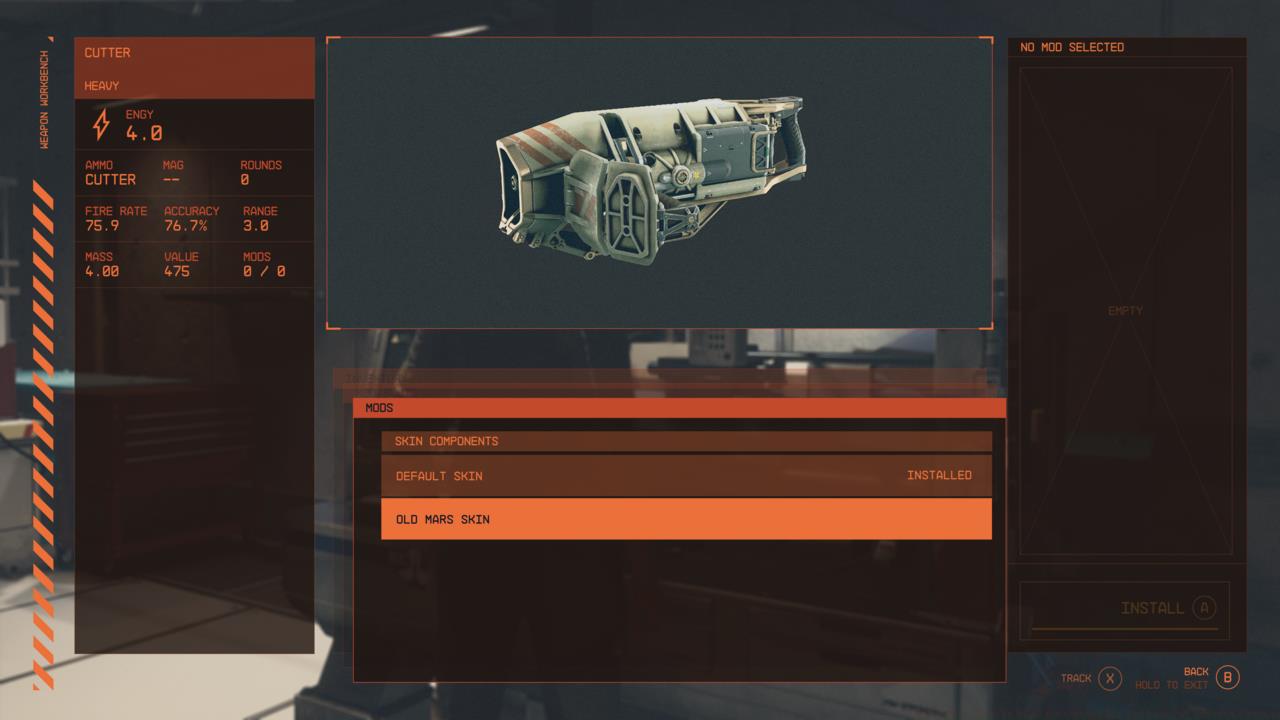
You can apply different skins at a workbench, including those you may have purchased with Starfield.
The Premium Edition’s Constellation armor skin transforms white sections into metallic silver while introducing bold crimson accents for distinctive visual appeal.
At weapon modification stations, you’ll discover the Old Mars cosmetic option specifically designed for your laser cutting tool. Simultaneously, the Deep Mining appearance package applies to your initial boost pack equipment and protective headgear. While you’ll naturally upgrade your spacesuit as you explore Starfield’s vast universe—encountering dozens of unique armor sets with varied statistical benefits—you can later locate enhanced versions of mining suits to continue utilizing these exclusive cosmetic treatments.
Premium Edition purchasers receive additional advantages including five-day early game access, automatic Shattered Space expansion preorder, and an extra cosmetic collection. The Constellation set can be applied to specific spacesuits, boost packs, and helmets, particularly those obtained from Sarah Morgan and Constellation members shortly after arriving at The Lodge. This skin also works with the Equinox laser rifle, a commonly found energy weapon throughout the galaxy. To apply any compatible skin, visit the appropriate workbench and select the “skin” category within the item enhancement interface.

The Premium Edition’s Constellation spacesuit skin swaps white for silver and adds more red.
Many players encounter confusion when their bonus items don’t immediately appear. Remember that skins only become accessible after reaching The Lodge and aren’t automatically equipped. If items seem missing, verify your game edition and ensure complete download of all bonus content through your platform’s store.
Strategic gear management enhances your skin utilization. While early-game equipment gets replaced quickly, higher-tier versions of mining suits and laser weapons maintain skin compatibility. Consider specializing in equipment types that support your preferred cosmetic options for long-term visual consistency. The Weapons Unlock guide offers additional insights into weapon progression systems that apply similarly to Starfield’s equipment mechanics.
For optimal experience, reference our Complete Guide for general gameplay optimization or explore the Class Guide to understand how different playstyles interact with cosmetic systems.
Action Checklist
- Complete initial missions until reaching The Lodge (approx. 2-3 hours)
- Locate basement workbenches in right hallway from main entrance
- Apply Old Mars skin to laser cutter at weapon workbench
- Equip Deep Mining skins on starter boost pack and helmet
- Premium Edition: Apply Constellation skins to appropriate gear and Equinox rifle
No reproduction without permission:SeeYouSoon Game Club » Starfield – How To Find Your Preorder And Premium Edition Bonuses Complete guide to locating and applying Starfield bonus skins from preorder and Premium Edition purchases