
TL;DR
- Palworld v0.5.0 introduces schematic upgrades via Drafting Table at level 45
- Convert duplicate low-rarity blueprints into valuable high-tier crafting recipes
- Requires 4 Ancient Technology Points and specific material investments
- Strategic blueprint management significantly boosts gear progression efficiency
- Advanced techniques minimize resource waste while maximizing upgrade success
The recent Palworld v0.5.0 patch revolutionizes how players manage their accumulated schematic collections, transforming previously worthless duplicates into valuable progression assets.
With the introduction of the schematic upgrade system, players can now systematically convert their stockpiles of common blueprints into rare and epic crafting recipes. This guide provides comprehensive strategies for maximizing this new mechanic’s potential while avoiding common optimization mistakes that could waste valuable resources.
Schematic acquisition follows a tiered rarity system where higher-tier blueprints dramatically enhance weapon and armor statistics. However, the most powerful schematics maintain extremely low drop rates from end-game content and high-level world bosses, making duplicate conversion an essential progression tool.
Rather than hoarding stacks of identical common schematics that previously served no purpose, players can now utilize the Drafting Table to merge and upgrade these blueprints. This system effectively turns inventory clutter into measurable power gains through strategic resource investment.
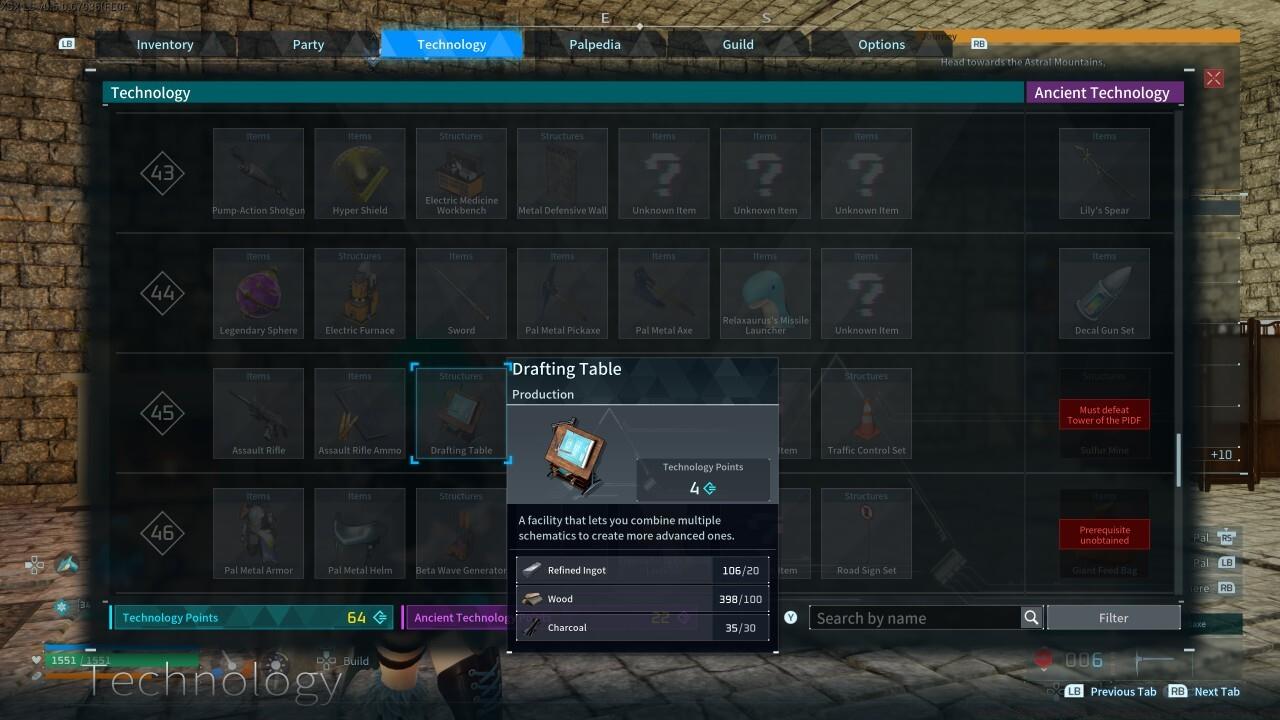
Drafting Table unlock interface showing the technology tree requirements
To initiate schematic enhancement, players must first construct the newly introduced Drafting Table workstation, which serves as the central hub for all blueprint upgrade operations.
Drafting Table Acquisition Requirements
The Drafting Table becomes available upon reaching character level 45 and requires a substantial investment of four Ancient Technology Points to permanently unlock within your technology tree.
This crafting station follows standard base construction protocols. Access your building menu through the action wheel interface, navigate to the Production category tab, and locate the Drafting Table among the newly added workstation options.
Construction demands specific material components that vary based on your progression stage:
Early-game players should focus on establishing efficient resource farming routes, while veteran players can leverage existing stockpiles. The material requirements scale appropriately for mid-game progression, ensuring the feature remains accessible without trivializing the upgrade process.
Once constructed at your primary operational base, the Drafting Table enables systematic processing of accumulated low-tier schematic duplicates. This transforms previously stagnant inventory items into actionable progression assets through carefully managed upgrade pathways.
With your Drafting Table operational, the schematic enhancement process begins by selecting duplicate blueprints from your storage containers. The interface clearly displays upgrade paths and material requirements for each potential rarity progression.
Optimization strategies include prioritizing schematic types that complement your current build objectives and avoiding upgrading obsolete equipment blueprints. Many players mistakenly invest in upgrading early-game weapon schematics that will be quickly replaced, wasting valuable enhancement materials.
Advanced techniques involve calculating the efficiency of schematic conversion versus direct farming. In some cases, dedicating time to farm specific world bosses for rare schematics may prove more time-efficient than upgrading from common variants, depending on your current gear priorities and available playtime.
Seasoned players recommend maintaining a balanced approach—upgrading essential gear schematics while continuing to engage in end-game content for direct high-rarity blueprint acquisition. This dual-path approach maximizes progression speed while minimizing resource bottlenecks during critical power spike periods.
Common pitfalls include neglecting to organize schematic inventories before upgrading, which can lead to accidental consumption of valuable unique blueprints. Implement a systematic tagging or storage system to prevent these costly mistakes that could set back your gear progression by significant margins.
Action Checklist
- Reach character level 45 and allocate 4 Ancient Technology Points
- Gather required construction materials through optimized farming routes
- Build Drafting Table at primary base via Production tab
- Organize schematic inventory, separating duplicates from unique blueprints
- Prioritize schematic upgrades based on current build requirements
No reproduction without permission:SeeYouSoon Game Club » How To Upgrade Palworld Schematics To Better Rarities Master Palworld's new schematic upgrade system to transform duplicate blueprints into powerful gear