
TL;DR
- Quick catching bypasses animations using item menu interactions
- Technique saves 5-8 seconds per catch during high-volume events
- Does not increase catch rate but dramatically improves efficiency
- Requires specific hand coordination and timing practice
- Advanced variations work better for different device sizes
Outpacing even the swiftest Pokémon like Ninjask or Electrode requires mastering advanced catching techniques
The quick catch method (also called fast catching) represents an essential skill for trainers serious about optimizing their gameplay efficiency. During limited-time events such as Community Days and Spotlight Hours, when Stardust bonuses are active or specific Pokémon spawns are abundant, this technique becomes invaluable for maximizing your collection rate. Whether you’re farming resources or hunting specific species like Bulbasaur, quick catching transforms your catching workflow.
This advanced method enables you to completely skip the standard catch animation sequence and subsequent rewards screen, allowing immediate return to the overworld map the moment your Poké Ball connects with the target. The time savings accumulate significantly during extended play sessions.
Below, we’ll explore the underlying mechanics of quick catching and provide comprehensive guidance for mastering this efficiency technique in Pokémon Go.
The fundamental principle involves strategically using the in-game item menus to create an interface bypass. By holding specific menu elements while throwing your ball, you can initiate an early escape from the encounter while the capture attempt continues processing in the background.
Quick catching dramatically accelerates your overall catching throughput, but it provides zero improvement to your actual capture success rates. The technique merely eliminates waiting time—the underlying catch probability calculations remain unchanged. Failed capture attempts still occur at the same frequency, requiring repetition of the process. However, the cumulative time savings make this method overwhelmingly beneficial for high-volume catching scenarios.
Strategic application is crucial: avoid using quick catching on high-value targets requiring careful attention, such as Galarian legendary birds or shiny Pokémon where missed opportunities carry significant consequences.

Here’s the comprehensive methodology for executing quick catches in Pokémon Go:
1. Begin by using your non-dominant hand to press and maintain contact with either the berry selection menu or Poké Ball inventory menu located in the bottom corners of the encounter screen. This hand will remain stationary throughout the initial phase.
2. Slide the activated menu panel across the screen by dragging your finger toward the opposite edge (direction depends on which menu you selected—drag right for berry menu, left for ball menu). Your finger and the menu interface should reach approximately this position when using the Poké Ball menu:
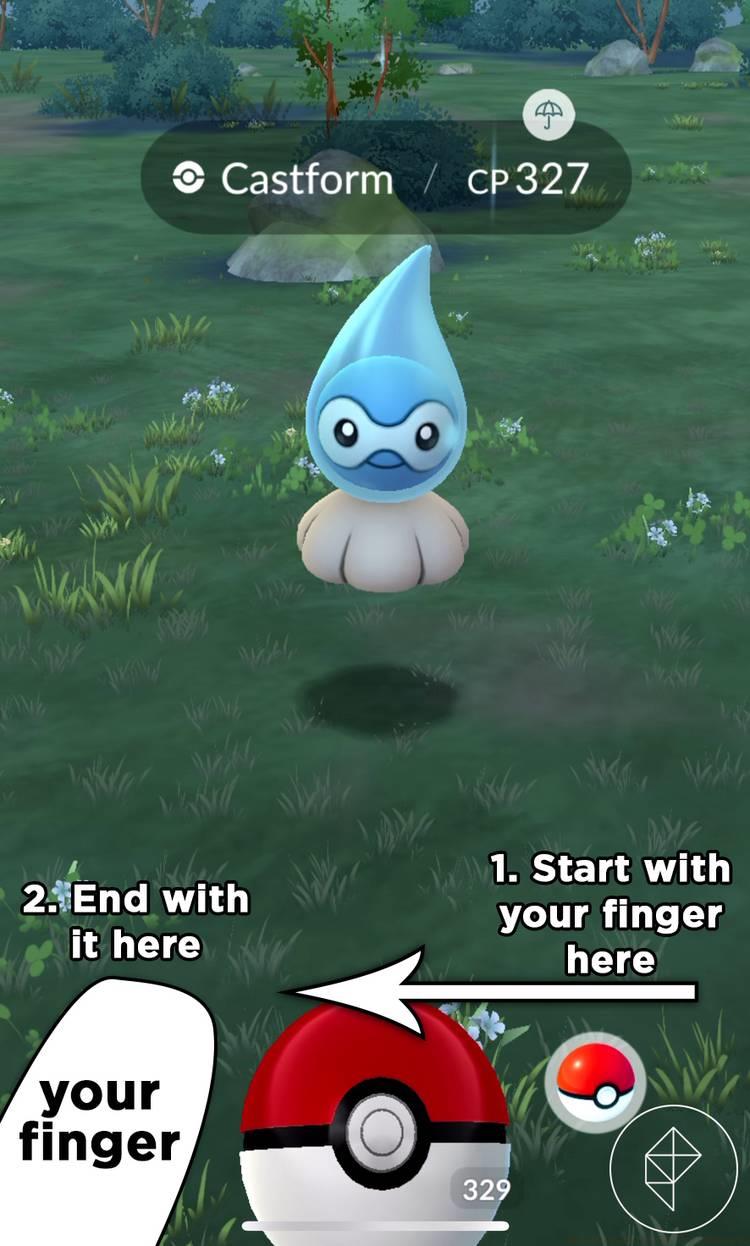
Graphic: Julia Lee/Polygon | Source images: Niantic
3. With the menu still active, use your dominant hand to throw the Poké Ball normally at the target Pokémon. The interface will remain accessible throughout your throwing motion.
4. Immediately after your ball makes contact with the Pokémon, tap the escape button (flee icon) that becomes accessible due to the active menu overlay. This action bypasses the usual animation sequence.
5. Return to the map view where you can immediately engage another Pokémon while the previous capture attempt resolves in the background. Check your journal or recent Pokémon to confirm successful captures.
Advanced Technique Variations: Experienced players can combine quick catching with other efficiency methods like rapid inventory management strategies. The two-handed approach works best on larger devices, while tablet users may need adjusted finger positioning. Practice the timing until the sequence becomes muscle memory—successful execution typically saves 5-8 seconds per catch attempt.

Image: Niantic via Polygon
Event-Specific Application: During Community Days with 3-hour spawn windows, quick catching can potentially double your total catches compared to standard methods. For Spotlight Hours featuring species you’re actively farming, this technique becomes essential for maximizing the limited time frame. Combine with strategic resource management approaches for optimal results.
Common Execution Errors: The most frequent mistake involves releasing the menu too early before the flee option becomes available. Others include improper finger placement that obstructs throwing accuracy or attempting the technique on unstable network connections where delayed responses can cause failed captures. Practice during normal gameplay before relying on it during limited events.
Performance Metrics: Under ideal conditions, quick catching reduces average catch time from 12-15 seconds to just 4-7 seconds—a 60-70% improvement in efficiency. This translates to approximately 50-70 additional catches per hour during active farming sessions, significantly boosting Stardust accumulation and shiny hunting odds.
Device Considerations: Larger smartphones and tablets may require adjusted hand positions for comfortable execution. The technique works consistently across iOS and Android platforms, though touch sensitivity variations might necessitate slight timing adjustments. Many advanced players combine this with efficiency-focused gameplay approaches for comprehensive optimization.
Strategic Limitations: Remember that quick catching provides no statistical advantage for actually capturing Pokémon—it merely accelerates the process. High-flee-rate species or weather-boosted Pokémon with lower base catch rates still require the same careful targeting, berry usage, and excellent throws for optimal success. The technique complements rather than replaces fundamental catching skills.
Action Checklist
- Practice menu activation with non-dominant hand during normal encounters
- Master the timing between ball throw and immediate flee action
- Test technique during non-critical events before major Community Days
- Optimize hand positioning for your specific device size and shape
- Combine with inventory management for maximum efficiency farming
No reproduction without permission:SeeYouSoon Game Club » How to quick catch in Pokémon Go Master Pokémon Go quick catching to maximize event rewards and catch efficiency with advanced techniques